After activating it, did you disable the cache plugin?
Could you try disable the cache plugin first, then try enabling “Enable language corresponding events” and try my suggestions?
If no changes, please try completely removing lang=”L2″ from the shortcode.
In order to hide it, please go to EventON > EventCard > open Designer > remove Location.
What I see:
Could you check for any EventON issues (fatal errors) in the debug.log file?
I changed the shortcode, so please take a look at
https://regenttheatre.com/list/
Thank you for letting us know!
Thank you for your messages, I am going to assign this ticket to Ashan and he will be able to take it from here and find you a solution. Please allow some time for him to get back to you, we greatly appreciate your patience and thank you for being a eventon customer!
I bought the eventon calendar plugin at Envato. I was just wondering about the “Regulær license”. So I need to find out where this license is, so i can cancel it :). Envato say there is no license attached to their account.
Please try this shortcode: [add_eventon_fc grid_ux=”2″ evc_open=’yes’]
this will open events in lightbox and the events card will be open on show.
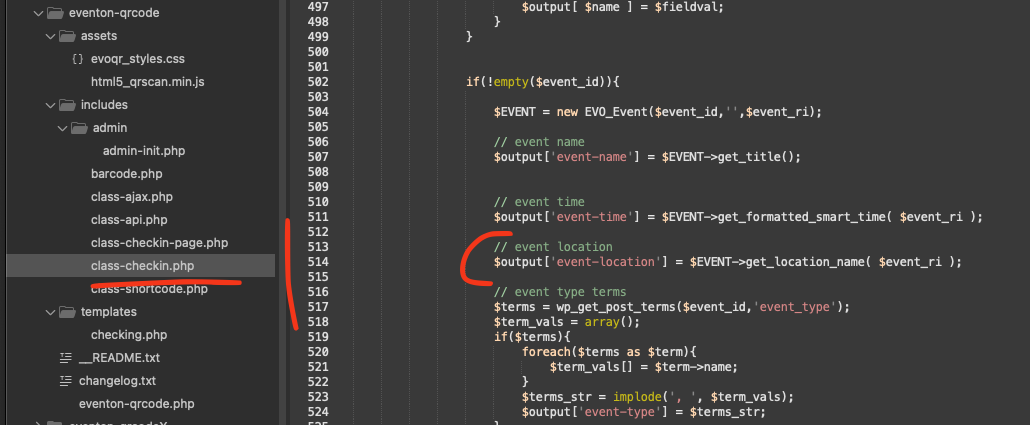
Hello Jefferey, absolutely we can share the patch fix code. It was rather easier than I initially.
code: $output[‘event-location’] = $EVENT->get_location_name( $event_ri );