Also: i see in NO demo AT ALL a dynamic search field for scrolling menus… i feel a little anxious about that cause i love envato but this should be a blocking point to use it more. 🙁
Replies for tickets on suppota
Also: i see in NO demo AT ALL a dynamic search field for scrolling menus… i feel a little anxious about that cause i love envato but this should be a blocking point to use it more. 🙁
We can’t do that on a huge site in preprod like this one sorry… can’t you just give us explanations/link to the good documentation/configuration? or even the shortcode demo…… 🙂
Hi Erica,
Please check if enabling that setting solves your issue.
Let us know how it goes.
I’ve done so. Any further steps to take?
Alright. How are you converting the csv file? Just want to know so that we can try to replicate the issue.
Also, would you mind sending a copy of the xlms file so that we can take a look?
Hi Ashan,
is there any update regarding this topic?
Br
Jens
Hello,
Yes, I was able to, but it did not solve the problem.
If this was an event with one date and a set capacity it works.
If there are several dates with tickets available then I am able to sell tickets for one event at the total of available tickets for all events.
For example,
Date 1 10 tickets.
Date 2 10 tickets.
I can purchase 20 tickets for event 1.
Please see the link below for a video demonstrating the above situation.
https://drive.google.com/file/d/10GjLsoZ2qPGKPqQbtPg_edzLdUlx3AZ-/view?usp=sharing
I have tried this with the Manage Ticket Stock option on and off.
I seems that the second variation is able to access however many tickets are available for the whole event even though they are allocated to different dates.
Let me know what you think.
Thanks
Iain
The only text that can be changed from Appearance is the number near the heart.
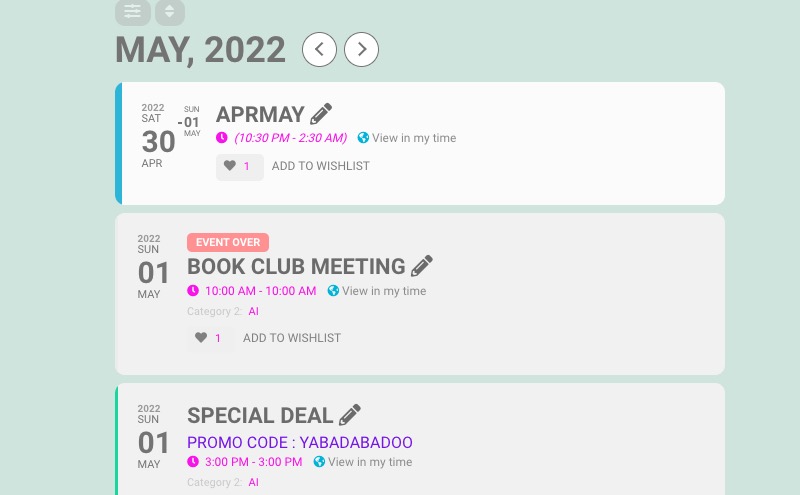
Please use the code for the rest.
Hello,
I would like to have all the event cards as strips.
Which design would you like:
https://demo.myeventon.com/
There is only September on this page:
https://kindermusikfestival-muenster.karibuni-online.de/programm/
Adding hide_empty_months=”yes” hides empty months.
Great! Please keep us updated.