Hello,
after talks yesterday with my client we run into two issues.
1) Creating an order with invoice via woocommerce automatically creates tickets (tickets are pending as long the order is completed) but when changeing the amount and kind of events the tickets do NOT reflect that. (this is only on backend)
2) creating an order on backend does not automatically reduce stock. ONLY when setting the order to completed
For the fist issue, we decided to not use the PDF Plugin and we do not send Tickets to clients (invoice and name of order is fine at the entrance) So we only count seats whats on invoice.
For the second I would like to ask if it is possible to set the system to reduce ticket stock when CREATING an order rather than COMPLETE an order? This works fine on frontend side though.
thank you.
Sometimes we’ll see the same entry multiple times.
Didn’t work unfortunately… cleared cache and everything.
disabling the plugin does not resolve it.
It was working correct at one point, on one of the pages. I think the problem is in the code.
Can you please advise me how to modify this code to make the grids round on all 4 corners(the left corners are square), and also how to make the images high quality?
BELOW is the code which I have modified in the event plugin area HERE
<?php
$eventtop_style = EVO()->cal->get_prop(‘evosm_eventtop_style’,’evcal_1′) == ‘white’? ‘0’:’2′;
$shortcode = apply_filters(‘evo_tax_archieve_page_shortcode’,
‘[add_eventon_list number_of_months=”5″ ‘.$tax.’=’.$term->term_id.’ hide_mult_occur=”yes” hide_empty_months=”yes” show_et_ft_img=”yes” tile_bg_size=”full” show_limit=”yes” ux_val=”4″ event_count=”6″ tiles=”yes” lang=”‘.$lang.'” eventtop_style=”‘. $eventtop_style.'”]’,
$tax,
$term->term_id
);
echo do_shor
(I’m also having trouble remotely activating the add-ons.)
ok so I should change this in the root files of the plugin? So with the next update it should get automatically?
That’s perfect…what did you do?
thanks, Dave
I didn’t hear back from anyone so I had to pay someone to fix it. I have no idea how they did it but it cost me $150. Frustrating.
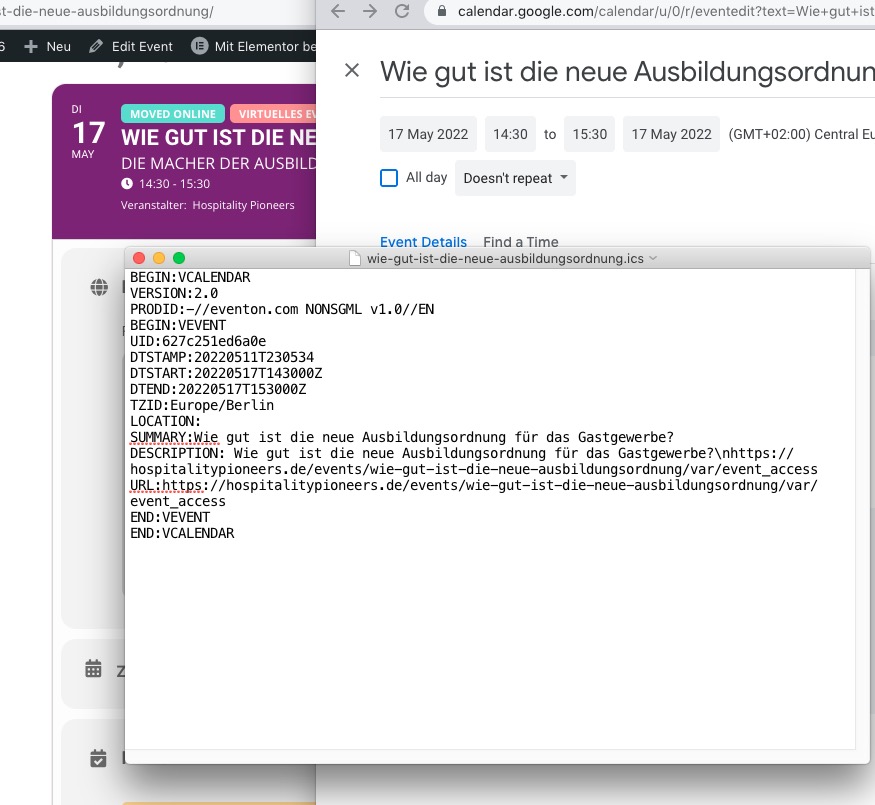
Could you make sure that your calendar’s timezone is correct?
Time is 14:30 in my calendar as well as .ics file:
Please update EventON to 4.0.6.
To update eventon to latest version: If you are unable to do autoupdate, you can go to codecanyon your account > download and get the latest eventon version as zip file. Then you can go to your website, deactivate old eventon, activate (Do not delete eventon settings & data when EventON is uninstalled) from eventon settings, delete old eventon, install new one and activate. This link will further explain the process it. Also you can follow us on twitter to get real-time announcements on updates!