Hm, i’m not sure how to return the data i want.. the event_content, event_thumbnail, event_subtitle or event_start, event_type_category for example ?
Is it something like :
SELECT event_subtitle, event_start, event_type_category
FROM wp_terms wt
INNER JOIN wp_term_taxonomy wtt ON wt.term_id = wtt.term_id
INNER JOIN wp_term_relationships wtr ON wtt.term_taxonomy_id = wtr.term_taxonomy_id
INNER JOIN wp_posts p ON wtr.object_id = p.ID
WHERE p.post_type = ‘ajde_events’
Where i replace event_subtitle, event_start, event_type_category with the good slugs ? Where can i find all the slugs for this ?
Awesome, thank you so much! You were great help 🙂
On this page, the description as body content and eventon title was automatically populated as the h1, dynamically.
So, Im hopeful to pull the rest of the data, specifically the event card., onto my existing template, as you can see below
https://xzib.com/e/the-metropolitan-museum-of-art-07-31-21-08-14-22-reclusion-and-communion-in-chinese-art-upper-east-side
Thank you for your response.
Im not a programmer, so I have a developer who is trying and failing to add a static header to your page template. So, I am not sure if this developer is incompetent, or if there is a coding limitation.
When I disable the eventon template, it is using a theme template which I can modify, So I have already accomplished the step you suggest in the thrive theme article, I believe. See here.
And I can try to find in file manager. But my question are,
If I access my file manager, and add the code correctly, will that then dynamically generate the event card on my existing pages?
Or, will it overwrite my page, and remove the header and other content?
Hey there
When I type 05, or any other month or day beginning with zero, it won’t be saved, because it starts with a zero.
It automatically changes. How can I change this, that it will accept the first number beeing a zero?
On one of my sites running eventon I am using xtheme pro the single event pages don’t share the same header but they still appear in google and my site isn’t penalized.
there is no schema options within the shortcodes.
you can however add an event to a page via the single event shortcode but this would be annoying if you have lots of events and not really a solution
this page might help https://help.thrivethemes.com/en/articles/4426206-how-to-create-a-specific-template-for-a-custom-post-type
and from our end https://docs.myeventon.com/documentations/how-to-customize-events-archive-page/
Hello,
ad 1) this is the event: https://bettfedernfabrik.at/veranstaltung/alex-kristan-13102022/
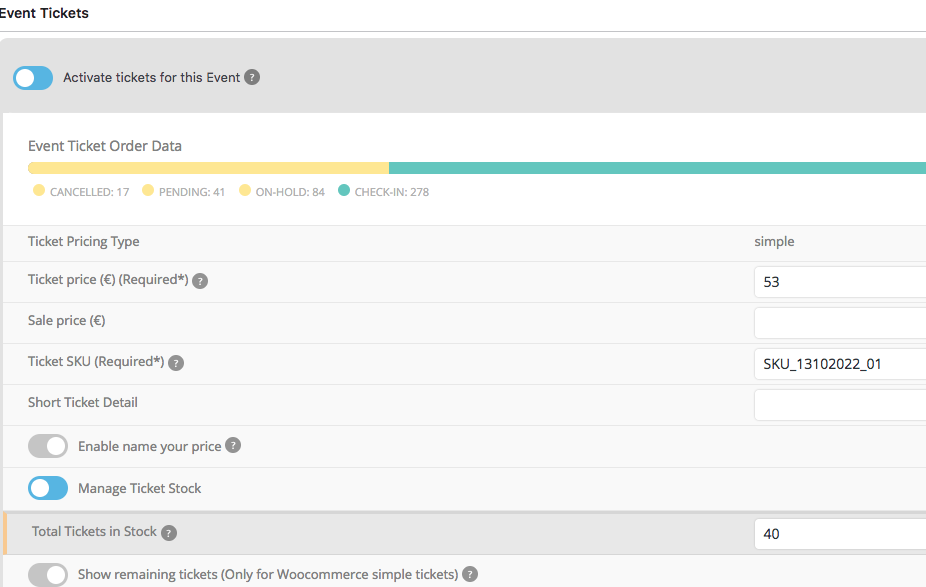
I just don’t understand: we always have 400 Seats, how can there still be 40 left?
Plese see image: 41+84+278 =403…. and still 40 left? Please help me to understand as my shop manager is confused and worried of not having enough seats.
PS: please turn off RSVP for them moment and turn on Ticket (do not save event) 🙂
2) good to know! Thanks.
3) BTW: Where can I turn off sending out emails with ticket in comfirmation email? I whant that to do manually (when client has paid)
Thanks!
We are glad your issue is resolved, if you have any further questions or concerns please feel free to create a new ticket.
Thank you . It works fine.
Hello,
Please use this code:
.eventon_events_list .eventon_list_event .evcal_desc .evcal_desc_info em.event_location_name, .evo_pop_body .evcal_desc .evcal_desc_info em.event_location_name { font-size: 16px !important }