Ashan,
Please check 2.
https://bettfedernfabrik.at/wp-admin/post.php?post=53274&action=edit&classic-editor
There are 20 ticket numbers, however only 18 Qty.
Replies for tickets on suppota
Ashan,
Please check 2.
https://bettfedernfabrik.at/wp-admin/post.php?post=53274&action=edit&classic-editor
There are 20 ticket numbers, however only 18 Qty.
Hello,
1. Which event the ticket https://bettfedernfabrik.at/wp-admin/post.php?post=52590&action=edit&classic-editor is connected to?
2. Thank you for your messages, I am going to assign this ticket to Ashan and he will be able to take it from here and find you a solution. Please allow some time for him to get back to you, we greatly appreciate your patience and thank you for being a eventon customer! Also please disable any IP blocking on your site if there are any.
Can you please explain how to correctly count the tickes on stock?
Please go to Edit Event > Tickets > Sales insight:
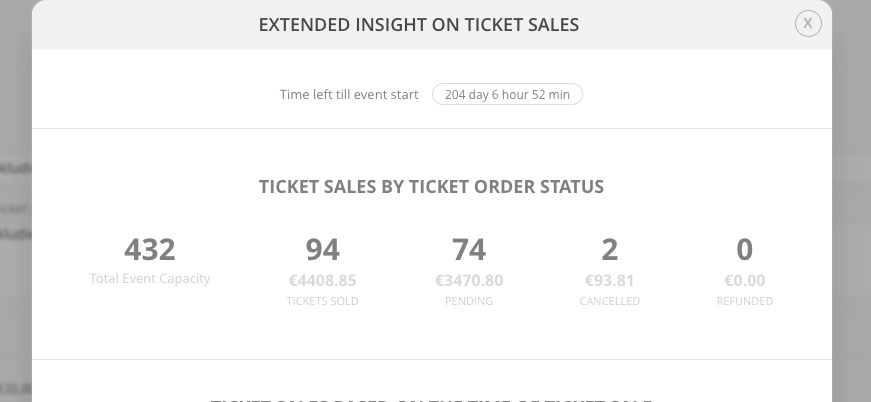
432-(94+74)-2=262.
Please take a look at https://strangework.com/2014/08/08/understanding-wordpress-taxonomy-table-relationships/
You can find events by filtering with p.post_type = ‘ajde_events’.
Hello,
Your current version of EventON is 4.0.5. Please update to 4.0.6:
To update eventon to latest version: If you are unable to do autoupdate, you can go to codecanyon your account > download and get the latest eventon version as zip file. Then you can go to your website, deactivate old eventon, activate (Do not delete eventon settings & data when EventON is uninstalled) from eventon settings, delete old eventon, install new one and activate. This link will further explain the process it. Also you can follow us on twitter to get real-time announcements on updates!
After the update, go to EventON > Time > enable Use UTC offset time globally on calendars (BETA), check if the time is correct.
Translation. Please take a look at this guide:
https://docs.myeventon.com/documentation/translation-languages/
To make calendars multilingual please follow
https://docs.myeventon.com/documentations/wpml-eventon-front-end/
You cannot show open event with Tile Design enabled, unfortunately.
Hello,
Unfortunately, event_location=zen,on,ten doesn’t work. As well as organizer_name=zen,on,ten.
Please try event_location=1078,268 and/or event_organizer=523,1038, where numbers are location, organizer ids you can find by going to Events > Location/Organizer.
Hi,
Ok thanks for your action, i will try to play with it.
Can you also tell me how can i reach the events and their data from the database please ? (which table…)
Hi Taylor,
You need to add the number of months you want the calendar to show. For example
number_of_months=”24″
Please navigate to Eventon > Settings > Shortcode Generator and see more options to add to the Event list shortcode.
Hello,
Do you mean you want to change the Virtual event badge color? If that is the case, add the custom CSS below to Appearance > Customize > Additional CSS
.eventon_events_list .eventon_list_event .evcal_desc span.evo_above_title span{background-color:blue; color:#fff;}
Hello,
Would you mind sending a screenshot of how the events appear on desktop as well as mobile?
Also, we will need an admin user in order to troubleshoot the issue.