Please send us wp-admin access to your site as a private message for us to further assist your situation.
Archives: Replies
Replies for tickets on suppota
Reply to: tickets(274459)
The only available option is Edit Event > Tickets > Emailing: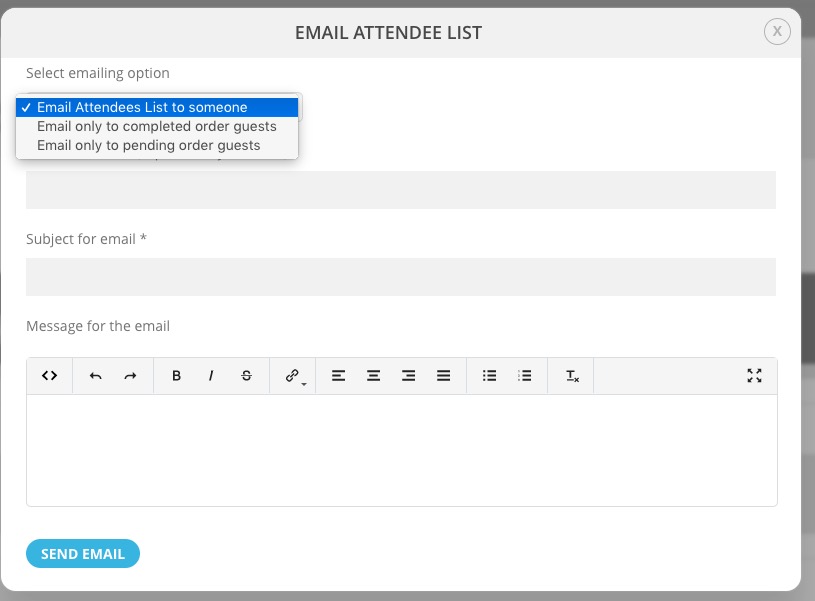
It seems that the only solution in your case is to go to wp-admin > Events > All Event Tickets > Edit. Email them manually.
Reply to: tickets(277423)
Please go to EventON > RSVP > RSVP Form > uncheck RSVP Count — (If unckecked system will count as 1 RSVP).
Reply to: tickets(277437)
Hello,
1. /my-account/orders > View Order > Order again should work. However, since this functionality is from WooCommerce, there can be issues.
2. Please go to EventON Settings > Tickets > select Upon add to cart redirect customer to: Do not redirect, allow adding more tickets to cart.
Reply to: tickets(277402)
so I have disabled a few setting that you don’t need- you are loading alot of events so its not going to be instant unless you are on a dedicated servere
and alternative idea would be
https://jbedev38200-jbestaging.pf22.wpserveur.net/eventon-test/
now instead of an accordian try it with a tab layout (I could not find the tab layout in the page builder as I could not convert it to english)
so the abo ve idea- the current month loads super fast and also the yearly view is loading in the background- when they switch tabs the yearly view should be appearing
Reply to: tickets(277423)
Thank you for your quick response…..it seems to be working but this is is not a party…where can I change where it How many people in your party. See this snapshot here: https://prnt.sc/Fdo7aS7dmV8M
Thank you
Reply to: tickets(274459)
No problem.
I have an event (for example, this one: https://start-studio.co.uk/events/art-night/).
It has bookable blocks every week. A person may book to go one week, then miss a week and then attend the week after that and so on.
Before each weekly class, it would be good to be able to send an email to all the people attending (but only that particular week/block – not every block going forwards forever).
Is there a way to do this please? If so, how?
Thanks!
Reply to: tickets(277294)
Thank you.
Reply to: tickets(277267)
With Event Lists you cannot limit the number of events for the whole list, only per month with event_count=”4″.
Event Lists: Ext lets you to easily show past events and limit the number of them in the list.
Try on https://dev.myeventon.com/wp-admin/ with:
[add_eventon_el number_of_months=”12″ event_count_list=”yes” event_count=”4″ el_type=”pe”]
Reply to: tickets(277327)
Great! Please keep us updated.