Please try a variation name for example Öğrenci (for copy-paste)
Archives: Replies
Replies for tickets on suppota
Reply to: tickets(274901)
Hi, I went back to my developer and this was his response
Hi @Helen
But the problem was there from the begining before we add our code. All our customization we did is in the plugin “Customization of job sheet and customization”. I have disable the plugin and check the problem still there. So I think the problem is not generate lateron. It was from the begining.
To verify this: You can disable plugin “Customization of job sheet and customization” temporary and check.
Thank You
Is there anything you can do to help?
Thanks
Helen
Reply to: tickets(275121)
https://www.myeventon.com/addons/rsvp-events/
Reply to: tickets(275118)
Hi Christina,
1. Please be sure to include your event image on the event options. If you have done that and it is not displaying, please send some admin credentials and we will take a look.
2. Please send a direct link to where those buttons are so that we can give you the accurate CSS to use.
3. You can setup the weekly view by using this shortcode [add_eventon_wv] . Please feel free to go to Eventon > Settings > Shortcodes and generate a code which works for you.
Reply to: tickets(274766)
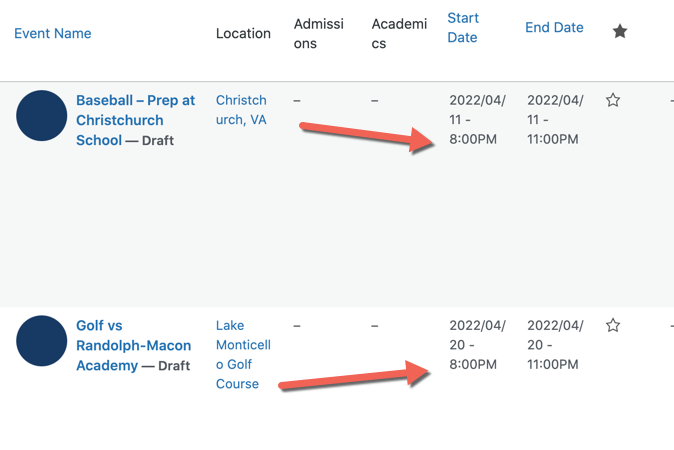
I’m importing now as drafts, as the school is watching and I need this fixed.
All drafts can be deleted and re-imported if you need to test. Right now they are all showing as 8pm. BUT I have an offset of -240 minutes. So the 8pm start times should be 4pm
See attachment.
Reply to: tickets(274766)
Yeah still not working. I’ve done the following:
- turned off “enable duplication event name check during importing”
- changed event processing timezone method to one that is 4 hours earlyier (-240 minutes)
Please help.
Reply to: tickets(275005)
That’s odd I got the same error, I’ve reset the password and tested it: 9105dR6l$)@a&YEZm9p*5&C(
Reply to: tickets(268013)
Why are the repeat dates occurring when we do not create them?
Reply to: tickets(272998)
Try this code:
#evcal_calendar_1 .eventon_events_list .eventon_list_event .desc_trig {background-color: red !important;}
Reply to: tickets(275005)
Now it says:
ERROR: Incorrect username or password.
Could you check?