Great news I was able to achieve both those tasks. Will need some more testing before releasing 🙂
Archives: Replies
Replies for tickets on suppota
Reply to: tickets(270754)
this page had eventon turned off
https://www.todayswillsandprobate.co.uk/wp-admin/admin.php?page=PO_global_plugins
I turned it on- check now
Reply to: tickets(272376)
please reply with the shortcode you are using for the full cal and I’ll reply with the fix
Reply to: tickets(268078)
So you would need to go to Event >all events and delete that post.
I will address the sensitivity as well 🙂
Reply to: tickets(272349)
Ashan,
the start and end time always go up 2 hours
Similar on dev2:
https://dev2.myeventon.com/wp-admin/post.php?post=29892&action=edit
Reply to: tickets(272349)
Hello,
Thank you for your messages, I am going to assign this ticket to Ashan and he will be able to take it from here and find you a solution. Please allow some time for him to get back to you, we greatly appreciate your patience and thank you for being a eventon customer! Also please disable any IP blocking on your site if there are any.
But as soon as I enabled “Hide End Time from calendar”, the end time jumps to 23:50.
This is normal for when you enable “Hide End Time from calendar“.
Reply to: tickets(272343)
Hello,
I’ve tried to add more languages
How many languages do you need? Please take a look at
https://docs.myeventon.com/documentations/include-additional-languages/
if it’s possible to translate the events themself.
Please take a look at these guides:
https://docs.myeventon.com/documentation/translation-languages/
Reply to: tickets(162332)
Hello Grace Rains,
Unfortunately, no solution yet.
Reply to: tickets(272341)
Hello,
You can use Single Event shortcode:
[add_single_eventon]
OR EventON Lists: Ext add-on https://www.myeventon.com/addons/event-lists-extended/
[add_eventon_el number_of_months=”12″ event_count=”1″ event_count_list=”yes”]
Try on https://dev.myeventon.com/wp-admin/
Reply to: tickets(272349)
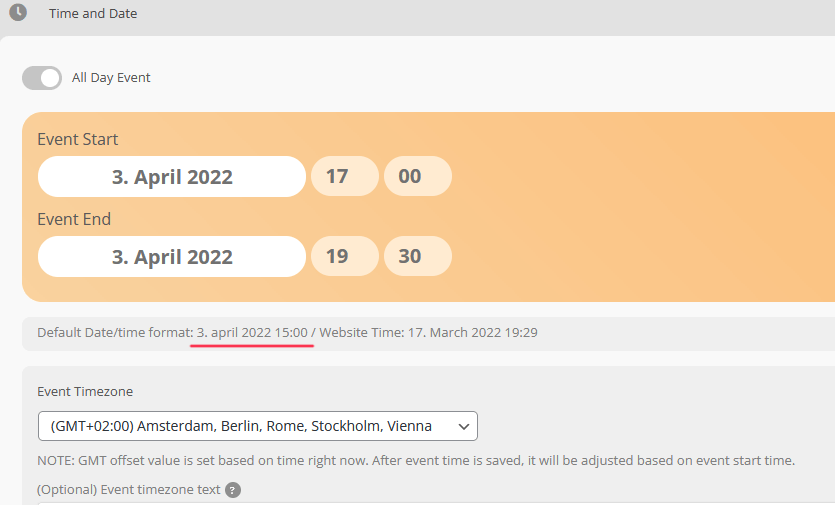
One thing is curious, maybe it helps: Look at the attached screenshot, it says “Default Date/time format: 3. april 2022 15:00”, so this is the actual time set as start time, but above it is shown as plus 2h.