Brilliant, that did the trick. Thanks a million
Archives: Replies
Replies for tickets on suppota
Reply to: tickets(270758)
Naturally EventOn is up to date (4.0.5)
Changing the calendar event content filter type does not help, the code still vanishes.
What about my other question about the mandatory live event URL? It is possible to embed the stream on the event page, isn’t it?
Cheers,
Michael
Reply to: tickets(270780)

Reply to: tickets(270780)
Reply to: tickets(270741)
Hello,
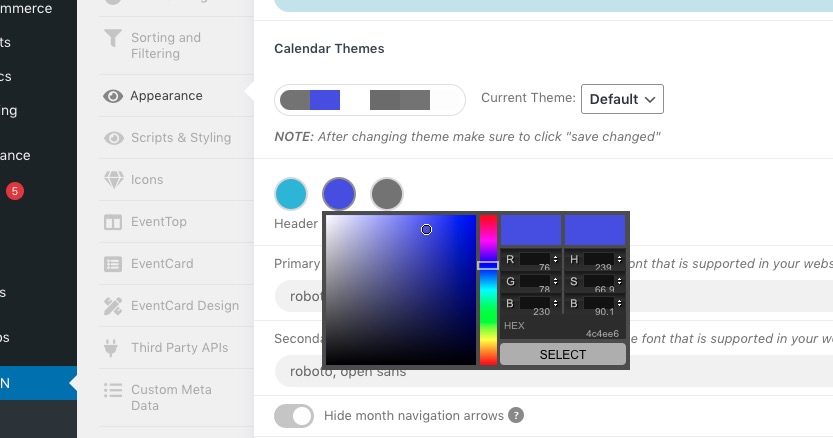
Header color can be changed here:
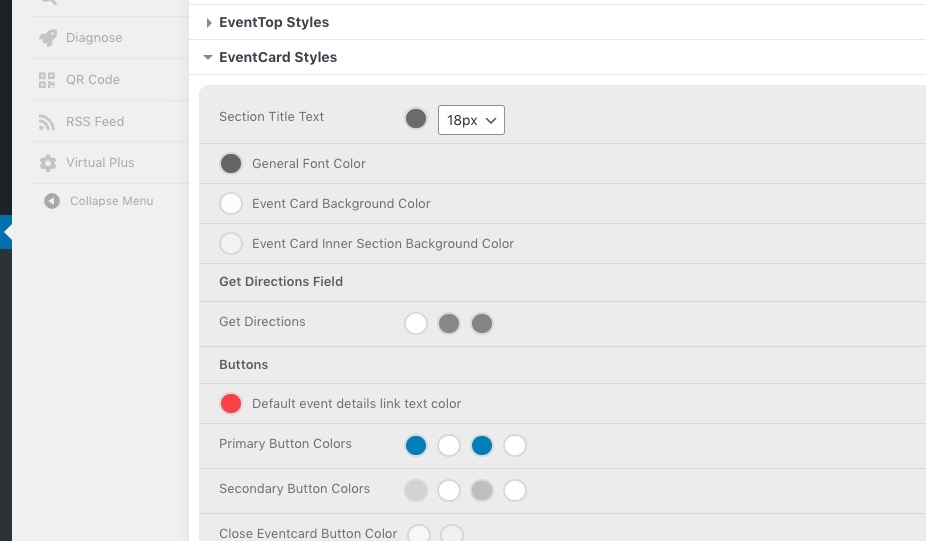
Background can be changed here:
Reply to: tickets(270745)
Hello,
The issue comes from plugins/fusion-builder. Please contact the plugin developer about the issue.
You can also follow
https://docs.myeventon.com/documentations/how-to-debug-for-php-code-errors/
and stop showing the error.
Reply to: tickets(270680)
I removed it from https://helpdeskx.s3.amazonaws.com/wp-content/uploads/2022/03/03130033/Eventcard-design.jpg.
Reply to: tickets(270750)
Hello,
Could you try going to EventON Settings > EventTop > Select Default Calendar EventTop Style: Clear with left border colors?
Reply to: tickets(270751)
Hello,
Please add this CSS code to EventON > Styles (If you don’t see any change, EventON > Scripts & Styling > turn off Write styles to header > save settings > turn on Write styles to header):
.evosliderbox.multiSlider.cs_def.ss_imgtop.ajde_evcal_calendar .eventon_events_list .eventon_list_event .desc_trig_outter { height: inherit !important; }
Reply to: tickets(270753)
Hello,
Unfortunately, we unable to help with customizations.
However, please take a look at
https://docs.myeventon.com/documentations/setup-use-custom-meta-fields-events/
or
https://docs.myeventon.com/documentations/show-additional-custom-data-eventcard/
You can add a new field with description text.