Hello,
Please follow this:
To update eventon to latest version: If you are unable to do autoupdate, you can go to codecanyon your account > download and get the latest eventon version as zip file. Then you can go to your website, deactivate old eventon, activate (Do not delete eventon settings & data when EventON is uninstalled) from eventon settings, delete old eventon, install new one and activate. This link will further explain the process it. Also you can follow us on twitter to get real-time announcements on updates!
The most important thing is “activate (Do not delete eventon settings & data when EventON is uninstalled) from eventon settings”.
As for the white screen of death please send us FTP access to your site as a private message, so we can perform several tests from our end and resolve your issue fast!
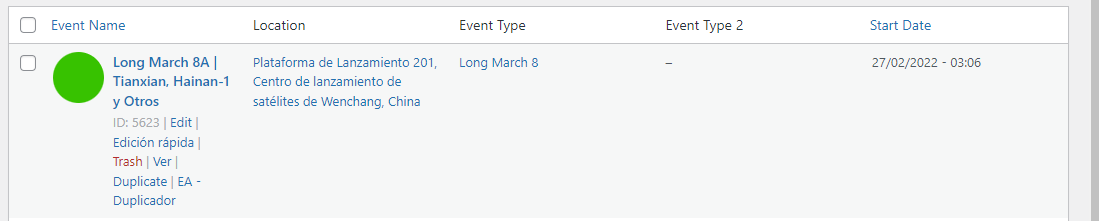
Please try using this https://es.wordpress.org/plugins/codepress-admin-columns/ or similar plugin.
Please add this to the shortcode hide_past_by=”ss”. It classifies Past Events Based on Event Start Date/time.
Now your server has two versions of EventON and Tickets. I’ve enabled new versions, so please take a look if everything (prices and also the design) works correctly.
You could try using WordPress Export. Go to wp-admin > Tools > Export and then import them with wp-admin > Tools > WordPress Import.
The problem is that not sure how fully it can import events.
And if you disable every other plugin and switch the theme, does it help?
Sorry that it’s taking so long to fix this issue. With server issues, usually, it’s really hard to understand what the issue is.
Okay, I think I got what I wanted, I just added more years, but it’s as expected.
One more thing, activate the “Event Type 3” and I can see it in the editor of each event, but it is not visible in the main page of the events, how could it be visible?
Ashan,
When you try to put two different minutes values, it saves them the same https://dev2.myeventon.com/wp-admin/post.php?post=29692&action=edit
Thank you for your messages, I am going to assign this ticket to Ashan and he will be able to take it from here and find you a solution. Please allow some time for him to get back to you, we greatly appreciate your patience and thank you for being a eventon customer! Also please disable any IP blocking on your site if there are any.
Ashan,
Could you check this one again?
I’ve tried with Chome Developer Tools and it seems to be working correctly.