I have done all the possible updates now.
Archives: Replies
Replies for tickets on suppota
Reply to: tickets(270042)
I was reviewing this page and the option you have to show “switch month below” seems interesting to me, because it is something similar to what I want, where the user has a simple view and can choose the month and year, how could I add it to my calendar?
Reply to: tickets(268578)
I can view attendees for all events now after updating EventON – Lists and Items to version 0.12
Thank you.
Reply to: tickets(270107)
if all those 4 events are in the same month then you can simply use the events list shortcodes found at
myeventon>>>settings>>>shortcodes- select events list- 1 month and number of events at 4
if however you wish to show the next 4 events regardless of the month they are in
you would need the events list extended addon
https://www.myeventon.com/addons/event-lists-extended/
or you might also try using the events Now shortcode from the generator see if that has any use for you
Reply to: tickets(270042)
currently no, on my own site I can show content based on size of screen- elementor can do this as well I have 2 shortcodes 1 for desktop/pads and one for phone size
so on mobile perhaps don’t show so many years- only show 1 year and I use Language 2 for the calendar and the months are Jan instead of January,
see https://www.kidsmagicworld.com.au/kids-magician-events/ for example make the browser like a mobile and you see it cahnge from feburary to just Feb
Reply to: tickets(269823)
only you can tell us if you need those addons they are to display calendars in different ways
to update the addons which are a yearly subscription
To update eventon addons: You can download latest eventon addons from myeventon > my account. Then you can go to your website, deactivate old addon and install new one and activate then delete the old addon. This link will further explain the process. Also you can follow us on twitter to get real-time announcements on updates!
as for updating eventon core from codecanyon- this depends on your server if its allowed to connect to ours- and if you have registered the license on your site
Reply to: tickets(269823)
I did as you suggested.
However, I had to deactivate the 3 add-ons (full, daily, weekly) to get it to work.
Do I still need those add-ons?
Also, still does not seem to auto-update
Reply to: tickets(270042)
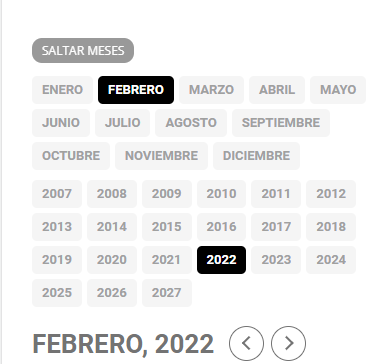
Another question, is there any way to show both years and months for the mobile version?
Maybe a drop down menu using a short code so that the desktop view is not affected?
Reply to: tickets(270042)
To update eventon to latest version: If you are unable to do autoupdate, you can go to codecanyon your account > download https://codecanyon.net/downloadsand get the latest eventon version as zip file. Then you can go to your website, deactivate old eventon, activate (Do not delete eventon settings & data when EventON is uninstalled) from eventon settings, delete old eventon, install new one and activate. This link will further explain the process it. Also you can follow us on twitter to get real-time announcements on updates!
Reply to: tickets(270042)
Can you add the option that events lasting one month are displayed at the end of the calendar?
I just saw that they have released version 4.0.3, however I can’t update it, it says that the archive does not contain any files.