I added following shortcut and it works at the moment.
[add_eventon_fc grid_ux=”0″ style=”names” jumper=”yes”]
I don’t now why.
Replies for tickets on suppota
I added following shortcut and it works at the moment.
[add_eventon_fc grid_ux=”0″ style=”names” jumper=”yes”]
I don’t now why.
The only error in debug is:
[11-Feb-2022 11:54:27 UTC] PHP Notice: spl_autoload_register(): Argument #2 ($do_throw) has been ignored, spl_autoload_register() will always throw in /home/www/illusionstheater-wp-2021/wp-content/plugins/goodbye-captcha/goodbye-captcha.php on line 134
[11-Feb-2022 11:54:31 UTC] PHP Notice: spl_autoload_register(): Argument #2 ($do_throw) has been ignored, spl_autoload_register() will always throw in /home/www/illusionstheater-wp-2021/wp-content/plugins/goodbye-captcha/includes/MchGdbcLibAutoloader.php on line 33
[11-Feb-2022 11:54:31 UTC] PHP Notice: spl_autoload_register(): Argument #2 ($do_throw) has been ignored, spl_autoload_register() will always throw in /home/www/illusionstheater-wp-2021/wp-content/plugins/goodbye-captcha/goodbye-captcha.php on line 134
https://tallerdecocinapalma.com/wp-admin/post.php?post=291&action=edit
Hello,
I deactivated the maxmegamenu plugin, without of any effect to the calender.
I make a debug log and will add it here.
Yes, I did, Thank You. I don’t see any answer to my question in the link provided.
I have the need to show in the event tile that the event is composed by 4 weekly single-day repeating occurencies.
Is there a way to have this info on the tile UI without the need to open it and read the whole event page?
https://tallerdecocinapalma.com/wp-admin/post.php?post=291&action=edit
sorry i am unclear as to what you wantfrom the last replies (the screenshot- I only read english sorry) I do not understand
Hello,
Could you update EventON to 4.0.2?
To update eventon to latest version: If you are unable to do autoupdate, you can go to codecanyon your account > download and get the latest eventon version as zip file. Then you can go to your website, deactivate old eventon, activate (Do not delete eventon settings & data when EventON is uninstalled) from eventon settings, delete old eventon, install new one and activate. This link will further explain the process it. Also you can follow us on twitter to get real-time announcements on updates!
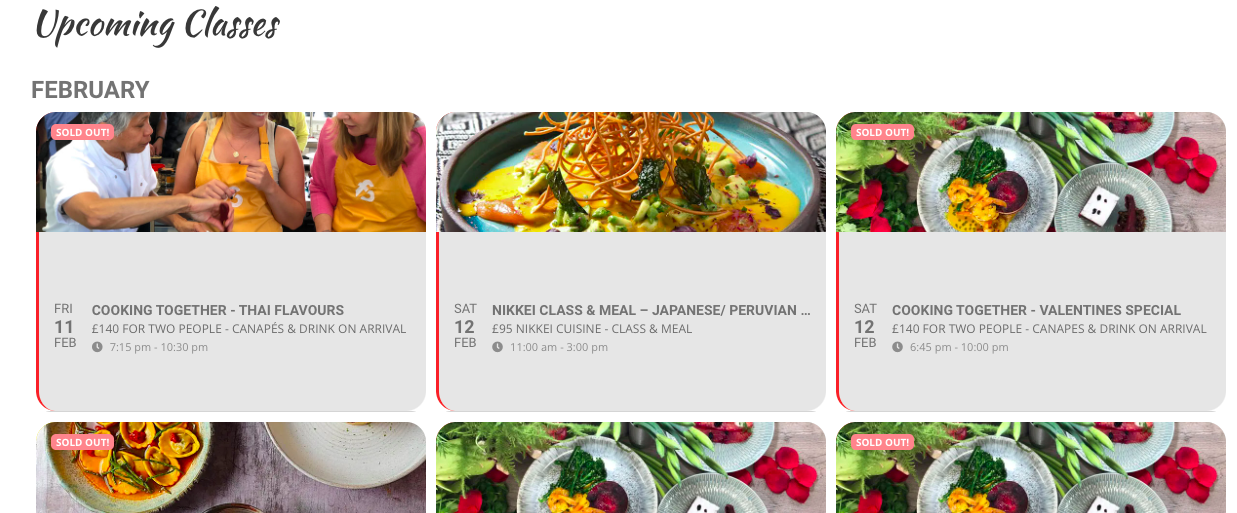
Hi,
It’s still not looking right – there is still a lot of grey at the bottom and the class text is in the middle of the grey, anything you can do to help will be much appreciated.
It’s not right on either the ful cal page or event list
https://www.foodsorcery.co.uk/
https://www.foodsorcery.co.uk/bookonline/
Thanks
Helen
Hello,
Unfortunately, we don’t have access to your account on CodeCanyon. Please contact Envato about the change.