Thank you for your great suggestion, at the moment it is not supported. However please create a new ticket and select Feature Request as category so others can vote on your idea and get it moved into development faster.
Archives: Replies
Replies for tickets on suppota
Reply to: tickets(268464)
And if you switch the theme to the default one, will it work?
Reply to: tickets(268155)
In this case you need to make it repeating, but also put Day 1 of the first week to Event Start Date and the last day of the last week to Event Date. Something like this: https://dev2.myeventon.com/events/repeating/
Reply to: tickets(268494)
Hello,
Do you have similar issue with disabled SMTP plugin?
Please also update EventON and RSVP add-on.
To update eventon to latest version: If you are unable to do autoupdate, you can go to codecanyon your account > download and get the latest eventon version as zip file. Then you can go to your website, deactivate old eventon, activate (Do not delete eventon settings & data when EventON is uninstalled) from eventon settings, delete old eventon, install new one and activate. This link will further explain the process it. Also you can follow us on twitter to get real-time announcements on updates!
To update eventon addons: You can download latest eventon addons from myeventon > my account. Then you can go to your website, deactivate old addon and install new one and activate then delete the old addon. This link will further explain the process. Also you can follow us on twitter to get real-time announcements on updates!
Could you also try going to https://www.hiltonheadgolf.net/wp/wp-admin/post.php?post=7141&action=edit > try using “Send RSVP Emails to other email addresses using below fields.”?
Reply to: tickets(268497)
Hello,
You didn’t understand 🙂
I want the ONE event in 2 languages (BTW i’m from belgium and we have 3 official languages in the country).
When someone order a ticket in french, the stock lower in french AND english.
And also, can I see attendees somewhere from french AND english at the same time ?
Thanks
Reply to: tickets(268463)
Please remove grid_ux=”1″ from the shortcode.
Reply to: tickets(268497)
Hello,
WPML or our system require you to create a separate event for each translation.
Also you don’t really need to have capacities in two languages in the same event. Just create two events and put 10 and 15 as capacity.
Reply to: tickets(268280)
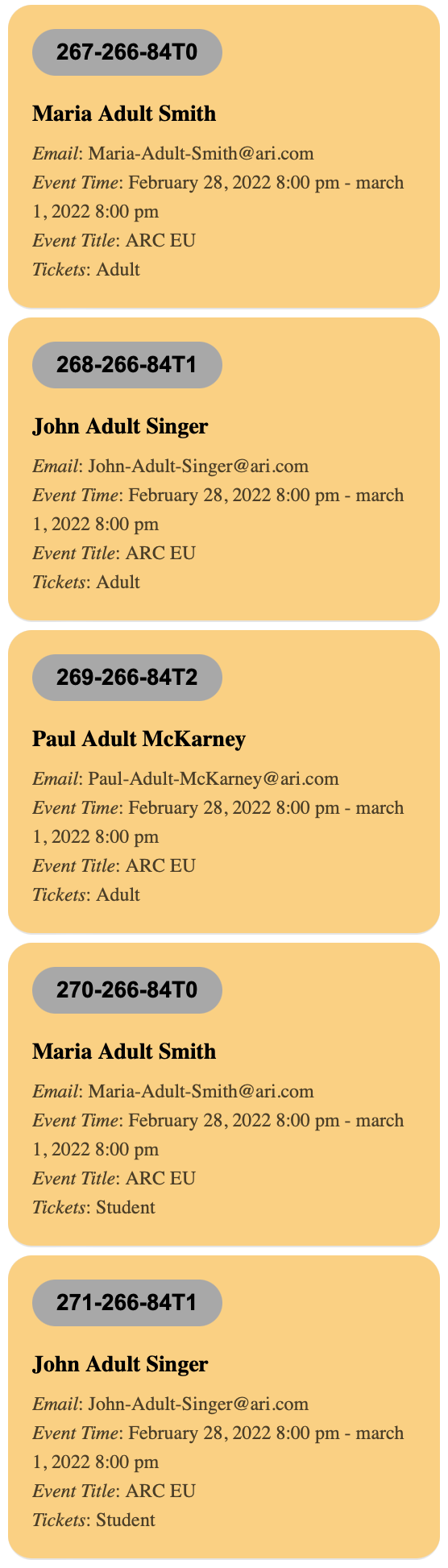
Hello,
I updated the plugin, but I am still having the same issue.
If you look at this order: https://dev.aynrand.org/wp-admin/post.php?post=266&action=edit
There are 3 Adult tickets and 2 Student Tickets,
I added this ticket holder information, respectively:
Maria Adult Smith
John Adult Singer
Paul Adult McKarney
Jasper Student King
Karen Student Flanders
Karen-Student-Flanders@ari.com
When you look at the order, this is what was registered (See screenshot attached)
For the student tickets, it repeated the first two Adult Tickets information.
Please, advise.
Reply to: tickets(268388)
I don’t understand. This is not a code canyon or envato account. This is the direct login at Event On: https://www.myeventon.com/my-account/ that I do not have access to.
Reply to: tickets(268463)
This is the access:
user
UPAlfa_Admin
psw
UPAlfa_Canberra**!2438_+*