sure!
bests,
Replies for tickets on suppota
sure!
bests,
Please create a clone website, so we can check the issue.
It seems the issue is fixed when I logged-in. Can I please try the instructions mentioned in this documentation?
Hello,
There is no available functionality to achieve any of these, I am afraid.
However please create a new ticket and select Feature Request as category so others can vote on your ideas and get them moved into development faster.
Could you update PDFer add-on to the latest version?
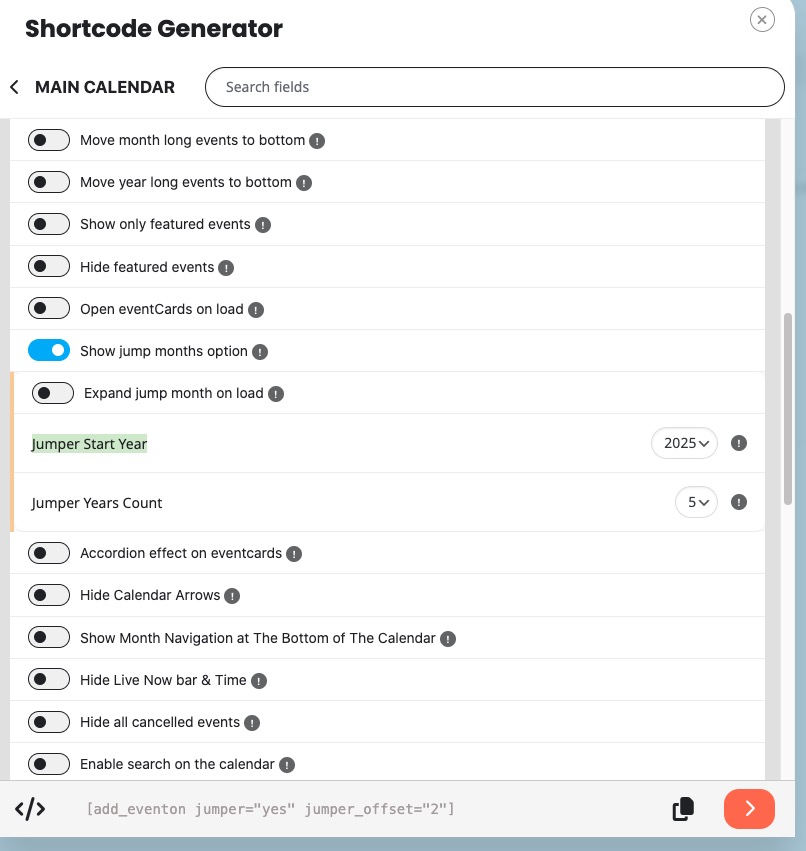
Just to make this easier, please go to Shortcode Generator and then select Main Calendar > enable “Show jump months option” > set “Jumper Start Year” to 2025 > copy the shortcode:
Ashan,
The same on dev2:
https://dev2.myeventon.com/test-1047/
Cannot assign an image.
Hello,
Thank you for your messages, I am going to assign this ticket to Ashan and he will be able to take it from here and find you a solution. Please allow some time for him to get back to you, we greatly appreciate your patience and thank you for being a eventon customer! Also please disable any IP blocking on your site if there are any.
Hello,
Please take a look at this shortcode that shows Featured Image:
https://socaevents.co/?page_id=437
You need to add show_et_ft_img=”yes” to the shortcode to show the image.
This shortcode shows Tile Design:
https://socaevents.co/?page_id=439
I added tiles=”yes” tile_bg=”1″ to the shortcode.
Please also note that start_date_range=”2025-08-01″ end_date_range=”2025-08-31″ formats are incorrect. I replaced them with 2025/08/01 and 2025/08/31.