Hi Billy,
Is it that the event is connecting without asking for a password? is that the issue?
Replies for tickets on suppota
Hi Billy,
Is it that the event is connecting without asking for a password? is that the issue?
Hi,
Any idea why my password protected event isn’t working?
Menucha and Mendel’s Wedding – YouView (primedigital.co.za)
Thanks
Hi,
Where are you with the fix? because no more news and nothing since December 13! Best wishes. Jean Marc
Hey STeven,
Not yet, we are working on this from our side, we appreciate the patience
Hey Billy,
Thank you for the feedback and the understanding, while we work on this
Thank you very much for this.
As a temporary solution, I made a backup and deleted these files from plugins/themeslr-framework/js :
jquery.datePicker.min.js
jquery.timePicker.min.js
It seems to have sorted out the issue.
Thanks
Hi Christina,
Regarding the Eventon main plugin which is not working, please create a separate ticket for that so that we can take a look at the issue. If you would to get a refund for that, please contact CodeCanyon, they handle the refunds for that plugin.
As for the three addons, I am going to assign this ticket to Ashan and he will be able to take it from here. Please allow some time for him to get back to you, we greatly appreciate your patience and thank you for being a eventon customer!
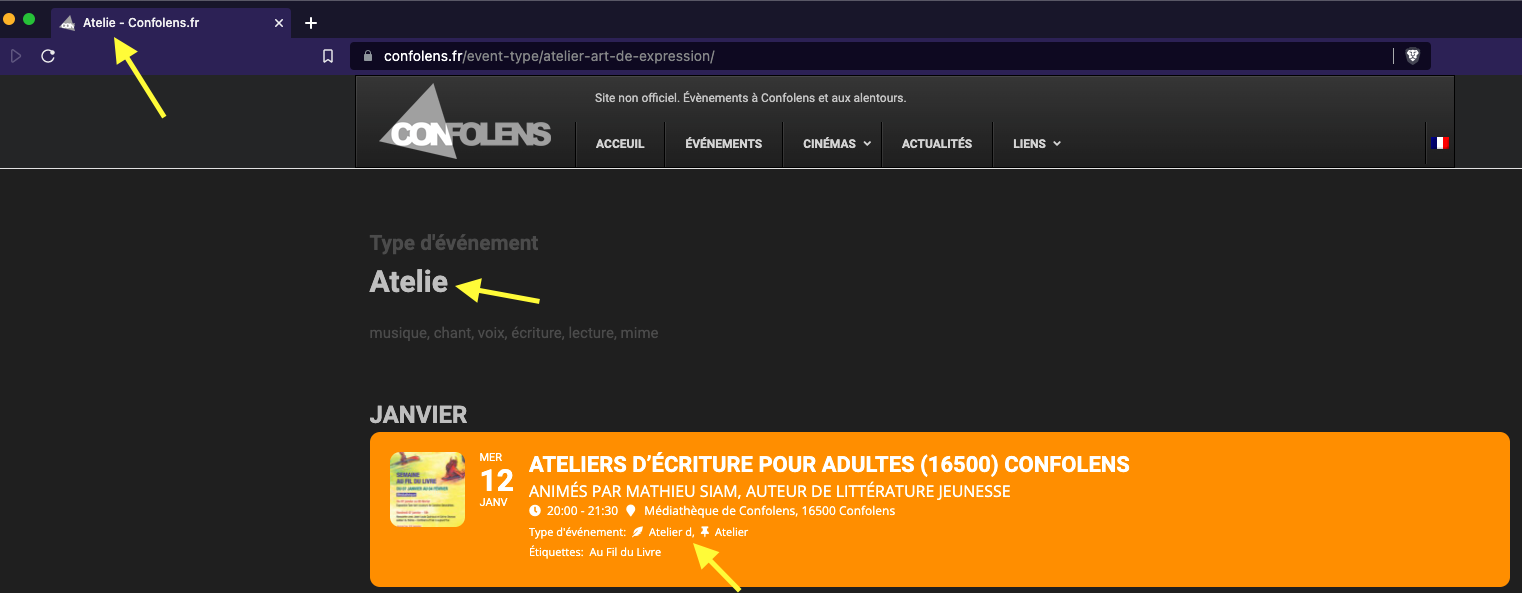
After sending my response, I realized I could somewhat test this by copying and pasting the right single quote ’ into my fields and see what happens.
For the Samphire event, changing from the apos to rsquo did what I expected, and the leading forward-slash disappeared. https://www.confolens.fr/evenement/la-ceilidh-avec-samphire-16490-alloue-2021/
But for the Atelier event, the results were far stranger….
https://www.confolens.fr/event-type/atelier-art-de-expression/
First I changed the event-type to not have ANY quotes, but for some reason, that didn’t change anything on the Event Top. Notice that the top page title now says “Atelier dart de lexpression” with no quotes at all, but the event-type in the Event Top still says “Atelier d”. I tried clearing my cache, resaving the event, resaving the event-type. I can’t get it to change.
If I uncheck that event-type, then it goes away, but then when I check it again, it still says “Atelier d”. Even stranger, I updated the name to just “Atelie” and the page title now says Atelie, and it changed the order of the event-types on the Event Top, but it still says “Atelier d”.
Very strange.
I access my FTP by going to my C-Panel, which is located on my hosting website.
go to hostgator.com and login to portal. Login: cma6442@gmail.com Pw: Dch16047&
Once logged in, you can go to my C – Panel and access FTP.
I can not have a temporary fix. Thus was fixed once before (debugged) and then it started happening again. It is not the theme or platform as I had those people also go in and do a diagnostic to fix any issues there. Site is working fine now – however, if I activate the EventOn plugin, then my website freezes up and I can’t click on any titlebar menu items or click any links. (I also had issues with the countdown timer from the beginning – it has never worked, just sat at zero’s……)
I can’t have a temporary fix. Or have to keep coming back to have you fix it when I am notified by members of my website that it is not working. That is embarrasing and not good to have happen – especially mor ethan once. This issue has been ongoing for the last 2 months now…..
can you please provide me with the shortcodes for both of these scenarios? Thank you