The issue seems to be intermittent. This is the event that was not working, but now it is.
https://saltspringcentre.com/events/satsang-salt-spring-island/var/ri-3.l-L1/
Is there anything special we need to keep in mind when inserting the Zoom link? This has happened a few times in the past and my client was able to tweak settings on the Zoom meeting and it seemed to fix the issue.
For some reason there was no tweaking that would fix this event, but now it seems to work.
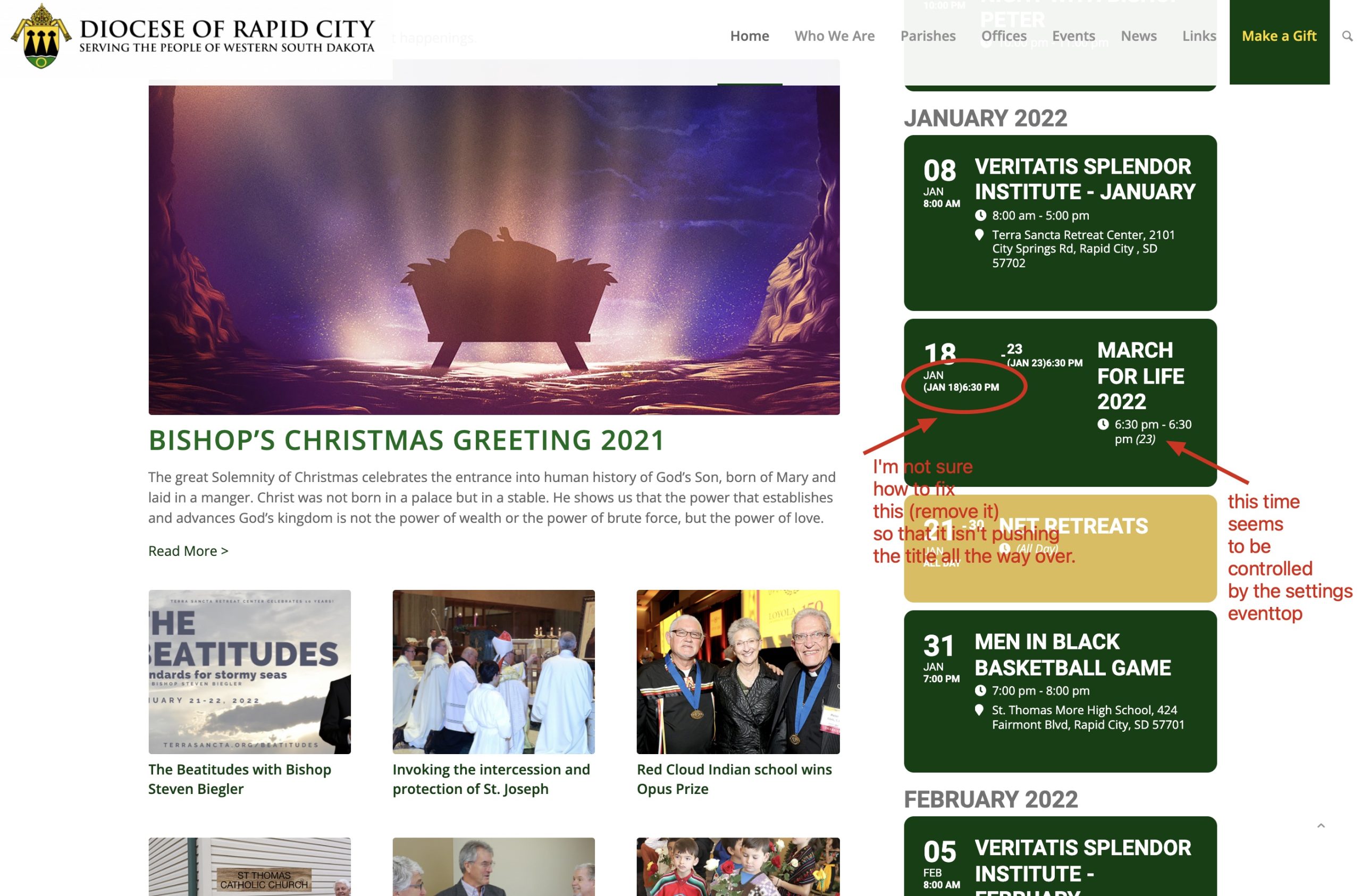
Yes, when I go to that settings area I can remove the TIME from the main section but there is also a time that is showing right underneath the date/day that is making some weird spacing in the boxes. I can’t seem to just remove that from the settings area. See attached screenshot and home page: https://www.rapidcitydiocese.org/
Hello, is there any update on this issue?
Would like to know if this was stated in the documentation/specification of the plugin.
I also need to make sure my event cards are all the same size and format. Is there a way to do this using the WYSIWYG editor EventOn?
Hi Ashanjay
Your overview really helped but now have a unique need that we can not overcome on our own. You can see our use case at:
https://domoathome.co
We are a restaurant that offers certain food options for certain times and dates only. Most are simple orders that can be handled with the Ticket variations tab. However, we need to send people to a shop page for certain events and not direct the user to the checkout page.
We like that the tickets push each user to the checkout page automatically. That has worked well in our demos and for our needs.
We do have a unique need that we cannot seem to figure out.
We now have event items called “Take & Bakes”. For these items we need the user to be directed to our “Menu Shopping Page” prior to the checkout. (https://domoathome.co/shop/). The user needs to select a ticket’s date and time, before being sent to the menu page: https://domoathome.co/shop/ – From the Menu page the user can select more options, go to cart and checkout. Currently, we do not know the best way to get users to the menu, prior to checkout.
I have tried to use the event-on widget from the WYSIWYG editor to send users directly to a link to the shop, but that bypasses the users ability to select a timeframe for their delivery.
Any suggestions?
Ashan – as mentioned, the calendar is almost empty this week because of Holidays and Covid (ticket was made almost 7 days ago when u could see the issue live). When it gets filled it is painfully slow – you can even take a look at the GTmetrix timeline above and see that the calendar plug-in is completely blank for 5s while it is loading – and this is with max cdn etc)
When there are no events in the calendar, it loads quickly – but when it starts to fill up to any more than 5-6 events per day (and especially 10+), it crawls to a halt. And while it is loading, there is *nothing* on the page for many seconds – it is completely blank. This is a major issue, for anyone that has more than a few events. And keep in mind that most users connection isn’t a wired 120mbps but closer to 10-20mbps especially on mobile).
(We we’re told to stop using 3a to get the headers to work correctly after the 4.0 update, but I guess that has been resolved so we’ll put them back on)
The biggest issue is that the plug-in does not *start* to show *anything* until everything is loaded, this is a huge problem and users think the site is broken and it means the plugin can’t be used scalably.
And this isn’t just a problem for us – if u create a bunch of events (images and all) u will be able to replicate for urself – it becomes unusable.
We really like the plug-in and have put all of our content into it, but we can’t have continuous blank pages – we hope u can resolve so we don’t have to redo all of this.
Please help resolve. Thank you.
Maybe this is the issue?
Uncaught (in promise) TypeError: Failed to register a ServiceWorker for scope (‘https://playbitherules.com/’) with script (‘https://playbitherules.com/bpbm-worker.js’): A bad HTTP response code (404) was received when fetching the script.
You need to contact the theme developer and ask about this issue. If it fixed itself with enabled EventON, I am quite sure that the issue is not with EventON.
Hello,
Autoupdate may be unavailable. Please update the add-on manually:
To update eventon addons: You can download latest eventon addons from myeventon > my account. Then you can go to your website, deactivate old addon and install new one and activate then delete the old addon. This link will further explain the process. Also you can follow us on twitter to get real-time announcements on updates!
Unfortunately, no. Facebook removed this functionality from their website so you cannot sync events with third-party plugins.
Unfortunately, you cannot edit the form without customizing the source code. Action User’s Submission Form has hooks that allow you to change them from the functions.php file, while Tickets’ Form hasn’t.