Ashan it appears they added fields to action user submit via this
https://docs.myeventon.com/documentations/add-additional-fields-actionuser-event-submission-form/
but the additional fields are not appearing on the form
Replies for tickets on suppota
Ashan it appears they added fields to action user submit via this
https://docs.myeventon.com/documentations/add-additional-fields-actionuser-event-submission-form/
but the additional fields are not appearing on the form
Thank you for your messages, I am going to assign this ticket to Ashan and he will be able to take it from here and find you a solution. Please allow some time for him to get back to you, we greatly appreciate your patience and thank you for being a eventon customer! Also please disable any IP blocking on your site if there are any.
Guys, I thought you now got access to the backend?
This is the help article, that the coder had used.
I fill a little like ping pong… but will ask him again for the code / file…
Hey Morten,
Thank you for your message.
We have not had this request before from someone, this is why we categorize it as a Feature Request.
Hey,
This is strange.
Can you please provide us FTP and WordPress access, we will try to review and fix this.
if possible also provide us the PHP version u are using
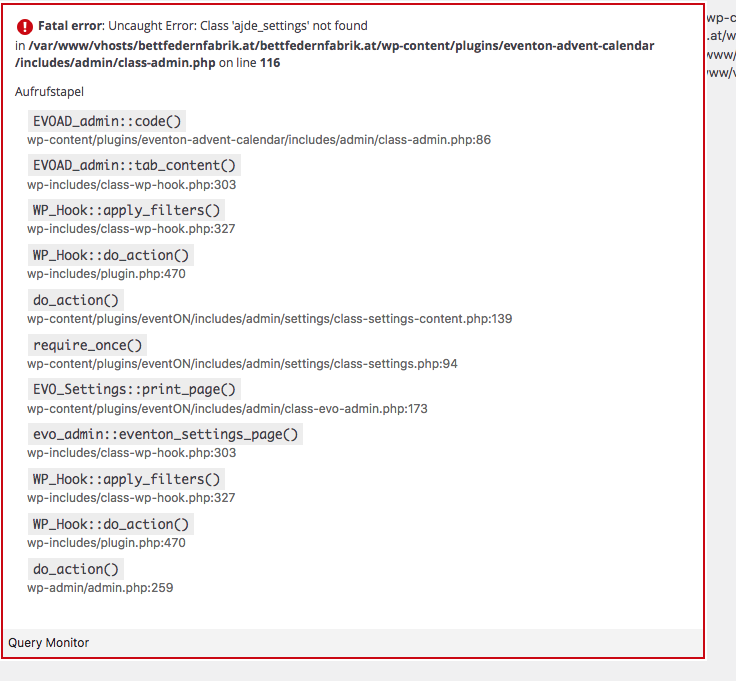
Hi,
dleted an uploaded the plugin via FTP. But still the same error.
Well, it should not be a feature.. It’s rather bug. Can you explain to me why that would be a feature?
You use EventON for some time, then you decide you need the tickets addon and pay 100 USD a year for that, you are pleasantly surprised to see that the “Event over” label is shown on the cards. However when you have events you don’t sell tickets for you cannot use the same label..? That just does not make sense. If you have bought an addon that implements that feature, it should work everywhere – not only on events with tickets. It should be uniform everywhere – so it looks the same nomatter if the event is free or you can buy a ticket for it.
Please don’t ask me to ask for a “feature request”. Please recognize that it’s a flaw and just correct the bug in a future release.
yes – i have added you to our dev server – it is easier to see the problem there as I have the ‘check availability’ function turned on on the eventcard
https://billabong.theteamserver.com/wp-admin
Click an event and then ‘check availability’ to see the {startdate} always return 01/01/1970
https://billabong.theteamserver.com/calendar/
user=eventon
password = E@D)tWyg)kZuPrv24m5pyqs$
Thanks
Paul
You can add HTML to the email reminder however
It is a generic email thats gets sent out and the info you can pull from the event are
{event-name} {event-link}{rsvp-yes-count}{rsvp-no-count}
The rest of the email is the exact same for every event
if you wish to send an email to……… hmmm hard to explain in text- see video below