This is only partially resolved. I’m still waiting for resolution of the primary issue.
Archives: Replies
Replies for tickets on suppota
Reply to: tickets(260347)
Reply to: tickets(260150)
seems to be error here:
function evocsv_function2($
I changed it and no critical error. But still no rsvp
Reply to: tickets(260150)
Added the code to the functions.php file and getting following error:
There has been a critical error on this website. Please check your site admin email inbox for instructions.
Removing the added code fixes the issue.
Reply to: tickets(260150)
Ah yes, sorry. Please make sure to follow this guide:
https://docs.myeventon.com/documentations/import-additional-fields-using-hooks/
You also need to add the required code. For example, _field_var_name must be replaced with evors_rsvp.
Reply to: tickets(259690)
I don’t think that debug is going to tell you something in this case. Please update add-ons and EventON.
Reply to: tickets(260157)
Please add this CSS code to EventON > Styles (If you don’t see any change, EventON > Scripts & Styling > turn off Write styles to header > save settings > turn on Write styles to header):
.ajde_evcal_calendar.eventon_single_event.boxy.box_2 .eventon_list_event, .ajde_evcal_calendar.eventon_single_event.boxy.box_2 .evoShow_more_events { width: 100%; }
Reply to: tickets(260044)
Hello,
It looks like Hero Maps doesn’t load Google Map API. Like these ones:
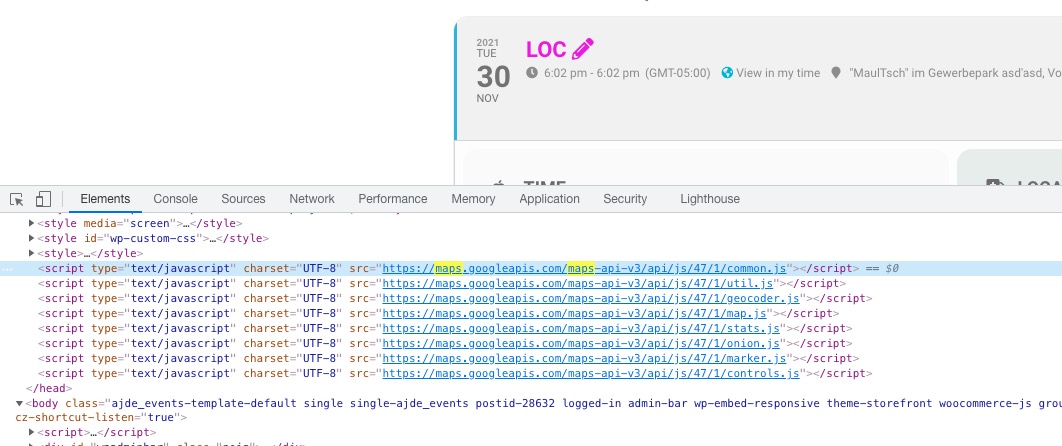
When you disable APIs on EventON’s side your other plugin must enable them then.
Reply to: tickets(259653)
?
Reply to: tickets(183534)
Hello,
I contacted our Network Administrator, and he said he increased the site memory limit to 512MB. Unfortunately, this did not fix the month calendar view for January or February – it still experiences the same issue when attempting to load.
Is it still fetching the same error?