Hello,
It’s the same procedure for the main plugin and also add-ons:
https://docs.myeventon.com/documentations/how-to-deactivate-eventon-addon-licenses/
Now activate it.
If you don’t delete the main plugin with disabled “Do not delete eventon settings & data when EventON is uninstalled” you will not lose any data. Check https://docs.myeventon.com/documentations/update-eventon/ > 2.2 – Back-end Way.
Hello,
Please check https://localise.biz/wordpress/plugin/beginners#add > make sure to select Custom.
Hello,
Please go to EventON > Event Top > Select Default Calendar EventTop Style: Clear with left border colors and gaps.
OR Add eventtop_style=”0″ to the shortcode.
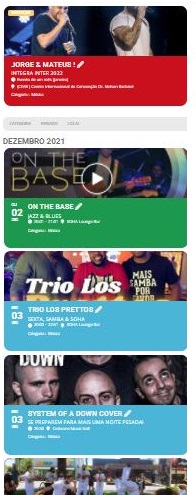
I don't have a highlight for the month of December, yet.
I will have from January until June

I understood the code you sent, but that's not how I thought.

You can pass me one that shows only HIGHLIGHTS, for the next 6 months.
So I put it at the top of the page, highlighting the main events of the coming months and then I keep the current code with the normal events and in the sequence of the current month. See attached example

I will use the httl page link on mobile only, so I sent the image in mobile format
Another thing, and I now feel guilty sending these in knowing you’re not being paid, is this – my page for ‘My Wishlist’ is not displaying the wished for events… https://walesoutdoors.co.uk/my-wishlist/
Thanks for that Dave – the /// addresses are from a globally used location service What3Words. this is now standard in the UK for emergency services. Effectively the world has been divided up into a 3 metre squares and each square has been given a unique three word name, hence ///bluntly.kilts.laminated or similar.
The issue didn’t arise with the previous version of the calendar so it is most certainly due to the update. I can remove this /// address from the set location info and see what happens. However I’m not convinced this will be the fix. The problem is I have 63 locations and so although not too onerous it’s just another task without knowing that it will work, so disheartening. It’s strange that the ‘> is random and does not apply to all those with the /// address, leading me to think this is not the issue.
Thank you so much David – and I never knew you worked for free – Ashan has obviously a lot f goodwill out there. Thank you 🙂
yes perfect, but is it possible without the small Photo when the accordion is closed?
did you increate the PHP memory limit or the wordpress memory limit? as in did you edit the wp-config.php or the php.ini file
and what did you set the WP_MAX_MEMORY_LIMIT
as
16 calendars on one page is alot to load- you have reached the max your hosting can handle
might want to look at https://www.myeventon.com/addons/event-lists-items/
which does the same thing but its only loading eventon once