It works! Thank you so much guys!
I also wrote you a urgent private ticket if you can reply asap it will help me a lot!
Thank you thank you
Replies for tickets on suppota
It works! Thank you so much guys!
I also wrote you a urgent private ticket if you can reply asap it will help me a lot!
Thank you thank you
Hello,
Thank you for your great suggestion, at the moment it is not supported. However please create a new ticket and select Feature Request as category so others can vote on your idea and get it moved into development faster.
Hello,
Please go to EventON Settings > Single Events > Select EventTop Style: Clean White.
After go to your shortcodes and add eventtop_style=”0″.
Hello,
It seems that the problem is in event_count=”6″ and event_past_future=”future” hide_past_by=”ss”. Could you try removing them?
Hello,
I am sorry, the access information you have provided did not work for us. Please check them and post the correct login information as a private message, thank you!
Could you try going to EventON Settings > try different Select calendar event content filter type?
Hello,
Are you referring to this date? If so please take a look at https://docs.myeventon.com/documentations/customize-eventtop-date-format/.
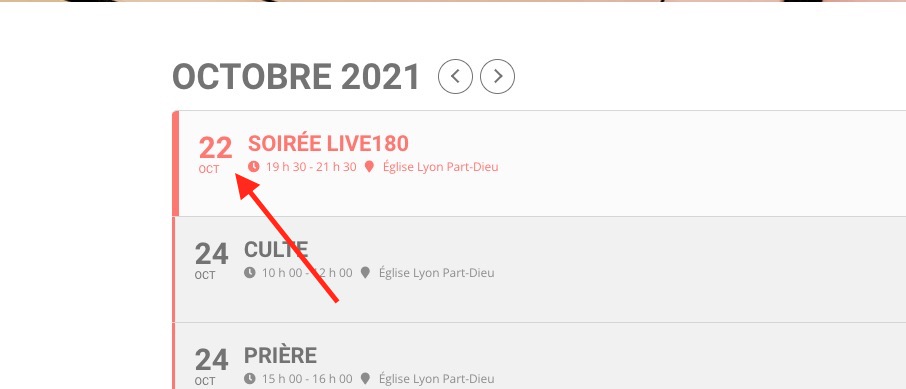
Hello,
Please follow this guide https://docs.myeventon.com/documentations/shortcode-generator/
Hello,
Please update EventON to 4.0.1.
To update eventon to latest version: If you are unable to do autoupdate, you can go to codecanyon your account > download and get the latest eventon version as zip file. Then you can go to your website, deactivate old eventon, activate (Do not delete eventon settings & data when EventON is uninstalled) from eventon settings, delete old eventon, install new one and activate. This link will further explain the process it. Also you can follow us on twitter to get real-time announcements on updates!
After the update please go to EventON Settings > Single Events > Select EventTop Style: Clean White. After go to your shortcodes and add eventtop_style=”0″.
Can we try disabling all plugins and switch the theme by ourselves?
Hello,
Could you replace tile_style=”1″ with tile_style=”2″ in the shortcode?