Ashan,
Please check
Replies for tickets on suppota
You have more than 30 active plugins and Avada theme enabled on 512M limit. If you disable all other plugins and also switch the theme does the plugin work?
Does your hosting provider has some kind of restrictions on which limit you can set?
If I were to create an event today (June 23rd) for an event 6 months away (Dec 23rd) and if I have the WP Query method set at…
Thank you for your messages!
I am going to escalate this ticket to development to help in here. Please allow us some time to address this, and we truly appreciate your patience. Thank you for being a valued EventON customer!
Now, if this isn’t possible, just let me know and I will move on. Thanks.
You put event_type=”230”, but you don’t have such type with the same id:
https://apo.org/wp-admin/edit-tags.php?taxonomy=event_type&post_type=ajde_events
Could you try removing it completely for a test?
Event Lists: Ext doesn’t support number_of_days. You can find all available options by checking Shortcode Generator:
https://docs.myeventon.com/documentations/shortcode-generator/
Instead of using number_of_days, please try adding ”Number of Months” (number_of_months=”12”) to your shortcode:
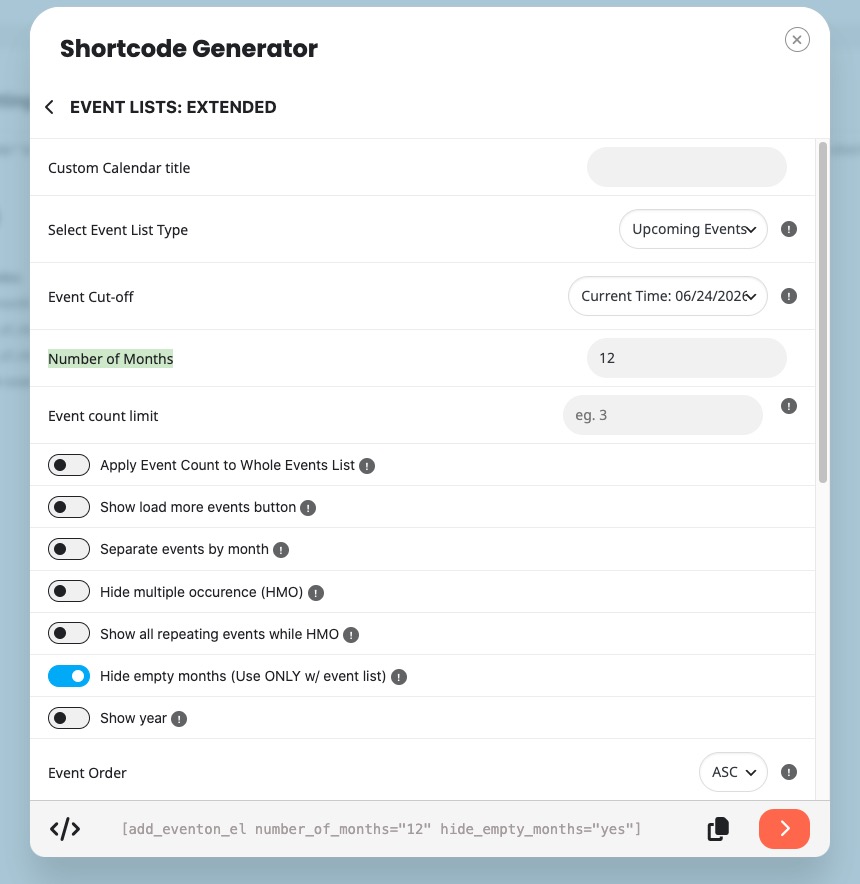
Also add hide_empty_months=”yes” to your shortcode to hide empty months.
Please also note that https://apo.org/wp-admin/plugins.php doesn’t have Event Lists: Ext installed.
If I were to create an event today (June 23rd) for an event 6 months away (Dec 23rd) and if I have the WP Query method set at ”created in last 5 months”, it stands to reason that when that event rolls around, it wouldn’t load because it wasn’t created in the last 5 months, correct? What good is that? Is the client possibly limited to only creating events so far out from the date of the event? It seems like this is a recent change with your plugin, as we’ve used it for a long time. Very odd that this is only happening now.
https://visitcasscounty.com/new-login/ – I changed thinking excessive bots were draining resources, but according to our web hosts, it’s your plugin.
I’m tried different WP Query methods. Which would you recommend for having 129 events? How many events can your plugin handle without exacting all our resources? Is 129 too many?
We are going to get the new version 5.0.11 out here in a bit and you can use that new version, which will have this issue resolved.
I even tried just using the number_of_days to just show 2 days.
[add_eventon_el hide_past=”yes” event_type=”230” hide_so=”yes” event_past_future=”future” number_of_days=”2”]
Unfortunately, I don’t think the Events EXT plugin is working even though it’s activate and the license key shows as registered.
Now it doesn’t even load with the add_eventon_el shortcode. It just spins like it’s trying to load events. The shortocde on the page is:
[add_eventon_el hide_past=”yes” event_type=”230” start_range=”today” end_range=”today” hide_end_time=”no” hide_so=”yes”]
I was able to update the plugin and enter my activate code, so that worked.
However, when I try to add this shortcode to a page:
The filters aren’t working.
https://www.bema.org/sean-test/
The shortcode that I want to use is to JUST show events from today and that is what is loaded on the page.
[add_eventon_el hide_past=”yes” event_type=”230” start_range=”today” end_range=”today” hide_end_time=”no” hide_so=”yes”]
Any idea as to why it doesn’t work?