How do you decide when it’s time to close RSVP? Because you can go to EventON > RSVP > set When to close RSVP to new RSVPs: When event starts. This way RSVP will be closed, but the list will be visible:
https://dev2.myeventon.com/events/rsvp-3/
Replies for tickets on suppota
How do you decide when it’s time to close RSVP? Because you can go to EventON > RSVP > set When to close RSVP to new RSVPs: When event starts. This way RSVP will be closed, but the list will be visible:
https://dev2.myeventon.com/events/rsvp-3/
sorry, I cant seem to find an edit ticket button. The admin login is https://tacomagardenclub.org/wp-admin
Hello,
Please update Tickets add-on to 2.4.17.
Can we access wp-admin, so I can re-create the issue on our test site.
Please send us wp-admin access to your site from “Access Info” box on right side menu, to further assist your situation.
Perfect! Please cancel your subscriptions while Ashan is working on this:
https://docs.myeventon.com/documentations/how-to-cancel-addon-subscription-before-auto-renew/
Closed as duplicate.
Hello,
Please take a look at
https://kinsta.com/knowledgebase/the-uploaded-file-exceeds-the-upload_max_filesize-directive-in-php-ini/
You need to increase upload_max_filesize.
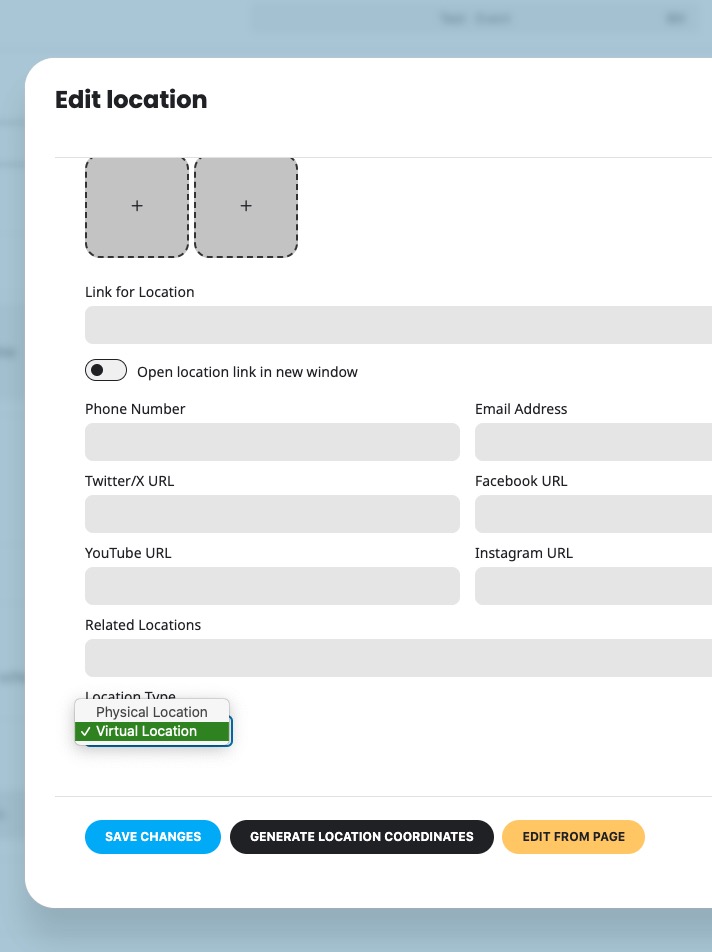
Please try going to Edit Event Location > try selecting Location Type: Virtual Location.
Is there a way to display the Attendees on the Event Card if RSVP is not enabled?
When we stopped RSVP on an event we didn’t see any attendees (people who paid for the event)
Hello,
Please follow the instructions in this documentation to activate debug in your site to see any PHP errors recorded that can provide insight on to whats going on. Please reply with a link to debug.log file. If you are not able to do this please send us FTP access to your site so we can do this for you.
Perfect! If you have any further questions or concerns please create a new ticket.