crt – thats a mistake.. On the checkout and basket screen I meant 🙂
Archives: Replies
Replies for tickets on suppota
Reply to: tickets(254718)
That didn’t work.
I applied it on the homepage here:
https://staging-mooneevalleycitycouncil.temp927.kinsta.cloud/
Shortcode:
[add_eventon id=”globalcalendar” ft_event_priority=”yes” show_limit=”no” ux_val=”3″ accord=”yes” subscriber=”no” wishlist=’yes’ tiles=”yes” tile_style=”1″ tile_count=”3″ event_count=”3″ tile_bg=”1″ etc_override=”yes” hide_so=”yes” eventtop_style=”0″]
Reply to: tickets(254634)
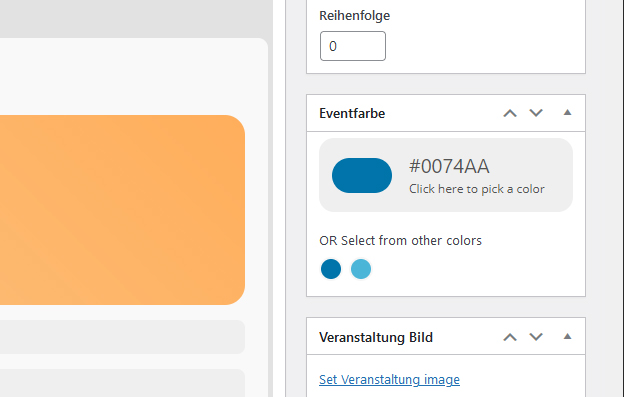
Thank you, it works!
Now only the event’s border is now in the event’s color. That’s fine!
Is it possible to change the predefined colors (see screen shot)?
Reply to: tickets(254718)
Hello,
Please add eventtop_style=”0″ to your shortcode to make the events to display like before.
Reply to: tickets(254504)
Okay, we will be waiting to hear from you with the credentials.
Reply to: tickets(254321)
You are very welcome 🙂 If you have any other questions, please feel free to create a new ticket.
Best regards,
Reply to: tickets(254321)
Thank you 🙂
Reply to: tickets(254733)
Reply to: tickets(254733)
Reply to: tickets(254718)
it happens to all events.
There is events at the bottom of the homepage:
http://staging-mooneevalleycitycouncil.temp927.kinsta.cloud/
There are also events here:
https://staging-mooneevalleycitycouncil.temp927.kinsta.cloud/play/my-week/events/