I am sorry what do you want me to do?
Archives: Replies
Replies for tickets on suppota
Reply to: tickets(254383)
Redmi note 8t but I have the sa me problème on every mobile I have
Reply to: tickets(254179)
Thank you!!
Reply to: tickets(254388)
Thank you. Which CSS file do I put this code in? Also, can you elaborate on why the problem was created in the first place?
Also, how do I address the dead space issue on mobile eventtop as noted above?
Reply to: tickets(254399)
We are glad your issue is resolved, if you have any further questions or concerns please create a new ticket.
If you have a moment, we would greatly appreciate if you could kindly leave us a review at codecanyon! from your account > downloads. Cheers!
Reply to: tickets(253844)
Hi Artem,
Caches have all been cleared. Your credentials are:
username: eventon
password: n!2TmUa$52hK9@Xmfd)Wy*Ss
The admin panel can be accessed here: https://oregonpediatricsociety.org/wp-admin
Reply to: tickets(254383)
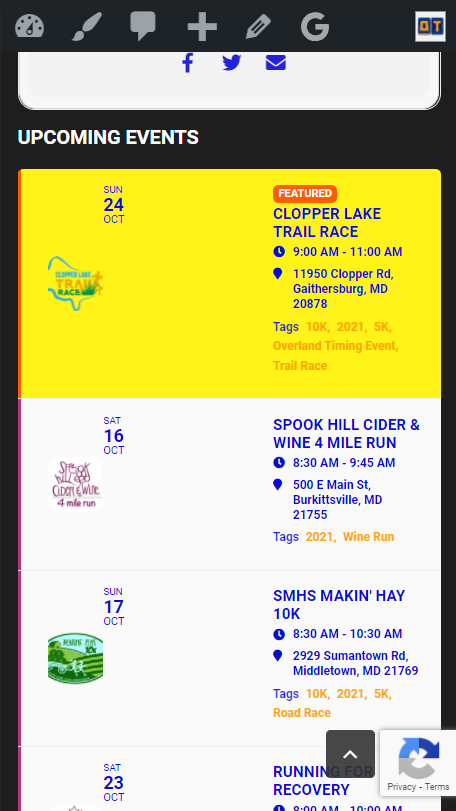
Mobile is mobile. I have the same issue. Looks terrible. Please fix.
Note that the Single Event page event looks fine on mobile, but I think it’s an issue with the “Event Lists Ext” or something that is broken. For example, in my upcoming events list we see this issue (see attached image).
Reply to: tickets(254388)
Hi Ashan,
There seems to be a typo in the code
Same as dev2
Reply to: tickets(254388)
Hello,
Please use the custom CSS code below to fix the issue.
.eventon_events_list .eventon_list_event .ev_ftImg {height:75px; max-height:75px;}
Reply to: tickets(254362)
I need a version I can read. Not a 150px thumbnail.
Also, why are you asking me to amend your code in order to simply to ensure the event title etc. fits onto the available space? Previously the text wrapped as necessary – see my first uploaded image.