Closing this work.
You will have to open a new customization request ticket if you need a help again.
Thank You
Replies for tickets on suppota
Closing this work.
You will have to open a new customization request ticket if you need a help again.
Thank You
you probably want to use event photos addon
https://www.myeventon.com/addons/event-photos/
see video walkthrough
We are glad your issue is resolved, if you have any further questions or concerns please create a new ticket.
If you have a moment, we would greatly appreciate if you could kindly leave us a review at codecanyon! from your account > downloads. Cheers!
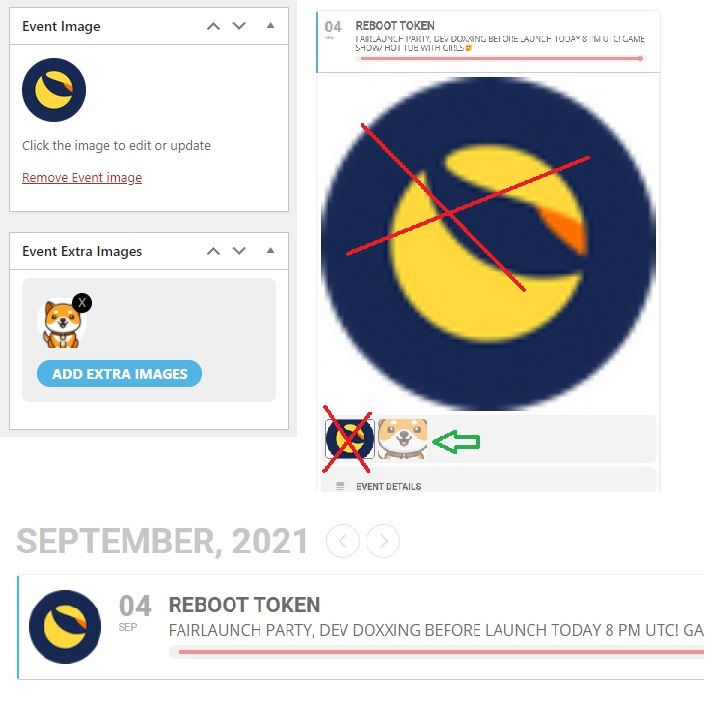
Here is an image, dont mind the paint skills… 😉
As you can see is the icon (logo) in the post list as Event image, that is good.
Now i dont want to see this inside the post as an image. is this possible?
Or is there a simpeler way, via custom fields maybe ?
Hope you can help me out, thank you in advance!
Alvin
Thanks! I added a button to the checkout page and it’s working fine.
Thank you for your messages, I am going to assign this ticket to Ashan and he will be able to take it from here and find you a solution. Please allow some time for him to get back to you, we greatly appreciate your patience and thank you for being a eventon customer! Also please disable any IP blocking on your site if there are any.
the video is jitsi
you can see how to set that up here: https://www.youtube.com/watch?v=apk5BXvbp-c&list=PLj0uAR9EylGrROSEOpT6WuL_ZkRgEIhLq&index=2
zoom does not work too well in the browser at this point in time, but once it does we will incorporate zoom embed into the event like jitsi.
Jitsi is native to the browser and you don’t need to set up a jitsi account or API to use it
from your screenshot the image vcircled on the right is the tiled event top
thats not possible with eventon and would require customization
that being said
A single event can be added to a page via the single event shortcode
so perhaps if you had a slider plugin of some kind and you add events into the slider 1 by 1
Ashan
clients is looking for a way to jump link direct to the schedual of the event and not just the top of the event
how to get an ID to the top of the schedual part and the speaker part if thats possible
the only way i can think of wiithout messing about with some javascript where you scroll to a class
would be in Myeventon>>>settings>>>>custom meta data
activate one of those and make it multi lines of text Html box give it a name or simply make it_________________________ for an effect
then in myeventon>>>>settings>>>>event card data
activate and position in between the speakers and the scedual
now when editing the event add this to the field
<h4 id="yabadabadoo"></h4>
make the ID your own and then you would create a jump link to that ID
you could for example put an image down instead and give the image an ID- perhaps make a Schedual Image
its not going to be that pretty I suspect
The issue for me other than how good it looks would be on this pageL: https://www.businessfactors.de/en/conferences/it-security
the event doesn't load straight away- when I scroll to it it takes a second to load- so its possible the jump link destination ID isn't loaded straight away
I am going to assign this ticket to Ashan to see if he can find you a solution. Please allow some time for him to get back to you. as its now weekend for him.
its not part of the addon but it but if anyone knows how and if its possible to get an ID into there so you can create a jump link he will