I took a copy of the website and created a staging site then updated all the EventOn plugins. So, this site –
https://ghf.twobluetoucans.co.uk/
is running EventOn 3.1.7, Tickets 1.9.5 and Seats 1.09 on WP 5.8 and Woo 5.5.2.
I did notice that your Tickets 1.9.5 download appears to still have a version number of 1.9.4 ??? But I am pretty sure it is 1.9.5 that is being loaded.
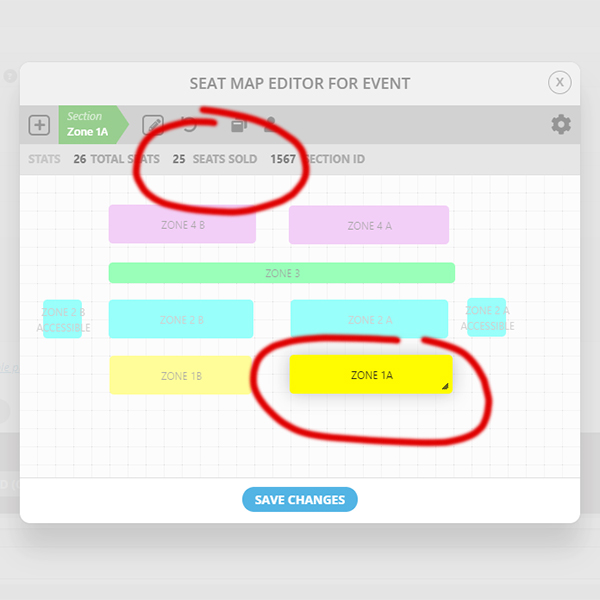
After all this, I still see the problem….. When I edit the seating plan and select a Zone, the number of tickets sold that is displayed in the header (see attached image). When I edit the Zone though, the Seats Sold So Far is displayed. Quite often, it’s a much smaller number than it should be. it’s this number that is used to determine the available tickets. The effect is for the the system to sell more tickets than it should.
If you look at this event, I know we have sold 25 tickets in Zone 1A
https://ghf.twobluetoucans.co.uk/events/janina-ramirez-goddess-revolution/
But when I edit the zone in the backend it says 18 of 26 have been sold. It thinks there are 8 tickets available in Zone 1A. You can clearly see this by mousing over Zone 1A in the front end seating plan. However, I can also see that 25 have been sold from the export of the tickets from the backend, so 25 is the right number. There should only be 1 ticket available in Zone 1A for sale but instead there are 8. So this will oversell 7 tickets.
I have been given permission for you to access the staging site if you need to do so.
Thank you
clark
website is lcms21.davidedigerdesign.com
Please also send us login/pass.
¿Hello? To my knowledge his is still unresolved, the plugin is not overriding the custom permalinks path in WordPress for single events. It should.
Hey David,
We have asked our CEO to do this for you, allow him some time and he will do take care of it for you.
js?key=AIzaSyBAl6okrAVBZCEbaLa5QTARsgm7ZyKBDHc&ver=1.0:72 You must enable Billing on the Google Cloud Project at https://console.cloud.google.com/project/_/billing/enable Learn more at https://developers.google.com/maps/gmp-get-started
for me the error message I get from this page
https://arturito.de/map-test/
right click the page >>>>>click inspect>>>>>>>>click the console tab on the pop up
you have not entered your credit card info into the google cloud service
they don’t charge you unless you get ove 25k loads a month but they need the credit card info
Hi Kenneth,
I followed the advices.
The API is working fine with “get directions”, I had a look at the google-advices and I followed the documentation on your site, but I did not find the reason, why the maps is invisible…
best
Hans
Hi Clark,
Please upgrade eventon to version 3.1.7 and check if that fixes your issue.
To update eventon to latest version: If you are unable to do autoupdate, you can go to codecanyon your account > download and get the latest eventon version as zip file. Then you can go to your website, deactivate old eventon, activate (Do not delete eventon settings & data when EventON is uninstalled) from eventon settings, delete old eventon, install new one and activate. This link will further explain the process it.
we have not used WCFM but we have used Dokan
action user works with tickets but doesn’t work with variations, seating price variations
Dokan works with action user and tickets
So dokan vendor who creates an event via action user and activates tickets- that ticket becomes their product

tags are showing for me. if you can’t see it- then clear your browser cache
