Hello- Sorry about the delay below is a video on how to set up additional fields and how to get them to display and not display and how to get some fields to display – easier to show you on video
Archives: Replies
Replies for tickets on suppota
Reply to: tickets(250015)
I also have a question and a request, say..
The person who takes this Formula can see the title of the event
in the content, but there is no information about the event date and time.
Can you ensure that this information is included
in this Reservation request?
Thanks
Reply to: tickets(248452)
This is still broken.
The URL they use for unsubcribe is:http://www.culpepercycling.com/subscription/?action=unsubscribe
but it fails.
Reply to: tickets(243090)
It seems that the multivendor plug in called “WCFM” works fine with EVENT ON.
Reply to: tickets(250039)
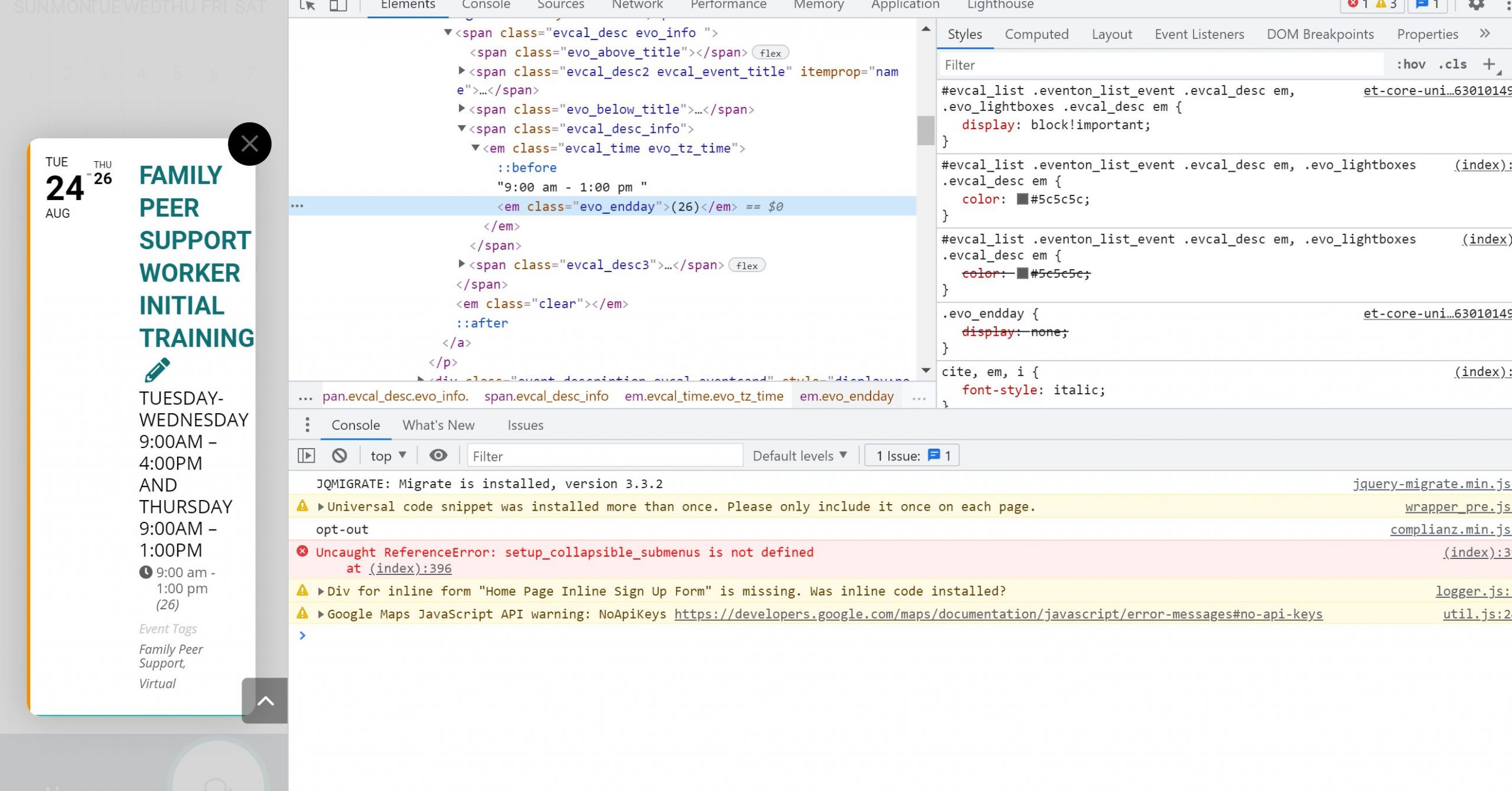
this code conflicts with a code I wrote to make evo_endday disappear.
How can I achieve event tags – display = true and evo_endday display = none.
This is what I wrote to make endday disappear.
#evcal_list .eventon_list_event .evcal_desc em, .evo_lightboxes .evcal_desc em {
display: none;
}
Reply to: tickets(241813)
I am currently reworking the site on a dev location – will be posting the site back to it’s main location at langleymusic.com on monday. Would like to have the calendar working today.
Reply to: tickets(241813)
Reply to: tickets(250041)
So you need to check if $td array actually contains your values: company and position.
Reply to: tickets(250041)
Hello,
$EVENT->ID and $EVENT->get_title() aren’t correct in this case because they output Event ID and Event Title. Please take a look at
How to get custom values
The second part of the code, pass on the value for each row of attendee. The function get variables $tn (ticket number), $td (ticket data array) and $EVENT (main event class) You can use those to create values for the new field you are adding to each attendee in the CSV file.
$td – the ticket data array holds an array of data for the ticket. You can use print_r($td) within the code to see what information is there and use correct associate path in the array to show those information.
eg. $td[‘oD’][‘ordered_date’] – will get you the date the ticket was ordered.
$td[‘oDD’][‘order_id’] – will give you order ID for the ticket.
Reply to: tickets(250029)
The only solution is to manually add them thought the Event Card RSVP Form. Unfortunately, you cannot add them from the backend.