Hello,
1. Could you elaborate? Not sure what “rental” means.
2. Please tell us more about “unfold”. Not sure what that means.
Replies for tickets on suppota
Hello,
1. Could you elaborate? Not sure what “rental” means.
2. Please tell us more about “unfold”. Not sure what that means.
Hello,
Please send us wp-admin access to your site as a private message for us to further assist your situation.
Also take a look at https://docs.myeventon.com/documentations/how-to-install-and-use-the-events-map-addon/
Hello,
Unfortunately, Event Lists shortcode doesn’t allow you to sort by months.
Please take a look at Event Lists: Ext shortcode:
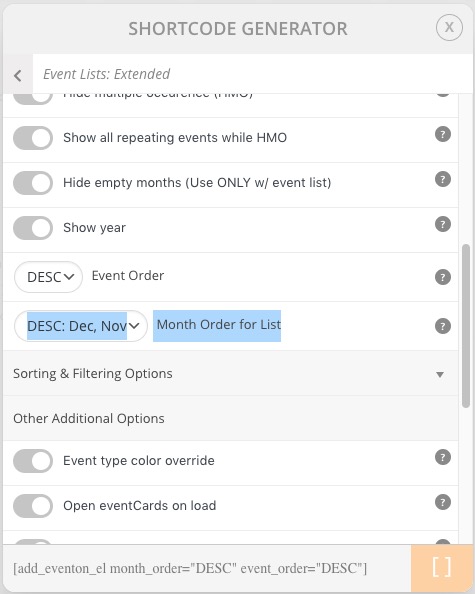
Try on https://dev.myeventon.com/wp-admin/
Also, how do I keep the cards closed by default?
Your shortcode on our test site https://dev2.myeventon.com/27540-2/. As you can see all events are closed. Could you try removing accord=”yes”?
Hello! I’m not sure how to get your attention. I never received the wetransfer email and would appreciate if you could resend to either allyson@embodiedpresent.com or allyson9@mac.com.
Thank you!
Allyson
Hello,
Thank you for the answer, but I don’t think it’s compliant with my request.
There are plenty of event organizer fields, like “Description”, “Organizer General Contact Information”, “Email Address”, “Facebook Link”… but when those fields are filled, most of them are not displayed in the event card data:
Is there a way to display all organizer fields correctly, without creating a new field for each event containing each time the same organizer information ?
What if I don’t want times on there?
I just want the following:
I left a fabulous review! Thanks again
We are glad your issue is resolved, if you have any further questions or concerns please create a new ticket.
If you have a moment, we would greatly appreciate if you could kindly leave us a review at codecanyon! from your account > downloads. Cheers!
Thank you. I was able to get all of the end dates changed, but it was definitely not easy. When trying in a batch, the change does not stick. When I do it one-by-one, it also doesn’t always work, so for a couple of them I had to repeat the process & clear the cache. Quick-edit is definitely the only way to change that end date & bypass the calendar widget that resets when you adjust the start date.
Awesome! Thank you!