Please add this CSS code to EventON > Styles (If you don’t see any change, EventON > Scripts & Styling > turn off Write dynamic styles to header > save settings > turn on Write dynamic styles to header). You can also add this code to wp-admin > Appearance > Customize > Additional CSS.
em.evoetet_val.evoet_dataval[data-id=”40″] { background: black; padding: 5px 5px; border-radius: 5px; } em.evoetet_val.evoet_dataval[data-id=”43″] { background: black; padding: 5px 5px; border-radius: 5px; } span.evoet_eventtypes.evcal_event_types em:nth-child(1) { display: none !important; }
Take Event Type id from wp-admin > Events > Event Type and put it to data-id.
With Event Photos add-on you can put them into a separate section, see “Secondary Image Gallery” on:
https://www.myeventon.com/addons/event-photos/
However, let’s try making thumbnails more visible with CSS code.
Please add this CSS code to EventON > Styles (If you don’t see any change, EventON > Scripts & Styling > turn off Write dynamic styles to header > save settings > turn on Write dynamic styles to header). You can also add this code to wp-admin > Appearance > Customize > Additional CSS.
.evo_event_images span { width: 150px; height: 150px; } .evocard_fti_in { background: linear-gradient(#3330 0%, #00000091 100%); }
Hello,
All months are empty for me. Which month should I select to see an event?
If possible, please send us wp-admin access to your site from “Access Info” box on right side menu, to further assist your situation.
i didnt e en notice that! is there a way to put those elswhere? this doesnt make sense.
Hello,
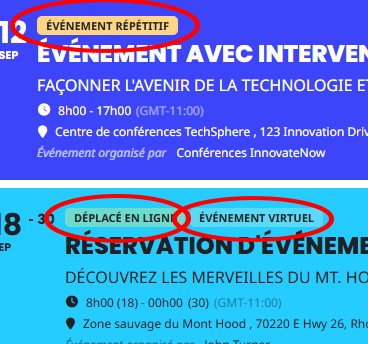
Yes, I would like my event types to take on the event’s planned color, like the example below.
Thank you very much for your help.
Philippe
http://akgi.shop/wp-admin
ID : blangels@naver.com
PW: Sunghyun1@
Subject: Issue displaying Naver Map inside Event Card (requires double click, map cut off)
Hello,
I am trying to integrate Naver Map API into the Event Card of EventON using the eventon_eventCard_extra1 filter.
The map loads, but there are issues:
-
The map only appears after clicking the event card twice.
-
Even when the map shows, the map frame is cut off (not fully displayed).
-
Zoom controls (+/–) appear, but scroll wheel zoom and drag are not working.
I confirmed that:
-
The Naver API key and domain settings are correct (map works perfectly on a blank HTML page).
-
The issue only happens inside the EventON Event Card.
-
I already tried calling naver.maps.Event.trigger(map, "resize") after ajde_evcal_show_event, but it did not solve the problem.
It seems the problem is related to AJAX loading timing or hidden container size when the Event Card opens.
👉 Could you advise:
-
The correct EventON hook or method to initialize a third-party map only after the Event Card is fully visible?
-
How to ensure the map resizes correctly so that scroll/drag/zoom works on the first click?
Thank you for your support.
Best regards,
Hello,
Are you trying to install the latest version of EventON or the one you purchased in 2018?
I am also going to assign this ticket to Ashan and he will be able to take it from here and find you a solution. Please allow some time for him to get back to you, we greatly appreciate your patience and thank you for being a eventon customer!
Perfect! Please keep us updated.
Ok we will make some tests and get back to you if the issue is not fixed. Thank you for your help 🙂