seat selection scheme does not open
Archives: Replies
Replies for tickets on suppota
Reply to: tickets(245843)
Awesome THX!
Reply to: tickets(232525)
Hello Mr. Basilis.
When will I get my money back?
Reply to: tickets(234178)
Hello Mr. Basilis.
When will I get my money back?
Reply to: tickets(244479)
Bonjour, j’ai crée un champ url et j’ai pu indiqué une adresse. Donc, si j’ai bien compris, si une autre adresse mail est utilsée, c’est à dire hors des miennes, l’utilisateur peut donc à ce moment là repmplir son formulaire ? C’est correct ?
Hello, I created a url field and I was able to indicate an address. So, if I understood correctly, if another email address is used, that is to say outside mine, the user can therefore fill in his form at this time? It’s correct ?
Reply to: tickets(244479)
Je traduis le site en français, au fur et à mesure de l’avancement de celui-ci, puis je corrige, les erreurs que je trouve. Et cela prend beaucoup de temps !
I translate the site into French, as it progresses, then I correct the errors that I find. And it takes a long time!
Reply to: tickets(246072)
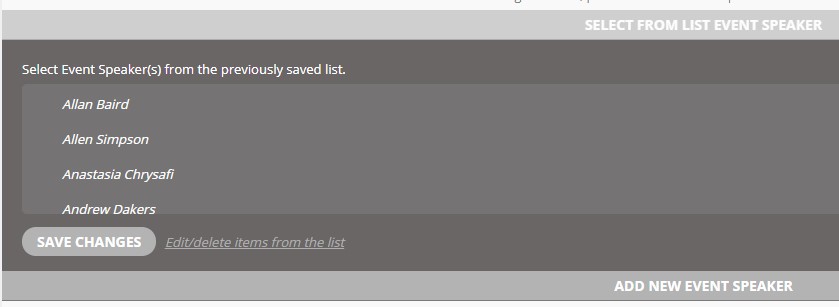
Screenshot showing the speaker select box
Reply to: tickets(245484)
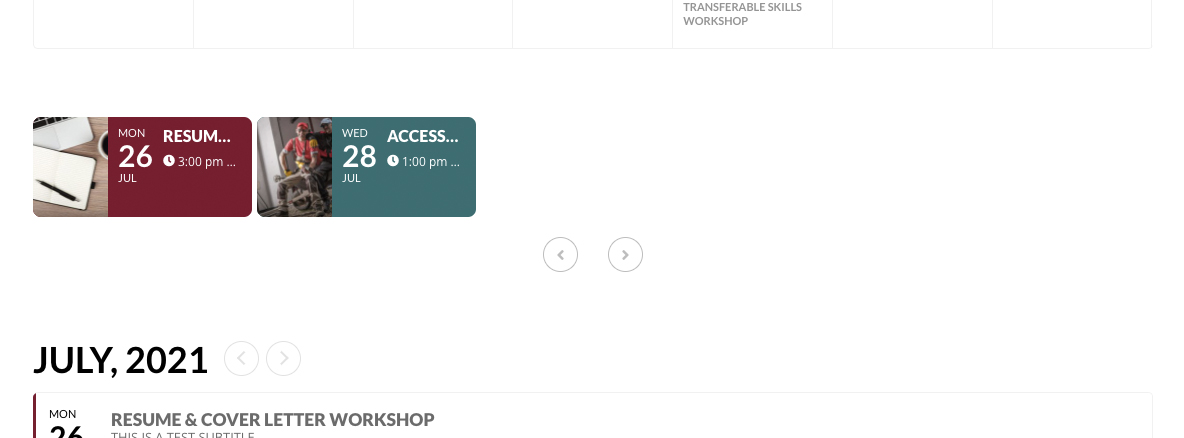
So what you’re saying is that the attached slider layout is acceptable to you? It displays half of one word of the event title, displays 2 tiles that don’t even stretch across the page, and is basically a 100% unusable display?
Reply to: tickets(245908)
Ashan,
Their ticket https://helpdesk.ashanjay.com/ticket/booking-management-is-not-user-friendly-and-difficult-to-navigate/
So I think they want to refund Bookings.
Reply to: tickets(244662)
Hello,
1. RSVP doesn’t support Booking add-on. Please check add-on’s description https://www.myeventon.com/addons/bookings/
2. This is how WordPress works, I am afraid. Not a lot we can do in this case.
3. Bookings guide is available here https://docs.myeventon.com/documentations/general-user-guide/
4. Please see 2. Unfortunately, we needed to do it this way. Otherwise it could cause issues.
5. Please check Action User – Event Manager https://www.myeventon.com/addons/action-user/:

Try it on https://dev.myeventon.com/wp-admin/
In order to request a refund, please create a new ticket under Billing & Accounts and be sure to include the order ID for which you need a refund for and the reason for requesting a refund.