The client has written some notes on the issue with screenshots and more detail.
https://www.dropbox.com/scl/fi/a4s88adz7iwa94pn9cvc8/DLC-Events-Products-2025-07-04.docx?rlkey=ow2s5oeyi6j0apdgyel42z0h0&dl=0
Cheers, John
Replies for tickets on suppota
The client has written some notes on the issue with screenshots and more detail.
https://www.dropbox.com/scl/fi/a4s88adz7iwa94pn9cvc8/DLC-Events-Products-2025-07-04.docx?rlkey=ow2s5oeyi6j0apdgyel42z0h0&dl=0
Cheers, John
Hello,
I am sorry, the access information you have provided did not work for us. Please check them and post the correct login information as a private message, thank you!
Could you go to EventON > Advanced > make sure that “Auto move events to trash when the event date is past” isn’t enabled?
Hello,
1. Please go to EventON > CSV Format:
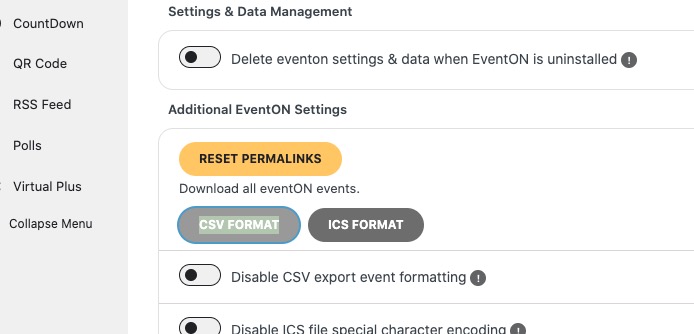
You’ll get much better example. Make sure to add event before downloading it.
2. WordPress assigned ids to Posts, Pages, Events and so on automatically, so you cannot manually assign them.
Just add events to wp-admin > Events. After, follow 1 and download the .csv file where you’ll be able to find all added events with their event_id present. Just change the data except event_id and upload the file to update events.
Are you referring to the original one or “The issue here, arise from eventcard data fields not saved. “?
Hello,
Please take a look at this ticket with similar issue and reply from Ashan:
https://helpdesk.ashanjay.com/ticket/accessibility-features/
Hello,
hide_empty_months doesn’t work with Main Calendar, only with Event Lists shortcode.
jumper_offset=”0″ and jumper_count=”3″ set Jumper to be from 2023 to 2025:
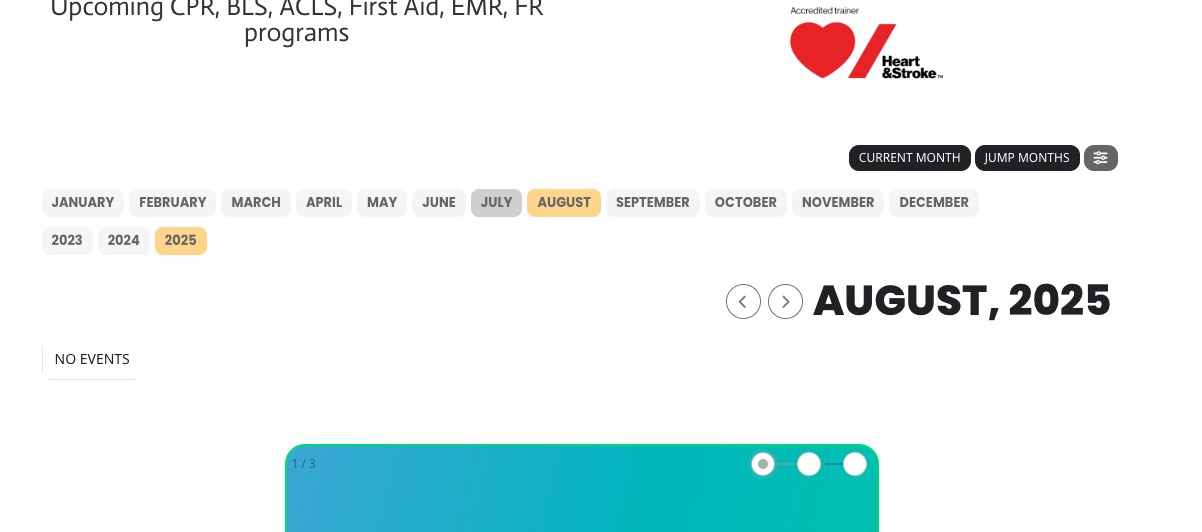
Since you enabled “Enable RTL (right-to-left all eventon calendars)”, the left arrow moves to the future and the right goes to the past. Please disable it.
HELLO,
my client gets very nervous now!
As mentioned above I used this code in the widget sidebar:
[add_eventon_fc eventtop_style=”0″ ux_val=”3″]
As this shows a huge amount of events it is not suitable, because there is a lot free space in the content of the homepage.
So I added event_count=”5″
[add_eventon_fc eventtop_style=”0″ ux_val=”3″ event_count=”5″]
Now the old problem only showing 1 day of events returns…
Please check this site https://kitz-magazin.de as I used the same code there, but it looks different with a scrollbar:
[add_eventon_fc eventtop_style=”0″ ux_val=”3″]
Why there is no scrollbar at https://ibiza-heute.de?
Why I cannot limit the amount of events shown for each day?
Would be nice I f you solve the problem which started 19. June 2025
Hi, thank you for what you’ve done so far, but unfortunately it seems the issue still isn’t resolved.
I think I have a site that is suffering from the same issue, I mainly use Brave browser. I have had reports from other people getting the smae issue. When i flush the cache it seems to resolve. I can’t work out when it breaks or why.
This is the page that sometimes doesn’t load the events:
https://t.somptingvillagemorris.org.uk/calendar/
Here is what the debug file contains but the issue wasn’t occurring:
[06-Jul-2025 08:48:40 UTC] PHP Notice: Function _load_textdomain_just_in_time was called <strong>incorrectly</strong>. Translation loading for the <code>tablesome</code> domain was triggered too early. This is usually an indicator for some code in the plugin or theme running too early. Translations should be loaded at the <code>init</code> action or later. Please see <a href=”https://developer.wordpress.org/advanced-administration/debug/debug-wordpress/”>Debugging in WordPress</a> for more information. (This message was added in version 6.7.0.) in /home/u636305174/domains/somptingvillagemorris.org.uk/public_html/t/wp-includes/functions.php on line 6121
[06-Jul-2025 08:48:41 UTC] PHP Notice: Function _load_textdomain_just_in_time was called <strong>incorrectly</strong>. Translation loading for the <code>tablesome</code> domain was triggered too early. This is usually an indicator for some code in the plugin or theme running too early. Translations should be loaded at the <code>init</code> action or later. Please see <a href=”https://developer.wordpress.org/advanced-administration/debug/debug-wordpress/”>Debugging in WordPress</a> for more information. (This message was added in version 6.7.0.) in /home/u636305174/domains/somptingvillagemorris.org.uk/public_html/t/wp-includes/functions.php on line 6121
[06-Jul-2025 08:48:43 UTC] PHP Notice: Function _load_textdomain_just_in_time was called <strong>incorrectly</strong>. Translation loading for the <code>tablesome</code> domain was triggered too early. This is usually an indicator for some code in the plugin or theme running too early. Translations should be loaded at the <code>init</code> action or later. Please see <a href=”https://developer.wordpress.org/advanced-administration/debug/debug-wordpress/”>Debugging in WordPress</a> for more information. (This message was added in version 6.7.0.) in /home/u636305174/domains/somptingvillagemorris.org.uk/public_html/t/wp-includes/functions.php on line 6121
[06-Jul-2025 08:48:45 UTC] PHP Notice: Function _load_textdomain_just_in_time was called <strong>incorrectly</strong>. Translation loading for the <code>tablesome</code> domain was triggered too early. This is usually an indicator for some code in the plugin or theme running too early. Translations should be loaded at the <code>init</code> action or later. Please see <a href=”https://developer.wordpress.org/advanced-administration/debug/debug-wordpress/”>Debugging in WordPress</a> for more information. (This message was added in version 6.7.0.) in /home/u636305174/domains/somptingvillagemorris.org.uk/public_html/t/wp-includes/functions.php on line 6121
I have since deleted the tablesome plugin since the site is no longer using it anyway, and now i don’t see a debug file.
See related image to problem