Hi!
That solved the problem, the font looks like it should be! Thanks a lot! I didn’t think that the solution would be that “easy” but I couldn’t ding the mistake.
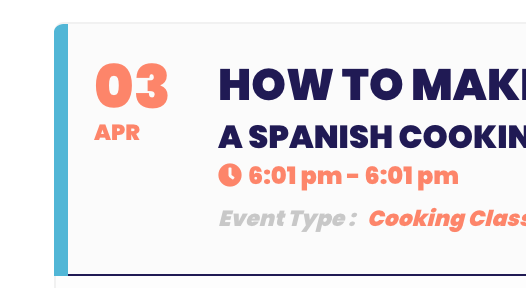
Concerning the icons I am happy with the look, at least they show up now. But they don’t show up the the color that I put into the appearance (#201855). I am not too picky with the icon color, but I just wonder why I can’t change it. Same with the tiny border on the left side of each event card. It’s a light blue and it doesn’t fit into my branding. It’s not a huge problem, but I just wonder how I can change that?
You were using the shortcode executer which is designed for sidebars where the names would be too big for it
use the shortcode generator found at myeventon>>>>settings>>>>>shortcodes to create your page shortcodes
I have removed that widget and placed a simply text field down and placed the shortcode in that and the name is appearing
you will also find the month arrows are larger now making it easier to switch months especially on mobiles
We are glad your issue is resolved, if you have any further questions or concerns please create a new ticket.
If you have a moment, we would greatly appreciate if you could kindly leave us a review at codecanyon! from your account > downloads. Cheers!
1: In order to sell a ticket to an event which would then unlock the zoom event you would need the tickets addon
https://www.myeventon.com/addons/event-tickets/
The basic paypal integration with the eventon you bought from codecanyon doesn’t connect to any database of people for an event and is not integrated with the zoom integration in any capacity. its simply a way to add a price in the event and then it goes to paypal- not recommended for events unless you only have one event .
2: If you had a repeating event- say every sunday for the next 2 months- you could set the ticket to sell
pay once and get access to each sunday or pay for each repeat
However- as you have mentioned zoom I assume you are selling say a series of events for the one price- the password for zoom will always be the same (unless you manually change it from within
Good day, I just made the update to 3.1.6 version, but I still have the same issue.
Hello,
Following are the access details:
samsara.grabensia.hu/wp-admin
user: eventon
PW: Eventon2021!!
In case you make any changes, please let me know what, and where you modified.
Thank you.
Please send us wp-admin access to your site as a private message for us to further assist your situation.
see video below- seems to be working so clear your browser cache
You need to be using the events list extended shortcode found at myeventon>>>>settings>>>>shortcodes
this video will walk you through your issue
See video 1 below for icons
See video 2 below for font
Hi dear team,
unfortunately we still need help.
I will check out the wp-admin and will sent it as soon as possible.
Write to you soon 🙂