Sure – all accept switching the theme – my guess is there is some script hiding the last div in a series? but it is strange that there still is a blank space for it.
Archives: Replies
Replies for tickets on suppota
Reply to: tickets(240664)
Please note that “Events with only these user roles”
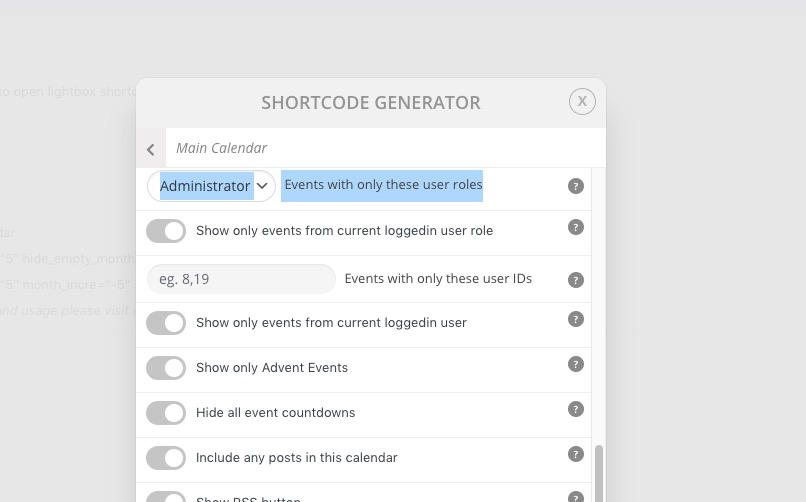
is not available without Action User Plus.
Reply to: tickets(240692)
Hello,
Please check now: https://cresco-akademie.de/?post_type=ajde_events&p=20041&preview=true
Reply to: tickets(240699)
Hello,
1. Please check https://docs.myeventon.com/documentations/translating-eventon-backend/
2. Please go to wp-admin > Settings > Time Format > select H:i. Now go to EventON Settings > Time > enable Use WP default Date format in eventON calendar (Excluding eventCard event date format).
3. Please go to EventON Settings > Time > select Default Event Timezone and enable Apply default timezone to all events.
Reply to: tickets(240692)
Okay, you are right. Now it also works on my end.
But there is another issue: I dont see any of the RSVP addon in the frontend, even I set up the RSVP in the card data. I only see the purchase option via WooCommerce (but we want to delete woocommerce on our end).
Is there anything I missed?
Reply to: tickets(240698)
Hi Matthias,
Please add the custom CSS code below to Appearance > Customize > Additional CSS to fix the paragraph spacing issue:
.eventon_list_event .evo_metarow_details .eventon_full_description p, .eventon_list_event .evo_metarow_details .eventon_full_description li {
font-size: 13px;
padding-bottom: 0;
margin-bottom: -2px;
}
As for icons not appearing, please take a look at this tutorial on how to fix that.
Reply to: tickets(240629)
Thank you, I have forwarded the problem to theme developer.
Reply to: tickets(235681)
Thank you Ashan, this is much better.
I have been tinkering with the tickets and seem to have got them working. The problem is stock levels. If I don’t set an individual stock level for each variety of ticket, they display errors and don’t function. This is fine for the short term, but the client wants one stock level set, not a level for each individual ticket type. Is there a way to add them without stock quantities?
https://www.loom.com/share/f2096c652d5348e7ab03072973afcef4
Reply to: tickets(240692)
Hi Enrico,
Please clear both your site and browser cache and then try again. Everything is working well on my end.
Reply to: tickets(230502)
Hi again, what about this issue?