Hello,
Your theme adds padding to all buttons. So please add this CSS code to EventON > Styles (If you don’t see any change, EventON > Scripts & Styling > turn off Write dynamic styles to header > save settings > turn on Write dynamic styles to header). You can also add this code to wp-admin > Appearance > Customize > Additional CSS.
.ajde_evcal_calendar .calendar_header .evcal_arrows, .evo_footer_nav .evcal_arrows { padding: 0 !important; }
Hello Shervin, just checking to see if you have any update on the seats after that code changes?
I will contact with fooevents. I attached wp-admin access.
URL: https://www.torreviejaplus.es/wp-admin
USER: Developer
PASS: #WzawDPlLLJ7B0EX@%cEDhZp
Thanks Artem! I don’t want to change the look of the homepage. I’m creating 2 additional page views for visitors. One page is the schedule view, https://regenttheatre.com/schedule/, which is all set. The other is a “list” page which is what I’m trying to configure and want to look like this, https://helpdeskx.s3.amazonaws.com/wp-content/uploads/2025/08/07121538/FireShot-Capture-656-EventON-Calendar-Demo-without-Addons-EventON-Demo-demo.myeventon.com_.png
It’s just a list, one event on top of the other that when clicked on will open up in a lightbox. I want this list to be able to be a minimum of 3 months of events on the list page.
Can you help me with this?
Event Card Designer affects all calendars on your website.
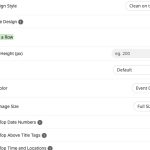
With Tile Design you can set 2 tiles per page minimum:
Could you elaborate more about what you are trying to achieve?
On this page https://regenttheatre.com/ which design do you want:
https://helpdeskx.s3.amazonaws.com/wp-content/uploads/2025/08/07121538/FireShot-Capture-656-EventON-Calendar-Demo-without-Addons-EventON-Demo-demo.myeventon.com_.png
or
https://helpdeskx.s3.amazonaws.com/wp-content/uploads/2025/08/08083406/FireShot-Capture-657-Home-Regent-Theatre-regenttheatre.com_.png
Do you have some kind of IP base restrictions on your server? The website isn’t loading for me at all.
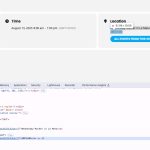
It seems that none of your locations have a full address:
Please send us wp-admin access to your site from “Access Info” box on right side menu, to further assist your situation.
Please also send us wp-admin access to your site from “Access Info” box on right side menu, to further assist your situation.
This fatal error is referring to fooevents:
[10-Aug-2025 16:54:08 UTC] PHP Fatal error: Uncaught TypeError: imagejpeg(): Argument #1 ($image) must be of type GdImage, false given in /home/dimedia/domains/buba.teatrmagii.pl/public_html/wp-content/plugins/fooevents/classes/class-fooevents-barcode-helper.php:330
Could you please try the instructions mentioned in this documentation?