Hi,
The calendar displayed is from Google calendar. EventOn people told us to get the ICS importer to make it work. That worked fine for a while, but the school needed the calendar to be updated hourly, so we paid you guys to do that work for us. With that said, if you think buying the full cal add on will fix the problem, that’s what we’ll do. Is there anything special we need to do after getting the addon?
Randy
Hello Eventon Team,
Unfortunately from the date of purchase of all for the licenses on the 25h Dec 2020 Problems were not answered with sloution later in the number of cases wasopened
I will ask from you to refund us ASAP for these, When support is not given for more than 6 months with all the references available to us, it is most likely a deliberate disregard or deception 🙁
Below are the lists I purchased from you but cannot be used due to a bug that exists on your side:
EVENT List& ITEM – EVOLI48cddda6-dede-4534-8ef3-2db037464390
I wish you good luck after finishing the affair between us
Thank you
Nitzan
Hello Eventon Team,
Unfortunately from the date of purchase of all for the licenses on the 25h Dec 2020 Problems were not answered with sloution later in the number of cases wasopened
I will ask from you to refund us ASAP for these, When support is not given for more than 6 months with all the references available to us, it is most likely a deliberate disregard or deception 🙁
Below are the lists I purchased from you but cannot be used due to a bug that exists on your side:
EVENT List& ITEM – EVOLI48cddda6-dede-4534-8ef3-2db037464390
I wish you good luck after finishing the affair between us
Thank you
Nitzan
Hello Eventon Team,
Unfortunately from the date of purchase of all for the licenses on the 29th Nov 2020 Problems were not answered with sloution later in the number of cases wasopened
I will ask from you to refund us ASAP for these, When support is not given for more than 6 months with all the references available to us, it is most likely a deliberate disregard or deception 🙁
Below are the lists I purchased from you but cannot be used due to a bug that exists on your side:
Action user -EVO8b1112ea-a78a-4361-bafb-2dc6fdf9d82b
Actionuser Plus -EVOAUP4c7b9058-2c79-4c58-aa10-939377fad503
ActionUser Paid feature events -EVOAUPFb66245f7-6056-4120-93ee-5fdc2749af5f
I wish you good luck after finishing the affair between us
Thank you
Nitzan
Not a coder, so trying to follow you here. Went to event page and added [add_eventon]eventtop_style=”2″
Where do I find edit event? At each event? Is there a global setting for the entire calendar? Do I find it under EventON Settings? Under Settings, Language, Styles? The choices are bewildering because they are so many. How do I find specifically?
All right, thanks for the videos!
I did as you told me, and now there’s a list. With gaps.
However, in the process, EventON changed the text formatting again (erasing line breaks e.a.)
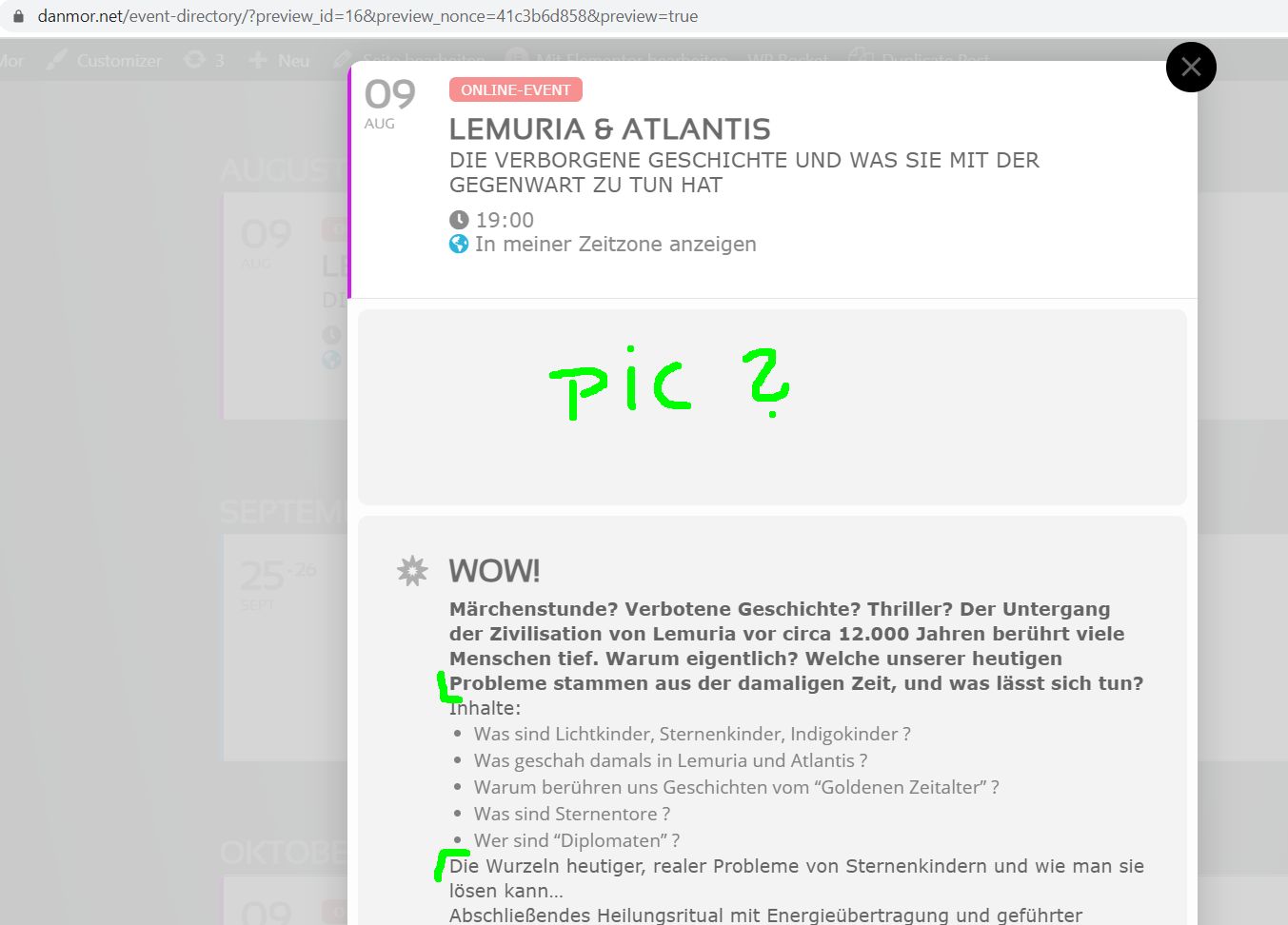
And the wide event images are not shown anymore in the popups.
When I added the show featured image shortcode, EventON also showed a small square event image in the top left corner of the event.
Hello,
Please add this to the shortcode:
eventtop_style=”2″
Now go to Edit Event > change Event Color.
Hey guys, following up here again.
I am being super patient but this is a bit much. Especially as a product owner and user (for a few years now!), plus having paid for support.
It’s almost been 2 weeks since I requested assistance with resolving this.
Hey Ashish,
I hope you feel good.
Can you work on this project ?
I have added 2 or 3 merge field
Can you create these instead of the one up there :
{client-first-name} (ex. : Ashish)
{client-last-name} (ex. : Ray)
{client-email} (ex. : reply50@gmail.com)
{event-day-numbers} (ex. : 31-09-2021)
{event-day-one-word} (ex. : thursday)
{event-time} (ex. : 9h30)
{event-time-ending} (ex. : 11h)
{event-location-name} (ex. : online, live}
{event-location-address} (ex. : 1234 Peace Street, Normandie 14130)
{event-location-description} (ex. : the actual event location description)
{event-color} (the actual color of the event)
{event-image-url} (the actual top image in Event Card)
{event-organizer-fullname} (ex. : Marc St-Arnaud)
{event-organizer-general-contact-info} (ex. : cell phone : 555-555-5555)
{event-organizer-title} (ex. : yoga teacher)
{event-organizer-email} (ex. : organizer@gmail.com)
{event-organizer-photo-url} (the actual image of organizer)
{event-organizer-facebook} (ex. : www.facebook.com/organizer)
{event-organizer-linkedin} (ex. : www.linkedin.com/organizer)
{event-organizer-twitter} (ex. : www.twitter.com/organizer)
{event-organizer-youtube} (ex. : www.youtube.com/organizer)
{event-virtual-method} (ex. : Zoom)
{event-virtual-url} (the actual full link)
{event-virtual-password} (the actual password)
{event-virtual-videocode} (the actual embed link)
{event-virtual-accessdetails} (the actual Additional Event Access Details)
in bold are the ones I have added