Please check now and let me know.
Archives: Replies
Replies for tickets on suppota
Reply to: tickets(233874)
Hello,
do you have new info for me ?
Regards
Mark
Reply to: tickets(232990)
Hello,
1. Please check https://docs.myeventon.com/documentations/how-to-setup-and-get-started/
2. WooCommerce handles this, so please check https://docs.woocommerce.com/document/payments/
3. This part comes from Paypal itself, so please check its documentation.
4. This guide is all you need to set up and run Variations correctly: https://docs.myeventon.com/documentations/how-to-setup-and-get-started/. Please check and let us know.
Reply to: tickets(235986)
Hello,
I am sorry, the access information you have provided did not work for us. Please check them and post the correct login information as a private message, thank you!
Reply to: tickets(235862)
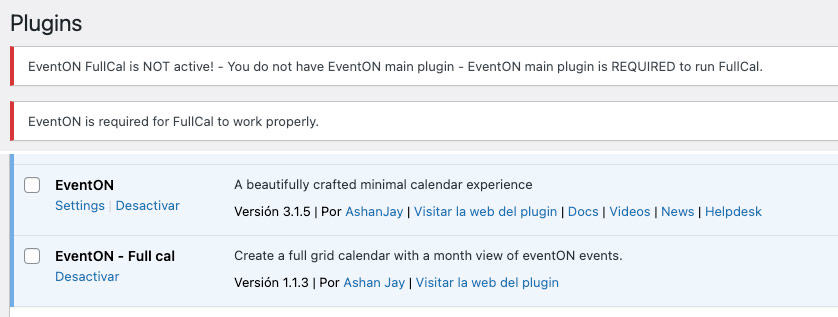
Yes, both plugins are active but the error is still there
Reply to: tickets(236150)
in myeventon>>>>settings>>>>shortcodes you can create your calendars
It appears you are using events list which can show any number of months in a large list
where as if you choose the main calendar- that shows one month at a time and the arrows appear to switch months
In myeventon>>>>settings>>>>styles and scripts
Toggle “write dynamic styles to header” click save and see if that changes your appearance colors
Reply to: tickets(236158)
the bars are the loading so yeah thats normal
If it doesn’t appear in your page builder – thats normal
but you can add the calendar to the event page and it shows on the front end right- after it loads in. thats how it works
Reply to: tickets(236161)
we have used Dokan which works with our system (I am also using Dokan pro on my website I am building) but the basic free dokan works just as well although theres no split payments with dokan lite (have not tested the other ones because Dokan worked the way we wanted)
If for example you have Action user and tickets addon
then your Dokan vendors can submit an event- with Tickets activated via the front end action user form
and that ticket creates a product in woocommerce is instantly and automated connected to the vendor
it does run on auto pilot you getting your cut of the ticket price all automated
please see video below (its long sorry)
Reply to: tickets(235986)
Why is the file not following the stands of your importer files? I exported the file with the Event on Plugin. How can I export the Events from Mtbcoach.de ?
Reply to: tickets(236153)
Please send us wp-admin access to your site as a private message for us to further assist your situation.
and also a link to the event in question