Ashan,
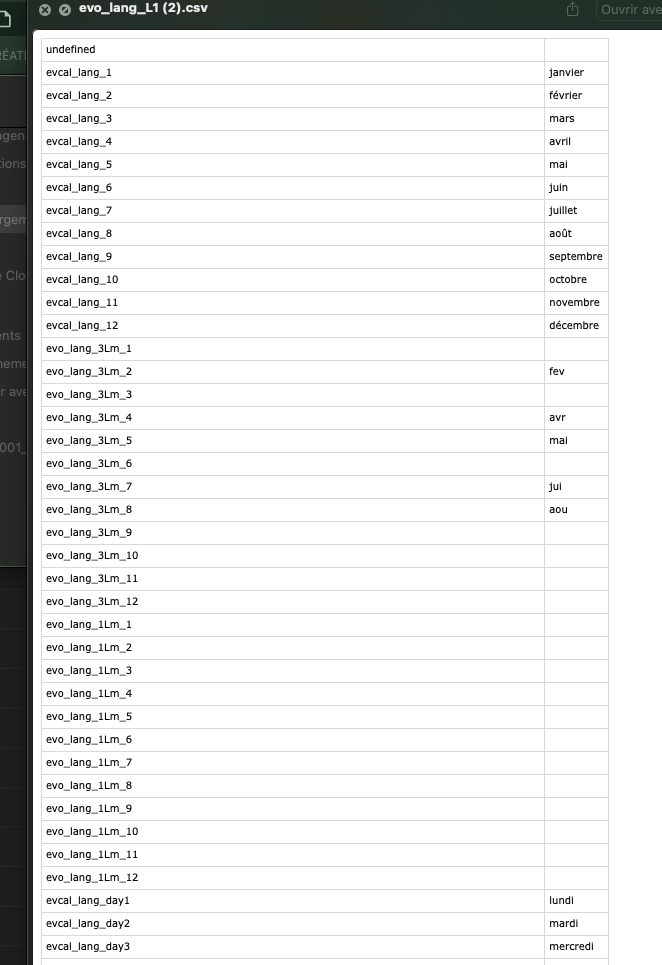
I’m currently working on translating the plugin using the L1, etc. , but I’m confused by the translation file provided. It doesn’t contain readable text strings—it only shows slugs like evcal_langue_1, which makes it unclear what I’m actually translating (for example, how would I know that evcal_langue_1 means “January”?).
The same on dev2:
https://dev2.myeventon.com/wp-admin/admin.php?page=eventon&tab=evcal_2
Hello,
eventon.pot can be found in EventON folder > lang.
About the export translations issue. Thank you for your messages, I am going to assign this ticket to Ashan and he will be able to take it from here and find you a solution. Please allow some time for him to get back to you, we greatly appreciate your patience and thank you for being a eventon customer! Also please disable any IP blocking on your site if there are any.
I am not sure either. We are adding some codes to lock down on purchased seats. Is it ok if I go ahead and apply the codes in your website once we finish it? — when we did tests on your exact situation we could not replicate the issue, seats never came back available after it was purchased.
No, please have a look at my comment “
Jun 18,2025 AT 3:03AM –
Posted 1 month ago
– #390428“:
Hi,
the problem reoccurred and now even for non-logged-in users. I had a
look at the new validate_request function in class-evo-helper.php.
To me it seems that it blocks the response even where neither
$require_admin nor $require_auth is required, e.g. in class-evo-ajax.php
line 133: EVO()->helper->validate_request( ‘nonce’,
‘eventon_nonce’, false, false, false );
I was wondering if this validation is really required if neither
admin nor auth is required for a request? My quick fix was to extend the
if-requirement in line 80 of class-evo-helper.php from:
if ( $error_msg ) {
to
if ( $error_msg && ( $require_admin || $require_auth ) ) {
This solves the nonce-verification issue in several places. Do you
seen any (security) problem with this? Could you maybe even adapt your
function accordingly, so that I do not have to alter the plugin code
after each update?
Hi Artem, Can you get this working today? If you are unable to get it functioning, the previous versions will need to be installed. I am out for most of today, will check in this afternoon.. Thanks for the help. Rick
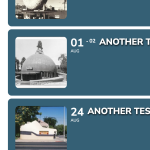
This is the default date I’m referring to, where the end date is only displayed on multiple-day events:
Sorry, I pasted the wrong code. Here’s what I tried, and this code always displays the end date:
add_filter(‘evo_eventtop_dates’,’fnc_002′, 10,3);
function fnc_002($array, $show_start_year, $object){
$start = $object->start_date_data;
$end = $object->end_date_data;
return array(
‘start’=>array(
‘year’=> ”,
‘date’=> $start[‘M’].’ ’.$start[‘d’],
‘month’=> ”,
‘time’=> ”,
),
‘end’=>array(
‘year’=> ”,
‘date’=> $end[‘M’].’ ’.$end[‘d’],
‘month’=> ”,
‘time’=> ”,
)
);
}

By default, the end date only shows up on multi-day events, but if I add this code, the end date always shows up, even on events that take place only one day. Is there a custom function available that will change the format the way I want but only show the end date on multiple day events? Here’s what I tried:
add_filter(‘evo_eventtop_dates’,’fnc_002′, 10,3);
function fnc_002($array, $show_start_year, $object){
$start = $object->start_date_data;
$end = $object->end_date_data;
return array(
‘start’=>array(
‘year’=> ”,
‘date’=> $start[‘M’].’ ’.$start[‘d’],
‘month’=> ”,
‘time’=> ”,
),
‘end’=>array(
‘year’=> ”,
‘date’=> $end[‘M’].’ ’.$end[‘d’],
‘month’=> ”,
‘time’=> ”,
)
);
}
Yes please if we can make them bigger. The biggest size in the options is just 15×15 pixels. If we can maybe triple it’s size that would be great.
Can we also make the map bigger? I think the biggest in the options is just 1000pixels right?