Hey Nuno,
Unfortunately, we do not offer this because envato does not allow that.
Maybe there could be a way by using envato API and we can somehow fetch some details, but eventually we cant allow download files only see the subscription details.
Replies for tickets on suppota
Hey Nuno,
Unfortunately, we do not offer this because envato does not allow that.
Maybe there could be a way by using envato API and we can somehow fetch some details, but eventually we cant allow download files only see the subscription details.
Hey Christian,
As you seem to know what you are talking about, I would suggest switching the function to be more on an async option, that could help a lot more eventually.
Hi Ashan,
Thank you for this. I will try to explain it to my dev team. I might get back to you for some more clarifications.
On a separate topic, you are an amazing developer and you did an awesome job with Eventon. I would like to stay connected. I have sent you a request via LinkedIn https://www.linkedin.com/in/alekseenkovv/
We are building a future Airbnb for online wellness related classes and events. Currently we are getting ready to start talking to investors to raise money for further product development and marketing. Not sure if this would be of any interest for you, but I would like to stay connected in case I can convince you to join our team in some way, or many for you to be our advisor. I’m open to discussions. Considering your experience and the fact that our platform is pretty much built around Eventon you would be the best possible addition to our team. Let me know your thoughts on this.
ok, I got it, I’ll look at the WP settings and hosting may be related to this .
Hello Team,
Please Note that Don’t update anything.
Hello Team,
May I try the instructions mentioned in this documentation?
Yes Please proceed.
Thanks for your help. I’ ll try the patch fix. I also updated the RSVP add-on.
Thanks.
Hello,
Please check how it works on our test event: https://dev2.myeventon.com/wp-json/eventon/events?post_status=publish (event “JSON TEST”).
https://dev2.myeventon.com/events/json-test/
As you can see even so it starts March 1st, you still can see it in JSON:

Could you check and let me know?
Hello,
Unfortunately, the only available solution is to use an extra dropdown field. When you sell tickets you can use Booking add-on https://www.myeventon.com/addons/bookings/. Unfortunately, RSVP doesn’t have such functionality.
However please create a new ticket and select Feature Request as category so others can vote on your idea and get it moved into development faster. OR You can send us a customization job request by creating a new ticket in here and selecting Customization Request as the category.
Hey Vasily, thanks for the message.
1 Sure thing mate. So here are the changes (not all of them)
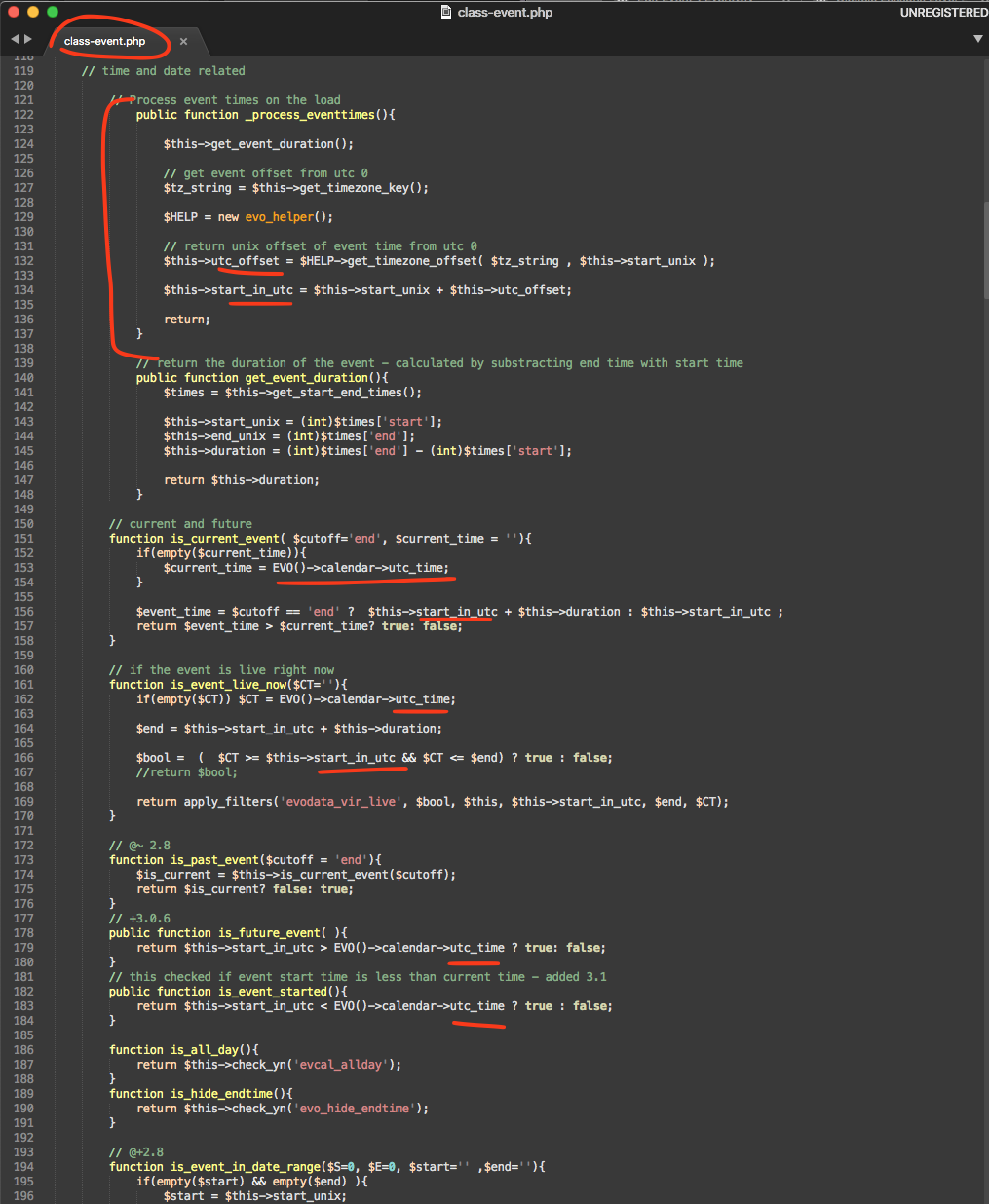
Basically, as you mentioned way above, the live now function was comparing event time in UTC0 to server time using current_time() which was not correct. The change I made was, when you save time it saves as 5pm in UTC0, but then using timezone value I adjust the time back to UTC0. Like if event is at 5pm in GMT-4, then what time that is in UTC0 which is 9pm. And then compare that with current UTC0 time. Which seems a better solution.
I am hoping to take this live so all the changes will be in the next version. I just need to test little bit more to see if it breaks any other parts of the calendar 🙂
2 – I think your theme has custom codes that pulls current user time, I am not sure how those are pulled from. As mentioned above use EVO_Event() class to call event times instead of using direct data values. the event class will be the standard for going forward. and any change like this one will be done to the class and then any methods you are using from the class would reflect those changes without having to make any adjustments.
Hope this make sense? 🙂 Sorry for taking a long time.. these timezones are a very complicated process 🙂 But once I get my mind into the thing its not as bad 🙂