Hello,
Please send us wp-admin access to your site as a private message for us to further assist your situation.
Could you also please try the instructions mentioned in this documentation to make sure your issue is indeed coming from eventon.
Replies for tickets on suppota
Hello,
Please send us wp-admin access to your site as a private message for us to further assist your situation.
Could you also please try the instructions mentioned in this documentation to make sure your issue is indeed coming from eventon.
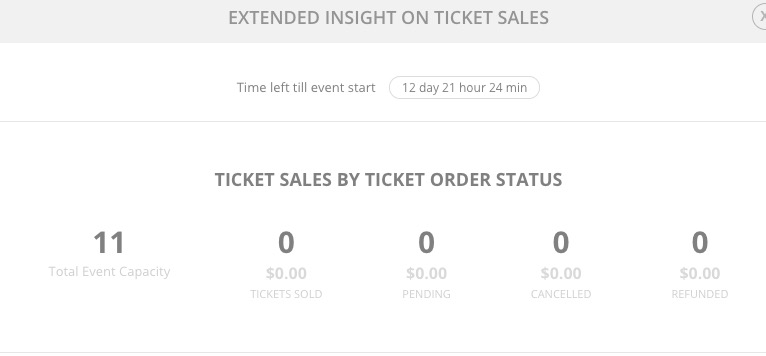
Could you also tell us if you’ve refunded or canceled any orders from the event?
Ashan,
There are 10 attendees but 11 sales:
https://gasconhorsemanship.com/wp-admin/post.php?post=1142&action=edit
Hello,
Thank you for your messages, I am going to assign this ticket to Ashan and he will be able to take it from here and find you a solution. Please allow some time for him to get back to you, we greatly appreciate your patience and thank you for being a eventon customer! Also please disable any IP blocking on your site if there are any.
1. The only solution in this case is to customize the source code. Please send us Customization Request.
3. The only available documentation is https://docs.myeventon.com/documentations/customize-location-organizer-archive-page/. Could you tell us what are you trying to achieve? Do you have a design in mind that you want?
You showed this screenshot https://prnt.sc/10bhrcj so I thought that you meant searching from the calendar search bar by address.
Thank you for your great suggestion, at the moment it is not supported. However please create a new ticket and select Feature Request as category so others can vote on your idea and get it moved into development faster. OR You can send us a customization job request by creating a new ticket in here and selecting Customization Request as the category.
I have created new events. it is showing like “Tickets are not available for sale any more for this event!”
May I try the instructions mentioned in this documentation?
Hello,
After the purchase please cancel your subscription by following https://docs.myeventon.com/documentations/how-to-cancel-addon-subscription-before-auto-renew/.
From https://docs.myeventon.com/documentations/terms-and-conditions-and-refund-policy/:
7.2 Subscription Cancellation
It seems that Google just changed their results page design. To make sure there are no SEO issues with EventON please try https://search.google.com/structured-data/testing-tool/u/0/.
Hi Ashan,
Thank you for the above.
I have tried it again by switching the theme to the one from WP. It looks like it is working now.
I have 2 questions:
Hello Elena Polato,
Please create a new ticket with included login info.
Could you also make sure to update add-ons as well if you have any?
To update eventon addons: You can download latest eventon addons from myeventon > my account. Then you can go to your website, deactivate old addon and install new one and activate then delete the old addon. This link will further explain the process. Also you can follow us on twitter to get real-time announcements on updates!