Hello,
Unfortunately, load more events via AJAX is not supported on basic list. You need to either use Main Calendar shortcode [add_eventon] or Event Lists: Ext add-on https://www.myeventon.com/addons/event-lists-extended/. Try on https://dev.myeventon.com/wp-admin/
Also the carrousel isnt working on the phone.
Could you show us a screenshot of this part?
Hello,
shorturl.at/msQ17 is empty. Could you check and re-send it?
Any luck yet? I am supposed to go live with the site this Friday.
Hello!
I’ve posted two more and those are not showing up now in the preview. Can you walk me through how you did it the first time so I can fix it in the future?
Thanks!
Hello with respect this should be a very basic the most basic feature of the add on. I believe the developer overlooked that. I really dont like as the answer is always ask for custom work!
I dont expect a plug in I purchased to leave behind the mess it does and making the mysql queriess slow and the database chunky and heavy with things like RSVPs for ended events. I stongly suggest that you add this to your list of bugs.
In fact is not even documented! If I knew I would not have purchased this plug in at all.
Thanks for understanding
Sure! Here’s FTP access:
Host
mcselca.org.dream.website
For your username/wordpress access which email shall I use?
Hello,
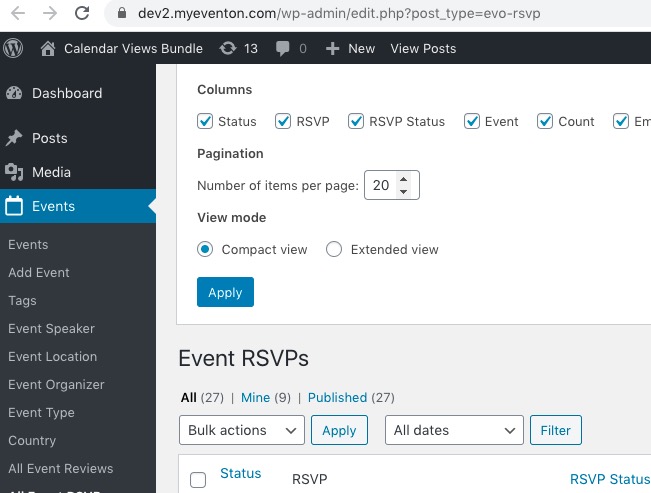
You could try going to wp-admin > All Event RSVPs > open Screen Options > increase “Number of items per page” to 200 or even more:
Also maybe there is a plugin that allows you to bulk delete content, unfortunately, EventON doesn’t have such functionality.
You can also send us a customization job request by creating a new ticket in here and selecting Customization Request as the category.
Hi there,
Could you please try the instructions mentioned in this documentation to make sure your issue is indeed coming from EventOn?
Let us know how it goes.
Hi Max,
The ticket is already private.
Regarding the issue you are having, please ask your hosting company to increase you wp-memory limit from 256M to 512MB. You can also do it yourself using this tutorial.
Hope this helps.
And can you set it on private please?