Hello,
Action User add-on is what you need: https://www.myeventon.com/addons/action-user/
What is the lowest user role that can post an event?
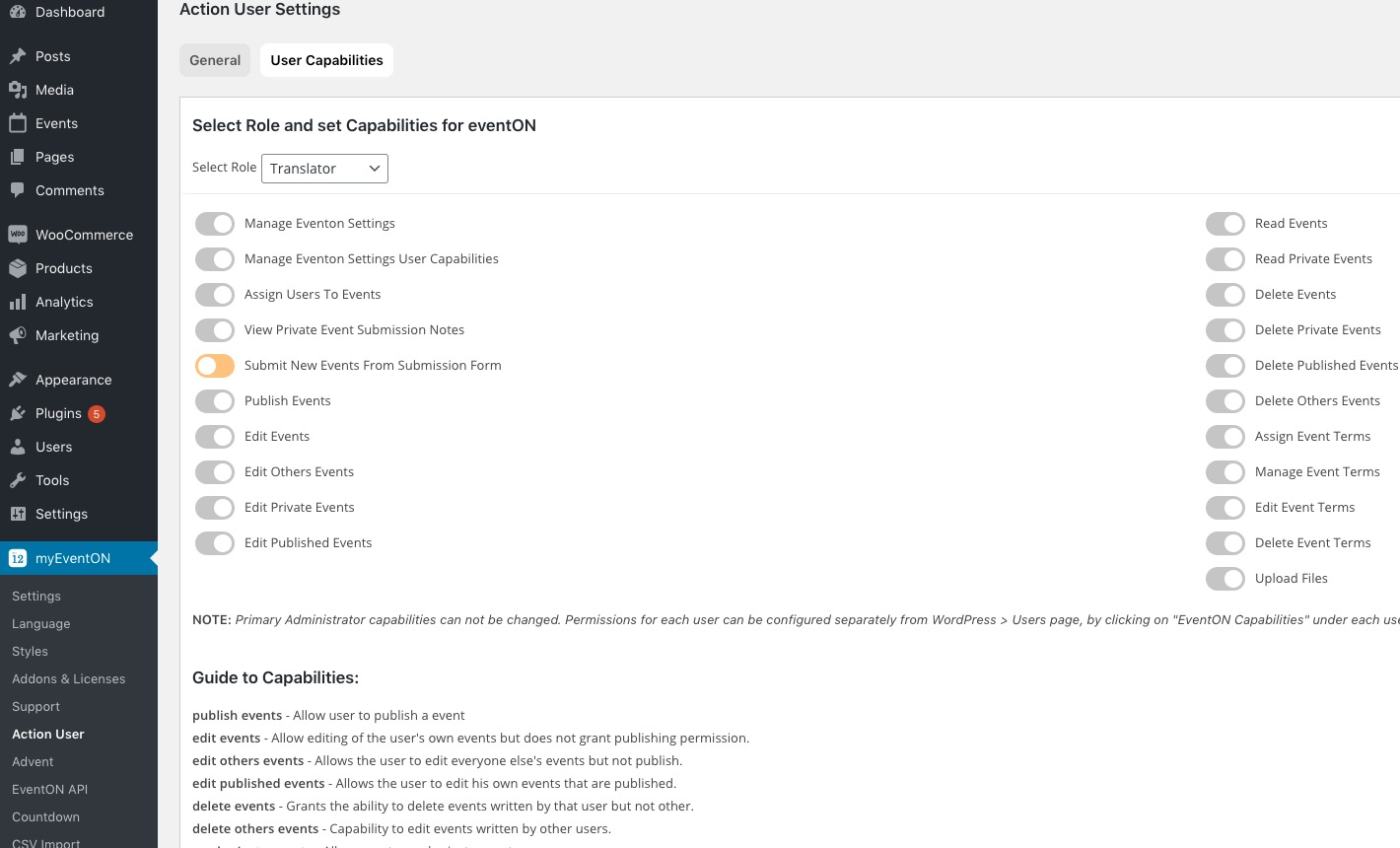
Any user role you like. Just go to EventON Settings > Action User > User Capabilities > enable Submit New Events From Submission Form:
‘ability for a logged in user to create an event via the sites frontend’.
Go to EventON Settings > Action User > Allow only logged-in users to submit events > enable Allow only users with “Submit New Events From Submission Form” permission, submit events.
Try on http://dev.myeventon.com/wp-admin/
John-Pierre Cornelissen,
Thank you very much! I am going to contact Ashan about this.
Hello,
Please go to EventON Settings > EventTop > enable Hide live event progress bar with time remaining.
Unfortunately, I am not sure how to fix this. It seems there is an incompatibility issue with the theme or Elementor.
Could you please try the instructions mentioned in this documentation? Try switching the theme and disable Elementor Pro.
Hello,
Lets try following this guide https://docs.myeventon.com/documentations/change-css-calendar/ and change Event Title.
Open Inspector and find “evcal_desc2 evcal_event_title”.
Now go to Styles tab and look for a CSS style that contains font-size:

As you can see the one style you need is
#evcal_widget .eventon_events_list .evcal_desc2 {
line-height: 120%;
font-size: 14px;
}
So copy it and put to EventON Settings > Styles like this:
#evcal_widget .eventon_events_list .evcal_desc2 { font-size: 18px !important; }
With !important it will work in 99% of cases.
If you don’t see any change try EventON > Scripts & Styling > turn off Write styles to header > save settings > turn on Write styles to header.
After the installation you can also contact us and if we available we can also do this.
It seems there is some kind of incompatibility between EventON and GoDaddy’s Sync. But it seems that CSV Importer add-on might help.
1. Just install it and then go to EventON Settings > Download all eventON events. and press CSV FORMAT.
2. Now on your other website go to EventON Settings > CSV Import > select the .csv file and press UPLOAD CSV FILE.
We are glad your issue is resolved, if you have any further questions or concerns please create a new ticket.
Sorry, I have password protected it to do the content modification. Should be fine now, I removed the protection.
Thank you for your help Ashan.

Looks terrible like this.