We have contacted them and there is a whole process for us to provide the fixed validation etc. But as you can see version <= 4.9.9 means eventON 4.9.10 is safe from this issue as we have addressed the issue in that version.
Archives: Replies
Replies for tickets on suppota
Reply to: tickets(391024)
Hello Joel, We are aware of the need for this and we are working on making improvements to as many elements as we can on eventON to convert them to ADA. It is very intricate as changing elements effect grately to functionality of eventON.
We hope to get an update out soon as we can have a stable version.
Reply to: tickets(391935)
And yes, we are aware of the lack of documentation for the points addon and we are hoping to get that fixed soon.
Reply to: tickets(391935)
Kindly update to the latest version 1.0.2
https://docs.myeventon.com/documentations/changelog-for-rsvp-points-addon/
Should fix this issues, make sure to clear cache after update.
Reply to: tickets(389889)
Just checking in to see if there’s been any update. Thanks!
Reply to: tickets(392049)
Reply to: tickets(391871)
Perfect! If you have any further questions or concerns please create a new ticket.
Reply to: tickets(391993)
Please update EventON + add-ons.
To update eventon to latest version: If you are unable to do autoupdate, you can go to codecanyon your account > download and get the latest eventon version as zip file. Then you can go to your website > make sure “Delete eventon settings & data when EventON is uninstalled” is Deslected from eventon settings, delete old eventon, install new one and activate. This link will further explain the process it. Also you can follow us on twitter to get real-time announcements on updates!
To update eventon addons: You can download latest eventon addons from myeventon > my account. Then you can go to your website, deactivate old addon and install new one and activate then delete the old addon. This link will further explain the process. Also you can follow us on twitter to get real-time announcements on updates!
After the update make sure to go to EventON > Tickets > enable Always redirect individual WC ticket Product page to event page on frontend.
Reply to: tickets(392015)
Hello,
Here’s the error:
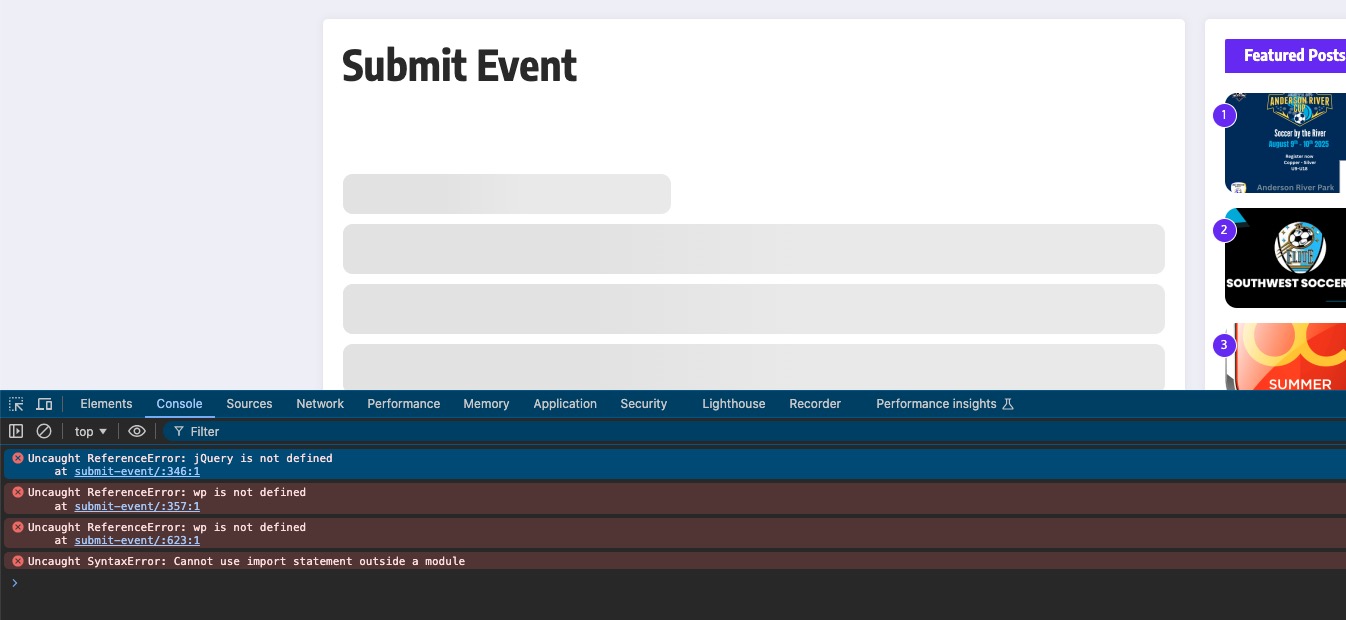
When I am not logged-in, it doesn’t load and shows the errors above.
Could you please try the instructions mentioned in this documentation? It seems that something blocks jQuery from loading correctly.
Reply to: tickets(392016)
Hello,
Can we take look at the website? Could you send us a link?