I was able to connect.
It seems that the problem is in this customezed version EventON – 147348 – Child. You can see in the attachment that everything starts to work when it’s disabled.
Replies for tickets on suppota
I was able to connect.
It seems that the problem is in this customezed version EventON – 147348 – Child. You can see in the attachment that everything starts to work when it’s disabled.
Hello,
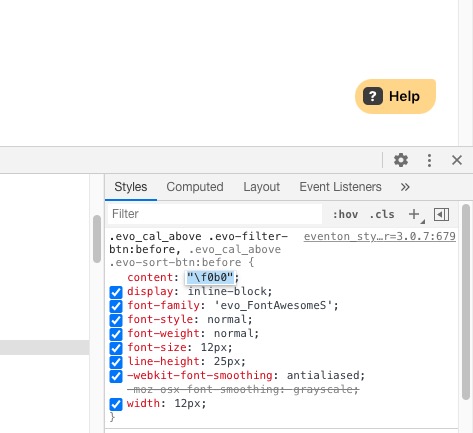
Please also make sure that there is a slash before f:
holisfactory@gmail.com
knKbpcfb34#Etc1@M9kY2Wb#
https://holisweek.com/wp-admin
and this is the page where there is the bug
https://holisweek.com/hwe/
I use ultimate member but not for hide bloks, only for log in and book in event on :/
Thank you guys for your help!
.evo_cal_above .evo-filter-btn:before, .evo_cal_above .evo-sort-btn:before {
content: “f0b0”;
}
you need to find out the f- number of the icon you wish to replace
Hi Ashish,
Ok. It could be great if we can check the work around Monday 25. Is it possible to you? Our client starts to be impatient (it’s a client…).
Have a good day.
Regards,
Arnaud.
see video
step 1: you need to drag the admin submit option to the top of the list
add this css to the page
.evoaup_slevel:first-child {
display: none;
}
which will make the top one vanish
and then on a page for the admins – just have the form as normal
possibly hide it with css just for one page which is where the main people add their events and have a second area just for your admins- let me have a see what can be done to hide it
Have you added this one?
.evotx_tix {
display: none !important;
}
ok, txt