Please go to EventON > RSVP > Emails: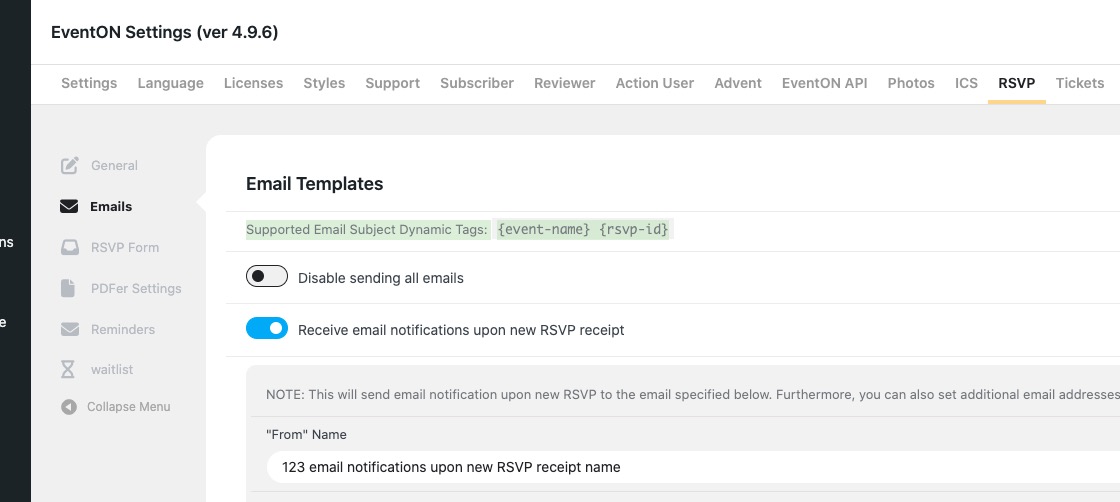
Archives: Replies
Replies for tickets on suppota
Reply to: tickets(386144)
The issue:
[01-May-2025 14:20:48 UTC] PHP Fatal error: Allowed memory size of 536870912 bytes exhausted (tried to allocate 1310720 bytes) in /wordpress/core/6.8.1/wp-includes/cache-compat.php on line 93
Could you try following and add 1024M as your memory limit:
https://docs.myeventon.com/documentations/increasing-wordpress-memory-limit/
Reply to: tickets(386142)
I added some code to Additional CSS:
https://steven136.sg-host.com/wp-admin/customize.php?return=%2Fwp-admin%2Fadmin.php%3Fpage%3Deventon
Font size is different now. I also changed margin top. Could you check and let me know?
Reply to: tickets(386281)
Hello,
I am sorry, the access information you have provided did not work for us. Please check them and post the correct login information as a private message, thank you!
Thank you for your messages, I am going to assign this ticket to Ashan and he will be able to take it from here and find you a solution. Please allow some time for him to get back to you, we greatly appreciate your patience and thank you for being a eventon customer! Also please disable any IP blocking on your site if there are any.
Reply to: tickets(386283)
Hello,
Please send us wp-admin access to your site as a private message for us to further assist your situation.
Reply to: tickets(386284)
Closed as duplicate.
Reply to: tickets(386234)
That sounds very good! Even tho i do not find the option in the Admin test-website.
Just for me to understand is my WHOLE Event Calender than in the RSS & ICS, or is it per event? we would like to put all automaticly in, so our members have it.
Reply to: tickets(386281)
This is the email we got from wordpress showing the problem.
Howdy!
WordPress has a built-in feature that detects when a plugin or theme causes a fatal error on your site, and notifies you with this automated email.
In this case, WordPress caught an error with one of your plugins, EventON – Subscriber.
First, visit your website (https://events.ebarrelracing.com/) and check for any visible issues. Next, visit the page where the error was caught (https://events.ebarrelracing.com/wp-admin/post.php) and check for any visible issues.
Please contact your host for assistance with investigating this issue further.
If your site appears broken and you can’t access your dashboard normally, WordPress now has a special “recovery mode”. This lets you safely login to your dashboard and investigate further.
To keep your site safe, this link will expire in 1 day. Don’t worry about that, though: a new link will be emailed to you if the error occurs again after it expires.
When seeking help with this issue, you may be asked for some of the following information:
WordPress version 6.8.1
Active theme: VioMag (version 1.4.8)
Current plugin: EventON – Subscriber (version 1.4.3)
PHP version 8.0.30
Error Details
=============
An error of type E_ERROR was caused in line 448 of the file /home/admin/public_html/wp-content/plugins/eventon-subscriber/includes/admin/class-admin-init.php. Error message: Uncaught Error: Call to undefined method evosb_admin::_get_subscribers_for_event() in /home/admin/public_html/wp-content/plugins/eventon-subscriber/includes/admin/class-admin-init.php:448
Stack trace:
#0 /home/admin/public_html/wp-includes/class-wp-hook.php(324): evosb_admin->email_on_event_save(Array, 14492, Object(EVO_Event), Array)
#1 /home/admin/public_html/wp-includes/class-wp-hook.php(348): WP_Hook->apply_filters(NULL, Array)
#2 /home/admin/public_html/wp-includes/plugin.php(517): WP_Hook->do_action(Array)
#3 /home/admin/public_html/wp-content/plugins/eventON/includes/admin/post_types/class-meta_boxes.php(459): do_action(‘eventon_save_me…’, Array, 14492, Object(EVO_Event), Array)
#4 /home/admin/public_html/wp-includes/class-wp-hook.php(326): evo_event_metaboxes->eventon_save_meta_data(14492, Object(WP_Post))
#5 /home/admin/public_html/wp-includes/class-wp-hook.php(348): WP_Hook->apply_filters(NULL, Array)
#6 /home/admin/public_html/wp-includes/plugin.php(517): WP_Hook->do_action(Array)
#7 /home/admin/public_html/wp-includes/post.php(5110): do_action(‘save_post’, 14492, Object(WP_Post), true)
#8 /home/admin/public_html/wp-includes/post.php(5212): wp_insert_post(Array, false, true)
#9 /home/admin/public_html/wp-admin/includes/post.php(453): wp_update_post(Array)
#10 /home/admin/public_html/wp-admin/post.php(227): edit_post()
#11 {main}
thrown
Reply to: tickets(386142)
I got the event card colors working. The font sizing all over is the main problem right now.
Reply to: tickets(386142)
None of the correct font sizes are displaying. Its not even displaying the font sizes of my theme when using h2 h3 h4 h5 h6…