We are glad your issue is resolved, if you have any further questions or concerns please create a new ticket.
If you have a moment, we would greatly appreciate if you could kindly leave us a review at codecanyon! from your account > downloads. Cheers!
Hello,
https://staging.webfrontier.it/overmed/calendario-appuntamenti/wp-admin leads to 404 error page. Could you check?
Please also go to EventON Settings > Time Settings > make sure that “Calendar Header month/year format.” doesn’t have double letters.
Hello Kenneth,
You welcome and thank you for your response
I prefer now to not add so many codes in my site for that issue, Are you going to release that fix in the next version of the EVENTON plugin ?
Thank you
NItzan
Hi Nitzan,
Thanks for reaching out!
You can download a CSV list of all users that have subscribed to your event by clicking on the download button on myEventON > Settings > Subscribe as shown below:
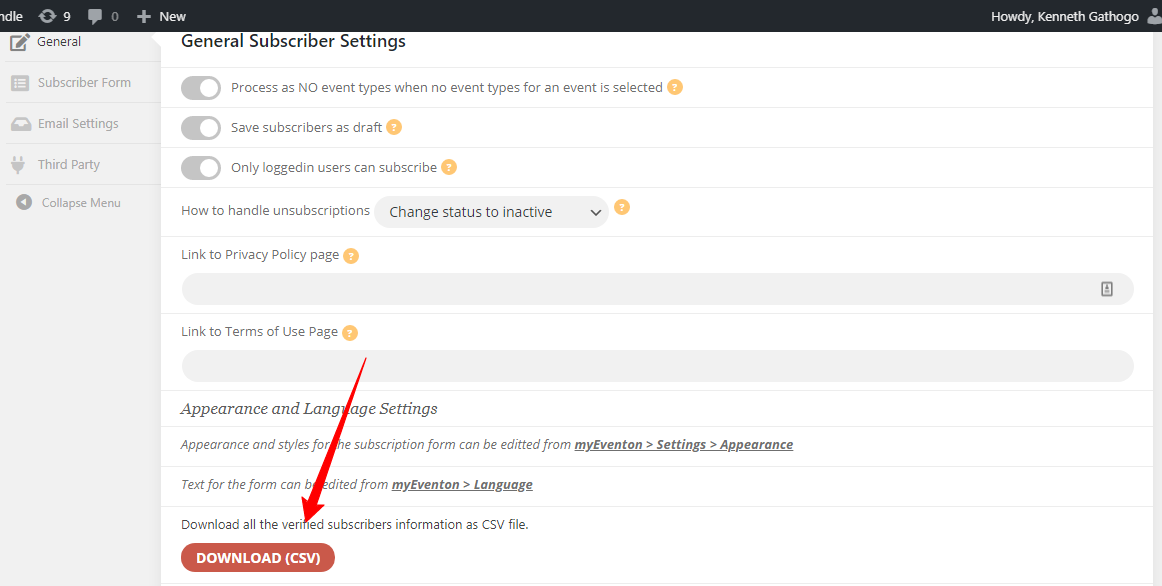
I hope this info helps!
Hi Nitzan,
Thanks for reaching out!
Would you mind sharing a screenshot of how this looks after adding the CSS?
Also, it would really help if you could share some temporary admin access to your site so that we can help to come up with the fix.
Thanks.
Hi Ashish,
We have just made the payment. What’s next now?
Kind regards,
Arnaud.
Customer completed payment of 800 for the job.
Hi Nitzan,
Thanks for reaching out and sorry for the issue.
I’ve been able to reproduce the issue and this has been submitted to the developer for closer investigation.
For now, you can apply the following CSS fix to change the direction of the arrows:
#evcal_prev{
 float: right!important;
}
#evcal_prev > i{
  transform: rotate(135deg)!important;
  left: 11px!important;
}
#evcal_next > i{
  transform: rotate(-45deg)!important;
  left: 11px!important;
}
Follow the css customization guide for more details about how to add this CSS to the plugin.
I hope this helps!
Hi Nitzan,
Awesome! We really appreciate it 😊
Feel free to contact us if you have any further questions or concerns!
Hi Ashan,
There is a conflict with the latest version of Elementor free preventing the loading of the page builder. On this customer’s site the builder loads but not the widget area but on the dev site the Elementor builder will not load at all.
Thanks.