i have buy
event on
Item ID:
1211017
Item Purchase Code:
15daa79a-2d93-4b4f-90f2-1e953c66e2cd
Purchase Date:
2018-12-01 10:58:21 UTC
action users
EVOe67106d5-dc8c-4d7f-a894-2167762f4f4d
01 01 2021
thanks for answer
Replies for tickets on suppota
i have buy
event on
Item ID:
1211017
Item Purchase Code:
15daa79a-2d93-4b4f-90f2-1e953c66e2cd
Purchase Date:
2018-12-01 10:58:21 UTC
action users
EVOe67106d5-dc8c-4d7f-a894-2167762f4f4d
01 01 2021
thanks for answer
I updated to 3.0.6 but it is still happening
Hello,
Could you please update EventON to 3.0.6 and check once?
To update eventon to latest version: If you are unable to do autoupdate, you can go to codecanyon your account > download and get the latest eventon version as zip file. Then you can go to your website, deactivate old eventon, activate (Do not delete eventon settings & data when EventON is uninstalled) from eventon settings, delete old eventon, install new one and activate. This link will further explain the process it. Also you can follow us on twitter to get real-time announcements on updates!
theproblem with the single events is not a lot of options. You cannot select the event type only the event itself. We need this to be dynamic so it will load whatever the live event is.
Is there a way to take this code
[add_eventon event_count=”1″ ux_val=”X” hide_past_by=”ss” event_type=”101,” show_et_ft_img=”yes” tiles=”yes” tile_count=”3″ evc_open=”yes” hide_arrows=”yes” hide_so=”yes” eventtop_style=”0″ etc_override=”no” tile_bg=”1″]
and just make it a single event but allow is to use event type? if this is not possible Ill figure a out a work around.
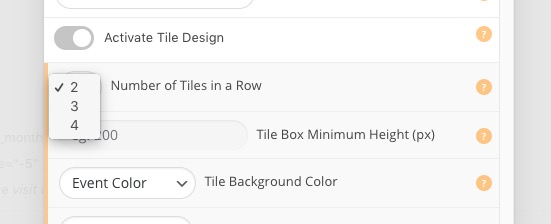
The problem is in tile_count=”3″ part of the shortcode. It divides row by 3 columns (33% per tile). The thing is that minimum number of tiles is 2:
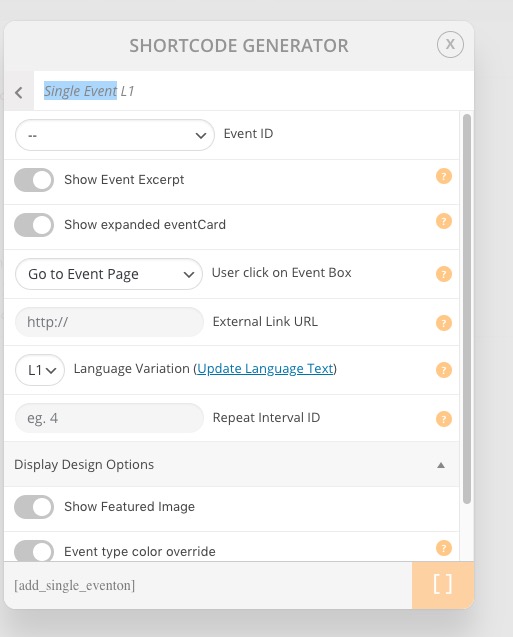
Maybe in your case it’s better to use Single Event shortcode:
Could you check and let me know?
We are glad your issue is resolved, if you have any further questions or concerns please create a new ticket.
Hello,
Everything is correct. “Show ticket purchase only for loggedin users” only affects the ticket purchase part and not the virtual event part of Event Card.
You have one option though. Go to Edit Event and select When to show the above virtual event information on event card: After user has purchased a ticket:
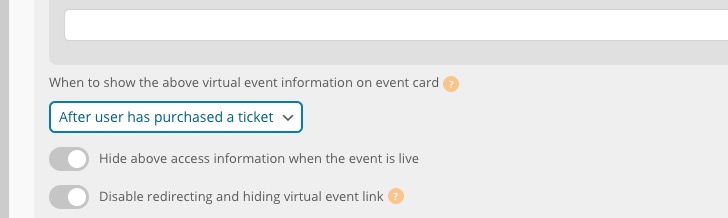
So Virtual Event link will only be visible after the ticket purchase.
Hello,
The problem is in numbers 1., 2.,… . Please remove them.
Please also note that in some cases (after you’ve removed the numbers) if you don’t see any change go to EventON > Scripts & Styling > turn off Write styles to header > save settings > turn on Write styles to header.
Meanwhile in order to fix:
here you can input the address on STREET ADDRESS field
– If your plugin in active non work
– if your plugin is not active the google map works
Could you go to EventON Settings > Google Maps API > enable Disable Google Maps API: Completely disable google maps? This disables Google Map on EventON’s Event Card but allows your form to work correctly.
Ashan,
1. Could you check:
An error of type E_ERROR was caused in line 111 of the file /var/www/vhosts/zante.info/httpdocs/wp-content/plugins/eventON/includes/calendar/class-calendar_generator.php. Error message: Uncaught Error: Call to a member function load_google_maps_api() on null in /var/www/vhosts/zante.info/httpdocs/wp-content/plugins/eventON/includes/calendar/class-calendar_generator.php:111
2. When I enable Disable Google Maps API > Google maps javascript file only (If the API js file is already loaded with another gmaps program), it still shows:
You have included the Google Maps JavaScript API multiple times on this page. This may cause unexpected errors.
I’ve tried disabling their theme’s google map api by removing Google API Key from theme’s options, but it breaks their submission form.