not sure if there are settings for this in EventOn plugin backend?
Archives: Replies
Replies for tickets on suppota
Reply to: tickets(387123)
can I show specific months? eg. May, June and July 2025?
Reply to: tickets(387198)
Hello,
EventON uses it’s own template for /events and also Single Event Page template. You can customize it by following:
https://docs.myeventon.com/documentations/how-to-customize-events-archive-page/
However, the easier solution is to follow:
PROTIP: If the /events page does not work due to theme/plugin conflicts, create a new page, call it “Events Directory” Insert eventon shortcode and use that as your main events page which will have a URL ending like /events-directory. This would be a perfect solution if you have conflicts with /events slug.
Reply to: tickets(387133)
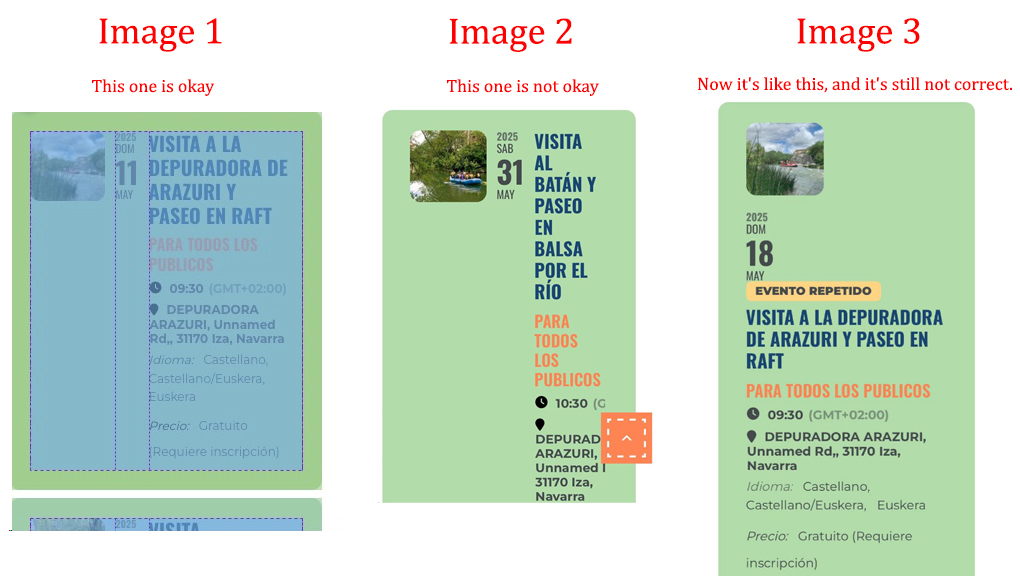
The issue is not resolved.
To help you better understand the situation, I’m sending you three images:
-
A screenshot of how I would like the calendar to appear on mobile devices. This is the reference for how it should look correctly.
-
Another one showing how it appeared before. That version was not correct, which is why I initially contacted you.
-
And a third one showing how it looks now after the recent changes. Although there has been a modification, it’s still not quite right.
I hope these references help you identify the problem more easily.
Thank you very much for your understanding.
Reply to: tickets(387124)
Ashan,
Their other ticket related the issue:
https://helpdesk.ashanjay.com/ticket/ticket-orders-with-seats-paid-with-stripe-apple-pay-do-not-appear-as-ticket-order/
Reply to: tickets(387124)
Hello,
Thank you for your messages, I am going to assign this ticket to Ashan and he will be able to take it from here and find you a solution. Please allow some time for him to get back to you, we greatly appreciate your patience and thank you for being a eventon customer! Also please disable any IP blocking on your site if there are any.
Reply to: tickets(386855)
Could you send us this screen again:
https://helpdeskx.s3.amazonaws.com/wp-content/uploads/2025/05/09071500/screenshot-console.cloud_.google.com-2025.05.09-16_12_46.png
Reply to: tickets(387133)
I removed the code from:
https://www.planconpeques.com/wp-admin/admin.php?page=eventon&tab=evcal_3
So now it should be fixed. Please check and let me know.
Reply to: tickets(386328)
Thanks so much Artem! It works like a charm.
Reply to: tickets(387133)
Hello,
Thank you for your response.
You now have administrator access.
Regarding the custom CSS, I’m not sure exactly which code you’re referring to. Could you please let me know where it is located or what I should remove?
I look forward to your help in resolving these issues.
Best regards,