Any ETA on when that fix will be implemented? Kind of a big deal to know what time the event is at
Archives: Replies
Replies for tickets on suppota
Reply to: tickets(213346)
Again, my question is about the waitlist only item. It lists ‘NA as spots available’. How do we get rid of that? it looks weird and confusing people.
Yes, it is working fine but that ‘NA as spots available’ needs to be removed. No one knows what that means and is creating confusion
Reply to: tickets(213332)
Hy Artem,
Ok i have not and will not delete the test event.
Sorry I have deleted the previous one yesderday 😉
There is not IP block so far.
Many thanks.
Marc.
Reply to: tickets(213237)
Hy Ashan, Hy Ashish
Thanks for your reply.
Great.
Ok. That’s ok.
It’s expensive for me.
But I understand.
Now, can you make a price for all this :
Because I want to start soon with this
A/ event on 182001 child addon : (this addons allows the user to launch the Virtual Event link from the logged user end)
- Make it work not only with TICKET addons (original purpuse you created it) but now with RSVP (so when RSVP is booked, the virtual event link will be displayed in the EventOn 182001 child addon AS WELL AS event onTICKETS bought through woocommerce)
- make a pop up when clicking on the event name : the event card light box appears
- in the table, make the ticket(s) (1rst column) showing the actual numbers of recurrences that the client has bought (how many TICKETS for this event OR how many RSVP recurring events count )
- make the table look and feel jut a bit better – for now it feels really dry – (all your addons are so esthetic but this one is too far away behind)
B/ RSVP addons : add “YES – the whole serie” button
1) add button on RSVP section – on Event Card : YES – all classes
2) modify on RSVP section – on event card : YES – this one class
3) make sure that on the confirmation email, its specifies that the user has booked the whole serie of the recurring event RSVP + beginning and ending of the recurring events booked
4) make sure that on the admin confirmation email, its specifies that the has booked the whole serie of the recurring event
5) make sure that the [evo_rsvp_manager] shows up this detail :
5.1) Event Type : You have booked one class (OR) you have commit for the whole series of this class
5.2) Time : from thur dec 31th 9h -11h am to thurs june 5th 9h – 11h am
With this fully working, I will be able to start with my students this january !
Many thanks
Marc
Reply to: tickets(213288)
Everything is correct. First event always takes it’s date from Event Start/End Date: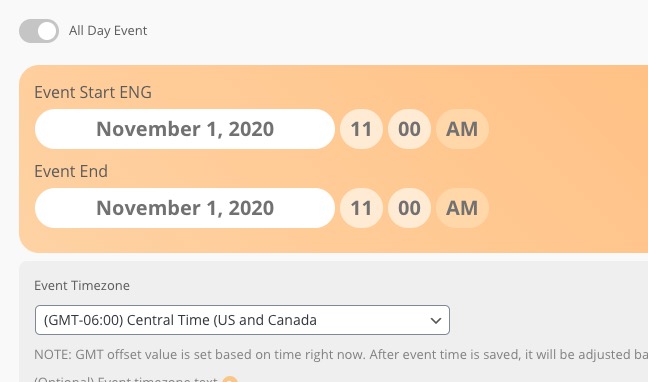
And only then it starts repeating events with options from
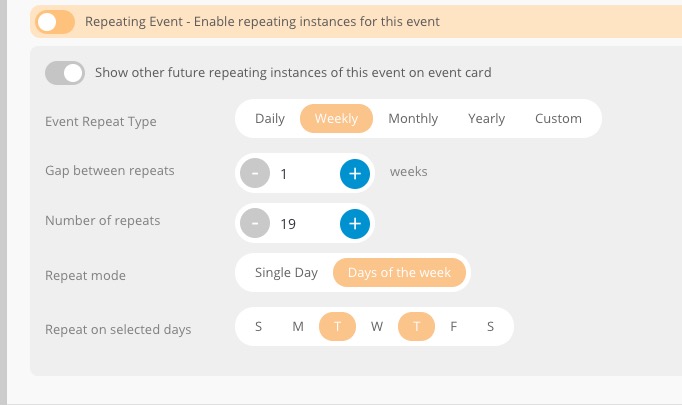
In order to fix this please select the correct Event Start/End dates first and then enable Repeating Event. So instead of Nov 1st it should be Nov 3rd.
Reply to: tickets(213332)
On dev2 everything works with enabled PDFer.
Reply to: tickets(213332)
Ashan,
With enabled PDFer users don’t receive RSVP confirmation emails. But when disabled everything works:
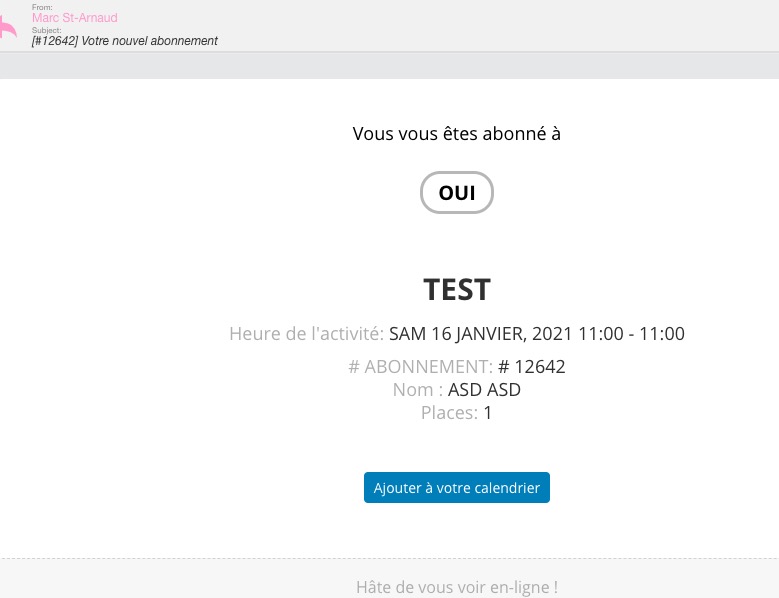
debug.log doesn’t have anything related to the issue.
Reply to: tickets(213332)
Please don’t delete this test event: https://mieux-etre.tv/wp-admin/post.php?post=12622&action=edit. It’s not visible in calendars.
Thank you for your messages, I am going to assign this ticket to Ashan and he will be able to take it from here and find you a solution. Please allow some time for him to get back to you, we greatly appreciate your patience and thank you for being a eventon customer! Also please disable any IP blocking on your site if there are any.
Reply to: tickets(210196)
Great! If you have any further questions or concerns please create a new ticket.
Reply to: tickets(213531)
Hi Angel,
Thanks for reaching out!
This is very odd. I’ve just tested this on our end but the event image is successfully populated in the JSON-LD data. Here is a screenshot:

Would you mind checking if one of your installed plugins is causing a conflict on your end by deactivating all other installed plugins?
You can use the following plugin to troubleshoot without affecting your site visitors: https://wordpress.org/plugins/health-check/
Let me know how this goes.