Sorry another one and can I change the color of the buttons – update and the RSVP button on the rsvp in weekly view to match the rest of the site? At the moment is the defaul EventOn pale orange color
Archives: Replies
Replies for tickets on suppota
Reply to: tickets(212606)
Hi and thanks I am being unfair is a great plugin and marked it 10 out of 10 on Envato.
Ashish is doing a customisation job. I will share my thoughts in a feature request.
The code you sent worked fine but the text Booking ID is still visible? Can I hide the text too please?
Reply to: tickets(211971)
…not able to delete the repeating events or to show them all…
This seems to be working on my side:

Could you try cleaning your cache?
The time of the repeating events still shows 4:30 and not 16:30 like the initial event.
Unfortunately, it seems that you need to re-add repeats to make them work correctly. We apologize for this. Could you add them again and let us know?
Reply to: tickets(212610)
1. These options are for admins only and for future use.
2. & 3. Please send us wp-admin access to your site as a private message for us to further assist your situation.
1. Please follow https://docs.myeventon.com/documentations/customize-single-events-page/. It seems that you need to customize the single event page template.
2. Please go to EventON Settings > Time Settings > enable Apply default timezone to all events.
Reply to: tickets(212606)
Please add this CSS code to EventON > Styles (If you don’t see any change, EventON > Scripts & Styling > turn off Write styles to header > save settings > turn on Write styles to header):
.eventon_rsvp_rsvplist p em.checkin_status { display: none !important; }
.rsvpmanager_event.check-in b { display: none !important; }
I must say the flexibility of the RSVP manager in terms of changing colours showing hiding text is very poor
The thing is that nobody asked us about these options. Could you send us a feature request?
Reply to: tickets(211959)
I’ve commented this code so “undefined” should be fixed: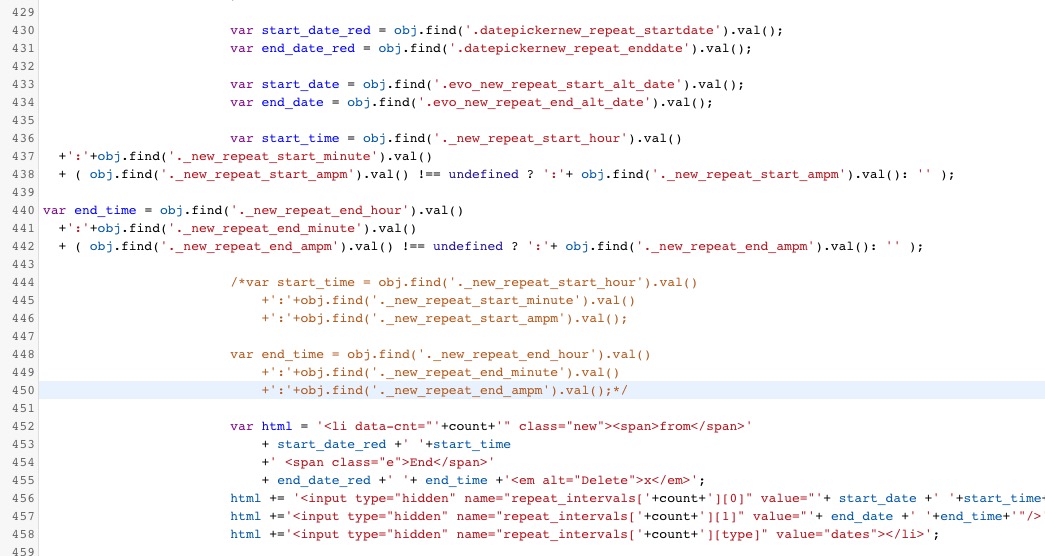
Could you check with clean cache?
Reply to: tickets(212402)
Does the same shortcode also work on the card view?
Yes, of course. Please add this to the shortcode:
tiles=”yes” tile_bg=”1″
And which shortcode do I need to use to show the past events?
Please follow this video guide: https://www.youtube.com/watch?v=b0HtbBjTjL8
Reply to: tickets(212606)
Thank you. But is there a way to hide Booking ID mand Booking Status: Check In?
I dont want them on the RSVP manager. I must say the flexibility of the RSVP manager in terms of changing colours showing hiding text is very poor
Reply to: tickets(212155)
Hi Ashis
Any news please? I ve not heard back at all and I need this urgently.
Kind regards
Reply to: tickets(212555)
We are glad your issue is resolved, if you have any further questions or concerns please create a new ticket.
If you have a moment, we would greatly appreciate if you could kindly leave us a review at codecanyon! from your account > downloads. Cheers!