It seems that the only solution is to add them manually. Just create an event that lasts for 6 weeks, enable Tickets, follow https://docs.myeventon.com/documentations/general-user-guide/ and create a block for each Monday.
Archives: Replies
Replies for tickets on suppota
Reply to: tickets(207958)
Hello,
Could you give us an example, so we can test this on our server?
Reply to: tickets(207903)
Hello,
1. Variations add-on only allows you to set up “Ticket Variation Stock Quantity (Leave blank for unlimited)” for each variation.
2. Since WooCommerce handles the checkout process you can send them a discount code they can use on Checkout to reduce the ticket price.
Plus could you tell us more about “Zoom Tickets”. Not sure what’s that.
1. Please check Edit Event > Tickets > Additional Information visible to customer after ticket purchase:
Details typed in here will be sent to customers vis confirmation email. This will only be sent once ticket purchase order is confirmed.
You can put any additional info here and it will be send to customers.
2. If Edit Event > Virtual Event is enabled, Zoom link will be included in the email.
Try on http://dev.myeventon.com/wp-admin/
Can this be accomplished: Connecting different email confirmation templates with the two different types of tickets for the same event?
You cannot create two different email types for the same event. You can send us a customization job request by creating a new ticket in here and selecting Customization Request as the category.
Reply to: tickets(207806)
Hello,
I cannot access wp-login:
YOU HAVE BEEN LOCKED OUT.
error
If you are a verified user, click the button below and an email will be sent to you with a magic link to bypass the lock out and log into your site.
Could you update EventON to 3.0.5 and RSVP add-on to 2.6.12, if needed?
To update eventon to latest version: If you are unable to do autoupdate, you can go to codecanyon your account > download and get the latest eventon version as zip file. Then you can go to your website, deactivate old eventon, activate (Do not delete eventon settings & data when EventON is uninstalled) from eventon settings, delete old eventon, install new one and activate. This link will further explain the process it. Also you can follow us on twitter to get real-time announcements on updates!
Reply to: tickets(207666)
Could you also tell us more about what’s not working so we can help?
Reply to: tickets(207666)
Ashan,
Could you check if these order ids are correct: Reply to: 207965
Also do you have Seats 1.0.1 and Tickets 1.7 so we can give them?
Reply to: tickets(207666)
Hello,
Thank you for your messages, I am going to assign this ticket to Ashan and he will be able to take it from here and find you a solution. Please allow some time for him to get back to you, we greatly appreciate your patience and thank you for being a eventon customer! Also please disable any IP blocking on your site if there are any.
Reply to: tickets(207968)
Hello,
Could you check and confirm this order id:
#101512 Bookings – Single Site
Could you tell us more about why our add-on doesn’t suit your needs?
Reply to: tickets(207976)
Hello,
Thank you for your great suggestion, at the moment it is not supported. However please create a new ticket and select Feature Request as category so others can vote on your idea and get it moved into development faster. OR You can send us a customization job request by creating a new ticket in here and selecting Customization Request as the category.
Please also check our add-ons: WeeklyView https://www.myeventon.com/addons/weekly-view/ and DailyView https://www.myeventon.com/addons/daily-view/. Try them on http://dev.myeventon.com/wp-admin/
Reply to: tickets(205497)
Ashan,
When Pinpoint shortcode is inside of Event Details it shows this js error:
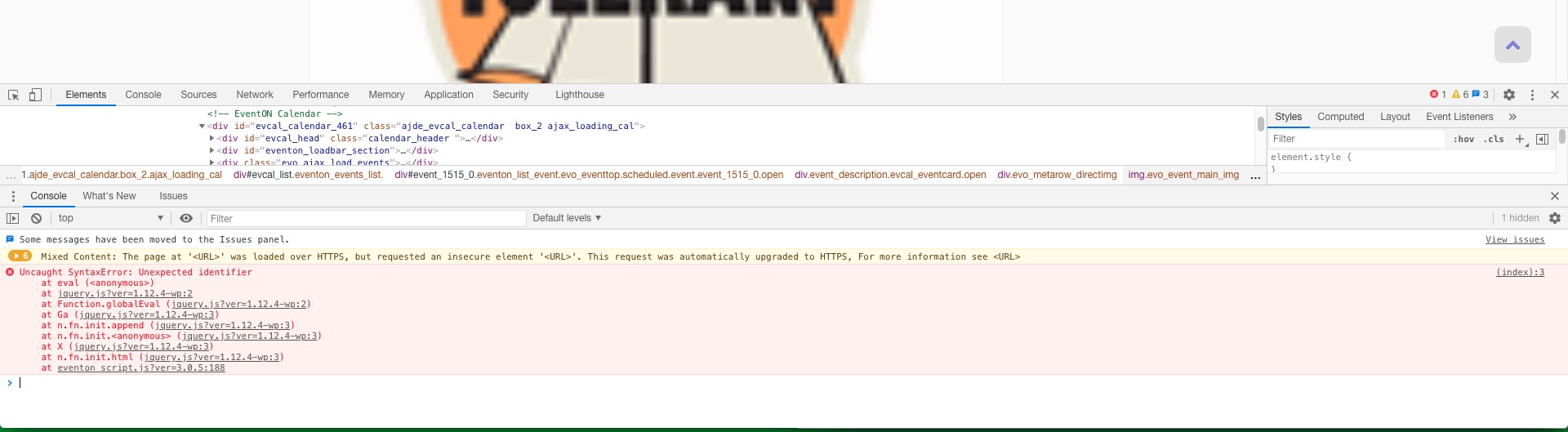
Is there we can do about this. Pinpoint developers response: #205738
I seem to have forgotten to assign you this ticket. I am sorry for that.